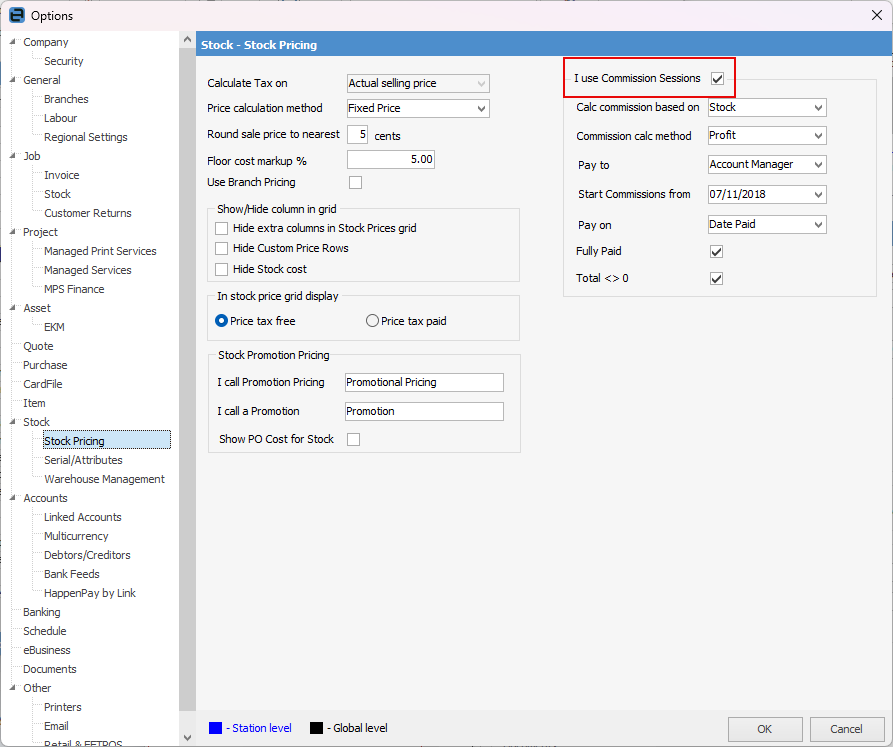
Before starting, there is some configuration required via Tools > Options > Stock > Stock Pricing. Tick I use Commission Sessions. More refined selections can also be made in this area, such as commission calculation method, etc.
Option |
Default Value |
Description |
|---|---|---|
I use Commission Sessions |
Unticked |
Tick to enable Commission Sessions. |
Calc commission based on |
Stock |
Select the default way to base calculated commissions on: ▪Stock – Commission is calculated at a stock level ▪Job – Commission is calculated at a job total level. |
Commission calc method |
Profit |
Select the default method to calculate commission on: ▪Price Inc ▪Price Ex ▪Profit. |
Pay to |
Account Manager |
Select the user the commission is payable to: ▪Account Manager ▪Name ▪Other. |
Start Commissions From |
blank |
Enter a date here to filter out jobs invoiced prior to this date. |
Pay on |
Date Out |
Choose from pay on the date out or the date paid. |
Fully Paid |
Unticked |
When ticked, include only fully paid jobs in Commission Sessions. |
Total <> 0 |
Unticked |
Unticked, include jobs with a non-zero value. |

These are set up on the Details tab of stock codes.
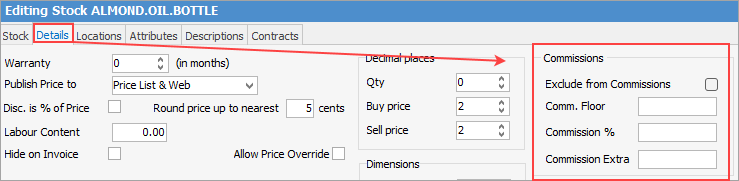
Commission values are comprised of three components:
All three components can be combined, for example 10% commission of profit based on floor cost plus an extra $10.
Exclude from Commissions is self explanatory. |
Further information