These fields should be used to implement full stock control on depleting stock, and to report on stock for purchasing.
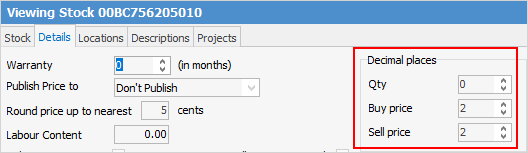

Set the number of decimal places to be able to buy and sell this stock in. The default is 0, eg. buy and sell 1, 2 or 3 whole units, but change this if buying or selling in fractions, eg. 1.25 kilograms.
The maximum number of decimal places available is four, ie. divide the unit measure to four decimal places (0.0001). |
Set the number of decimal places to purchase stock in – up to four decimal places. The default set by Jim2 is two decimal places, but this can be increased, eg. for rounding purposes.
Practical example Typical labour is billed in one hour increments – this needs to be divisible as there may be times where it is sold in ¼ hour blocks. The unit measure for Labour is 1. To sell ¼ of an hour, it is actually 0.25 of the stock unit for labour. To do this: ▪Open the Labour stock record. ▪Go to the Details tab at the top of the record. ▪At the Decimal Places in QTY field move the counter to 2 (allowing for two decimal places). ▪Click Save & Close. 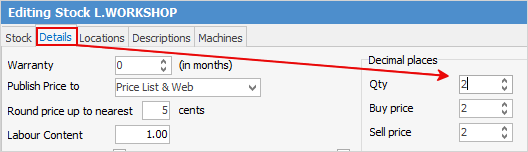
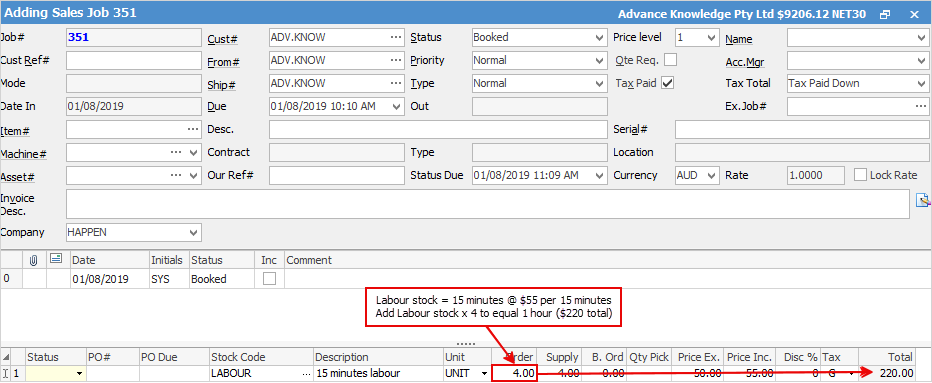
Now to sell that ¼ hour of labour: ▪In the job stock grid enter the Labour stock code. ▪In the Order field enter .25 (¼ of an hour). ▪Jim2 will divide the hourly charge by .25 to calculate the selling price for the labour. 
|

Further information