
Before continuing, please read the Managing Your Website Overview and Design Mode Introduction.
If the eBusiness Service sample website has been installed, this contains all the web page setups. |
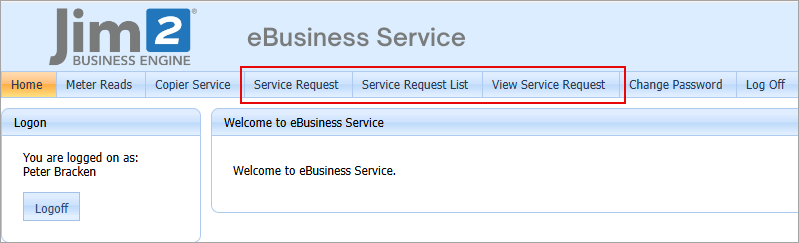
When a user is logged on as a customer, they can view Service Request, Service Request List, View Service Request.
 |
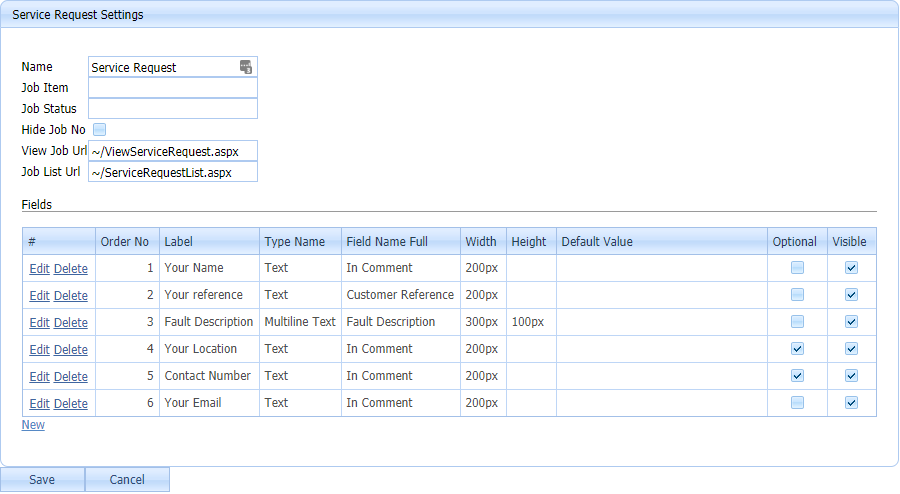
▪Customers are able to add service requests (jobs). ▪When a service request is added, the following specifics can be set: –Job Item –Job Status ▪The fields on this form can be customised for specific requirements. Fields that can be specified include: Multiple columns can be added to a comment, so any generic field name can be made up and will go into a comment. For example, if there is a custom requirement that needs customers to specify their computer name, this would be added to comments.
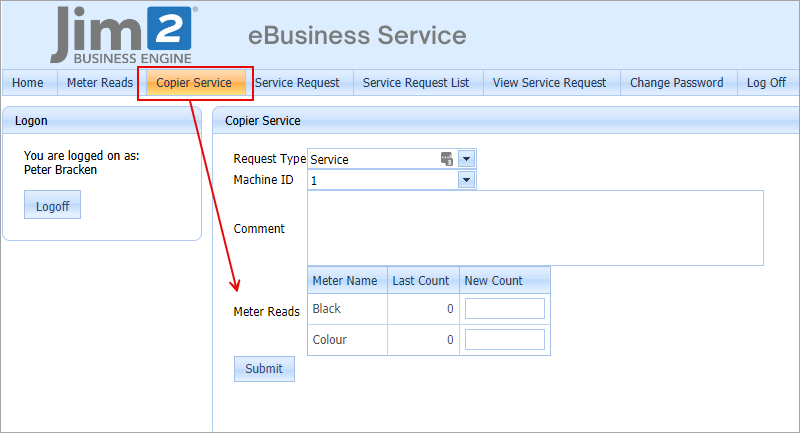
JEF can be configured to allow/require service meters when submitting a service request:
 |
Service request settings
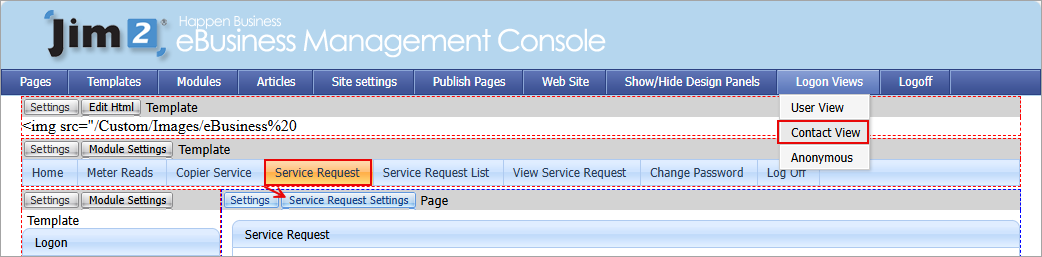
To view the service request settings:
1.Log on as Administrator.
2.Go into Design Mode.
3.Select Logon View > Contact View.
4.Go to the Service Request page.
5.Click Service Request Settings.
The top fields are as follows:
▪Name – this is the Named Module Settings, which means this module with these settings can be put on multiple pages.
▪Job Item – this is the Item that the job is created under.
▪Job Status – this is the status that the job is created under.
▪Hide Job No checkbox.
▪View Job Url – this is the URL (for hyperlink) that is used after a customer has entered a new service and they select View Job.
▪Job List Url – this is the URL (for hyperlink) that is used after a customer has entered a new service and they select Job List Url.
▪Fields – these are the fields required to show on the service request form.
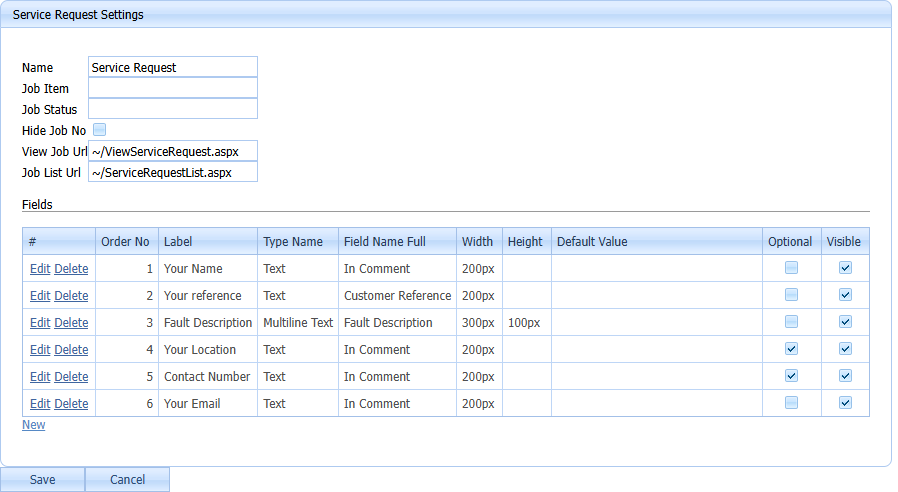
▪Order Number – is the order in which the fields appear on the form. ▪Label – this is the text that is used to describe the field to the customer. ▪Type Name – this can be either text, multiline text or drop down list. –Text – a normal Text Box. –Multiline Text – this enables the customer to enter multiple lines of text. –drop down List – this is where to set a range of values that users can input from a drop down list. This is good for fields such as Job Status, Priority, etc. ▪Field Name Full –Status – This is the job status, if the customer is required, choose from a list of statuses. –Customer Reference – goes into the Customer Reference field on the job. –Priority – goes into the Priority field on the job. It is best used with a drop down list. –Type – this maps to the Type field on the job. It is best used with a drop down list. –Invoice Description –Fault Description –In Comment – this field will go into a comment on the new job. This field can appear multiple times on the job form with different labels. ▪Width, Height – set the width and height. Multiline Texts are typically set to have a larger height. ▪Default Value – This is the default value that is set when a customer starts a new service request. ▪Optional – if this is not ticked, a user must enter a value for this field. ▪Visible – this hides a field from the customer. Typically, this would be for entering a value for a field without letting the customer see this value. 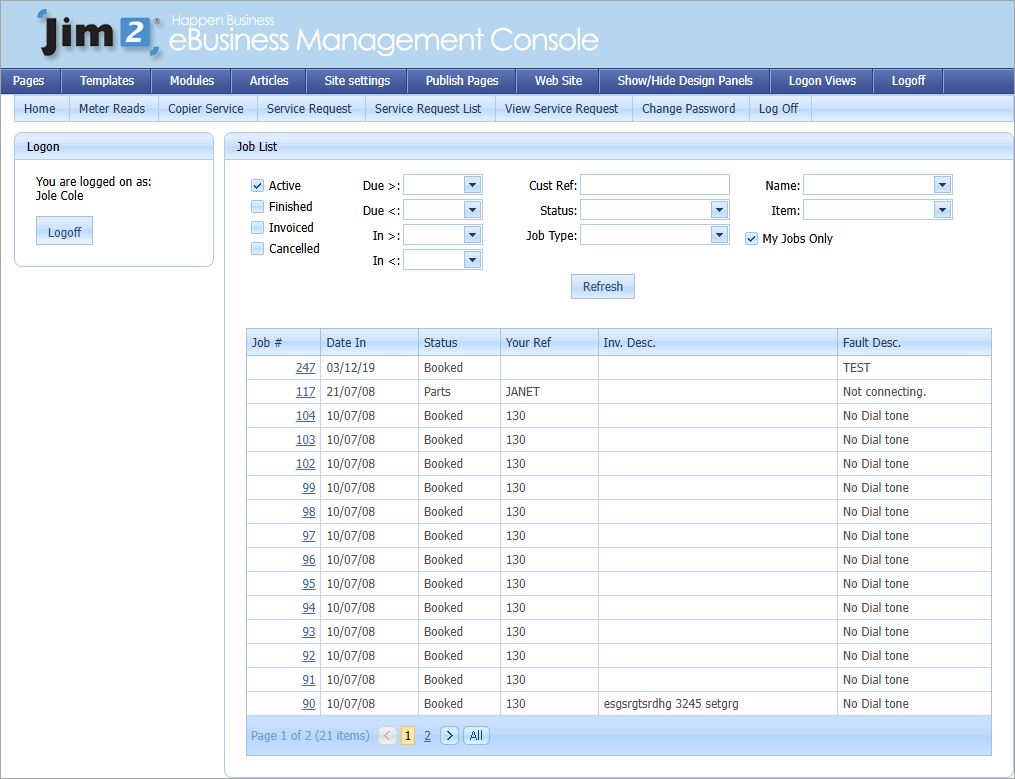 |
The Service Request List is a Job List that is customised for the customer. |
To view the Service Request List settings: 1.Log on as Administrator. 2.Go into Design Mode. 3.Select Logon View > Contact View. 4.Go to the Service Request List page. 5.Select Job List Settings. 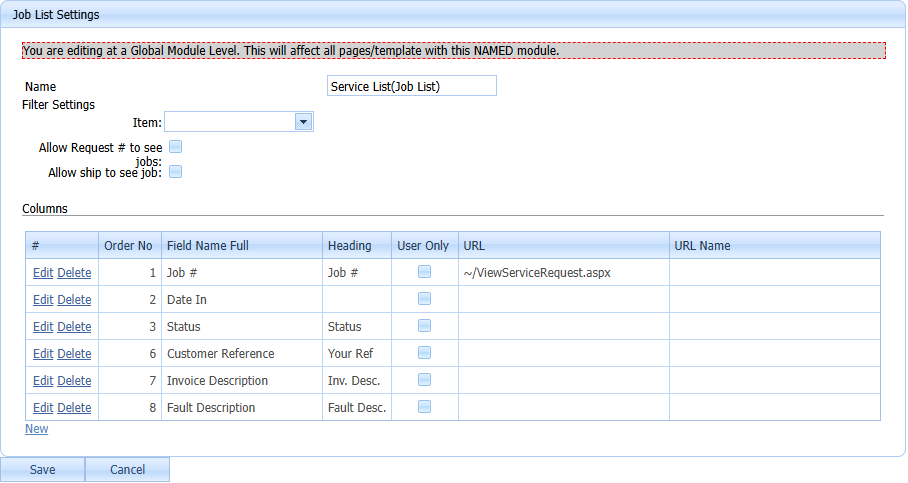 The fields are as follows: ▪Name – this is the Named Module Settings, which means this module with these settings can be put on multiple pages. ▪Item – it is possible to force the customer to use a specific job Item, therefore they will only see jobs with that specific Item. ▪Allow Request # to see jobs: checkbox ▪Allow ship to see job: checkbox. ▪Columns – these are the columns to be listed for a customer. –Order No – the order in which the fields appear on the form –Field Name Full – for example, job number, date in, status, etc. –Heading – for example, Status, Your Ref. –User Only – if this is ticked, the field will be displayed to users only. –Url – is used for Job#. Enter the URL of the Update Job/Service Request Page. –Url Name – name displayed in the grid when a URL is used. |
The View Service Request is an Update Job module that has been customised for the customer. The customer is able to:
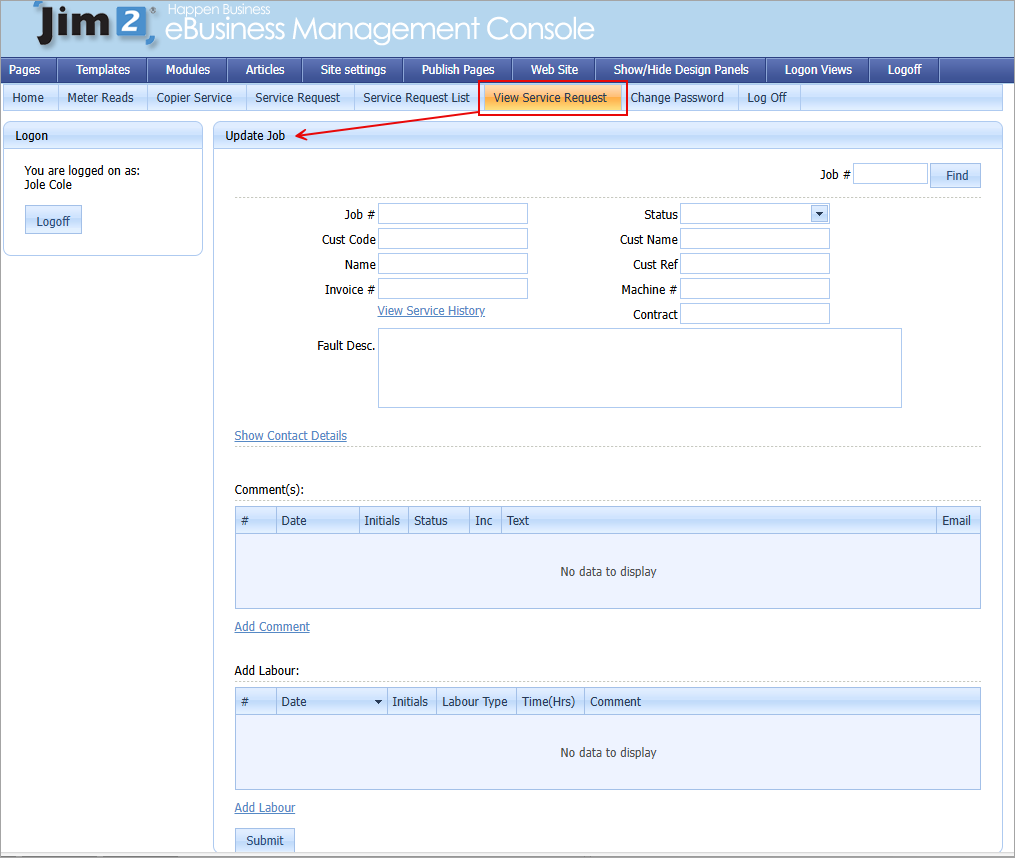 ▪View the job information. ▪View comments that are flagged as Inc. ▪Add comments to a job. When customers add comments, emails can be sent to the Name on the job, account manager, and other specified emails. When customers add comments, the job status can be changed to a different status. This allows creation of a Job List with all the updated jobs. |
To view the View Service Request settings: 1.Log on as Administrator. 2.Go into Design Mode. 3.Select Logon View > Contact View. 4.Go to the View Service Request page. 5.Select Module Settings. 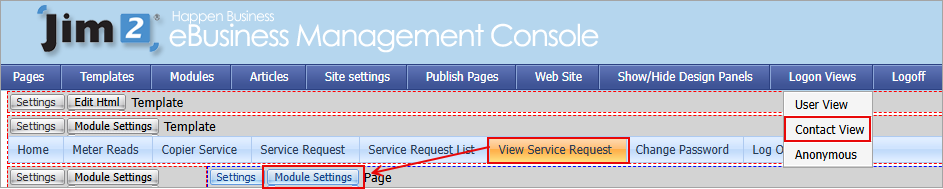 |
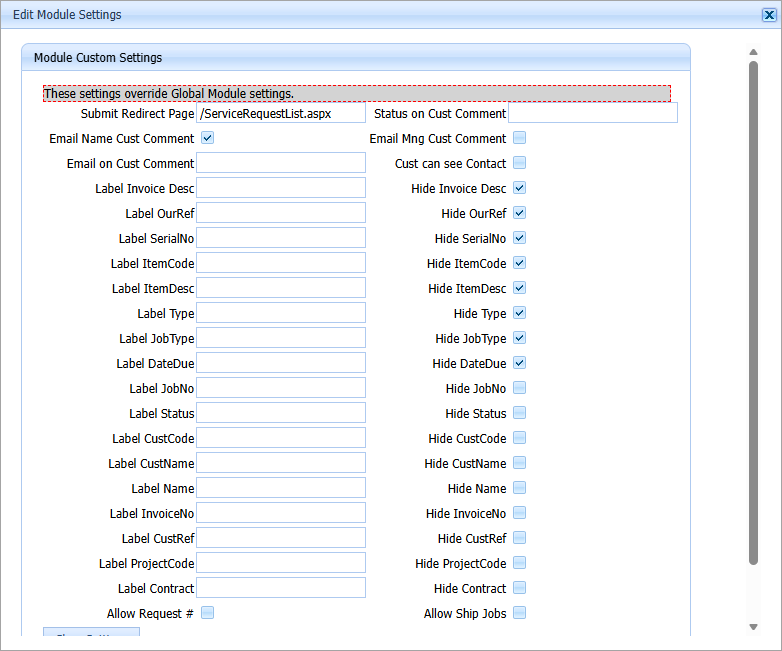 ▪Submit Redirect Page – is the page that the customer is redirected to after they update the job. ▪Status on Cust Comment – this is the status that the job is changed to when a customer comments on a job. ▪Email Name Cust Comment – if this is ticked, the person named on the job will be emailed when a customer adds a comment to a job. ▪Email Mng Cust Comment – if this is ticked, the account manager on the job will be emailed when a customer adds a comment to a job. ▪Email on Cust Comment – here, add an extra email address that is sent when a customer adds a comment to a job. ▪Cust can see Contact – tick to allow the customer to see the contact information. ▪Label – enter relevant information here. ▪Hide – (OurRef, ItemCode, Type, DateDue, AccMng, Invoice Desc, SerialNo, ItemDesc, JobType) will hide these fields on the form. |
The Jim2 user can see the Job List and also the Update Job.
 |
When logged on as a user, do the following.
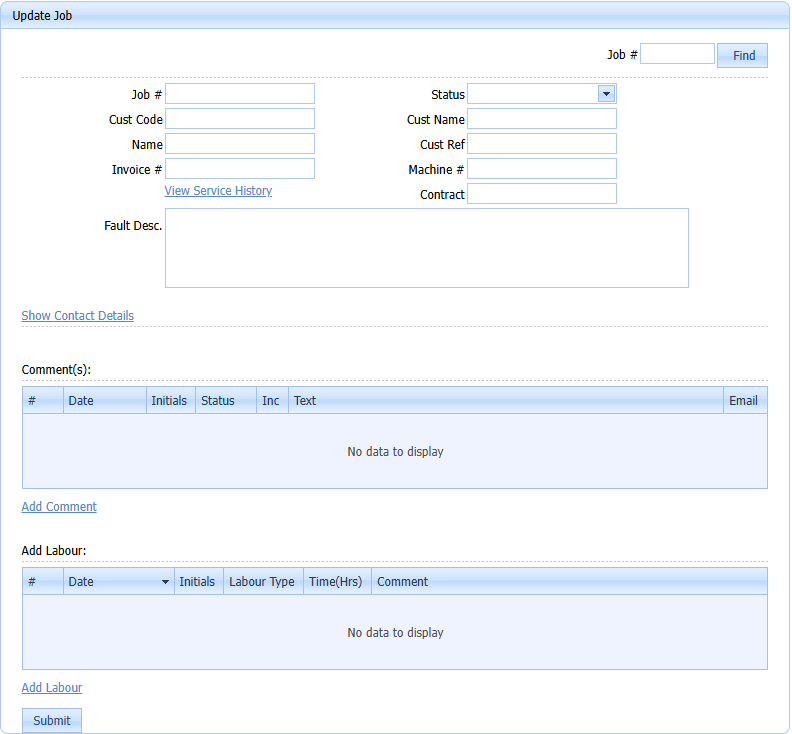 ▪View Job Information: –Job Header Information –Contact details for the Job –Google Maps links for the Address –Current comments on the Job –Current Labour on the Job. ▪Update Job Information: –The status for the Job –The Fault Description on the Job –Add comments to the Job –Add Labour to the Job. |
Further information