Select a contract from the list, and:
1.Click Add Meter at the bottom (shortcut key is Ctrl B, or right click on the desired contract).
2.Enter the meter reading – pressing Enter will move to the next meter (if a multiple meter contract).
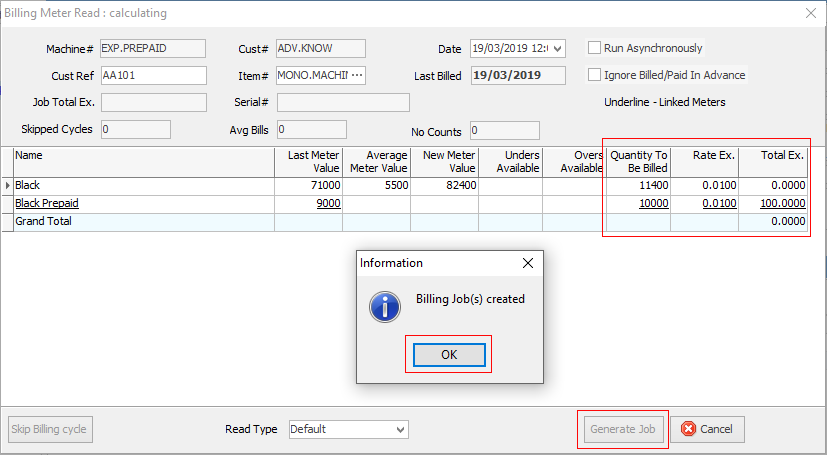
3.Click Bill Meter. Jim2 will automatically create a job on the status of FINISH and in READY mode.
|
If a service meter has been invoiced and a wrong reading was entered, go to the Invoiced Job tab on the bottom of the contract and view the service meter jobs. Unprint the invoice in question. Fix the read, then re-invoice. |


Field |
Explanation |
|---|---|
Contract# |
The contract number. |
Cust# |
Customer card code. |
Date |
This date is normally set by the macro as set on stock. It will also be used for the Previous Job.Read date macro. It also appears as the Read Date in the Meter Reads tab on the contract. |
Cust Ref |
Enter a customer reference, or something that may be meaningful as an internal reference. |
Item# |
Select the correct Item# for this job. |
Last Billed |
This is the date the contract was last billed. |
Job Total Ex. |
Total excluding GST. |
Serial# |
The contract's serial number. |
Skipped Cycles |
How many skipped billing cycles have been performed. |
Avg Bills |
Number of Average Bills. |
No Counts |
Number of times No Counts received. |
Run Asynchronously |
For large contracts, the meter billing calculation can take a significant amount of time. Tick this box in order to avoid waiting for the completion of the calculation. This screen can be closed immediately after generating the job. |
Ignore Billed/Paid in Advance |
Ticking this box will bypass the usual check that ensures a meter's new count is greater than its last count. This should only be used if one of the meters has been billed or paid in advance, and require to leave it that way. |
Further information