The final step in setting up Jim2 for Multi-Currency is to nominate the default currency on the customer and vendor cardfiles.
This is performed on the respective Vendor and Customer tabs by choosing from the drop down list.
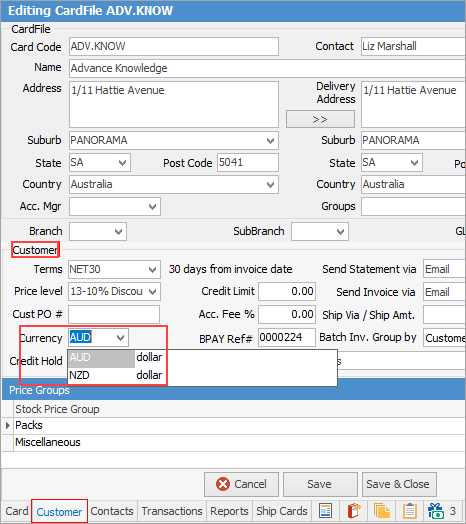
Customer Currency
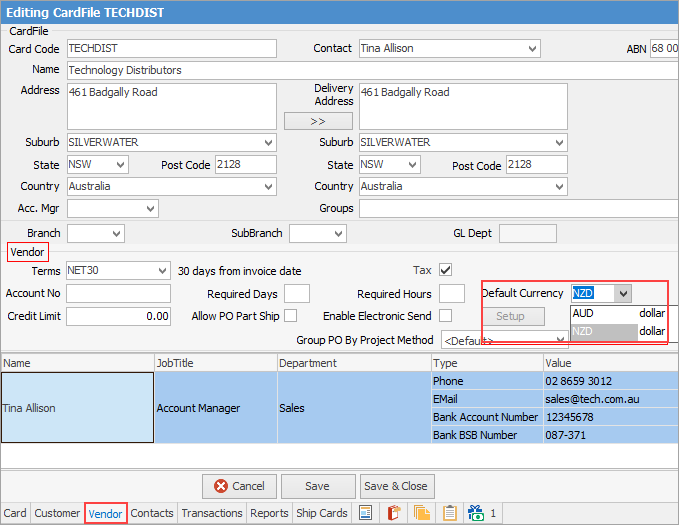
Vendor Currency

|
There is no need to create multiple cardfiles for a customer/vendor who trades in multiple currencies. Cardfiles can have a default currency for both customer and/or vendor. This default can be changed to any other active currency at an object level, as required.
|
|
Further information
Multi-currency Definitions
Multi-currency Security
Multi-Currency General Ledger
Multi-Currency Options
Multi-Currency Currency Setups
Multi-Currency Currency Rates
Multi-Currency Bank Account
Working with Multi-currency
Multi-Currency Transaction Journal
Multi-currency Revaluation
Multi-Currency Business Analysis
Multi-Currency Purchasing
Multi-Currency Stock
Multi-Currency Transfer From Home Account to Overseas Account
|