Trackable reports allow a report to be tracked when printed, emailed or exported (logged in History) from a security point of view, and records the number of times this has happened, providing printed X times functionality on reports, etc.
By default, all reports are not tracked, and must be flagged as Trackable to enable this functionality.
 |
It is recommended to only flag key reports as trackable, based on either security requirements, or if printed X times functionality is required (eg. picking slips). |
Whenever a trackable report is previewed/printed/emailed/exported, a history log entry is made that includes the following information:
▪date and time report invoked
▪user who invoked the report
▪related Jim2 object (job, quote etc.)
▪related Jim2 object number (job no, quote no)
▪report event (print, preview emailed, etc.)
▪report path and name.

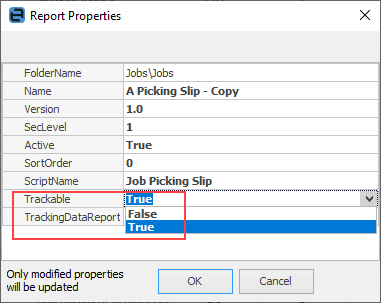
To mark a report trackable, open Report Designer via Tools > Report Designer. Choose the report and select Properties on the ribbon. Change the Trackable report property to True.
 |

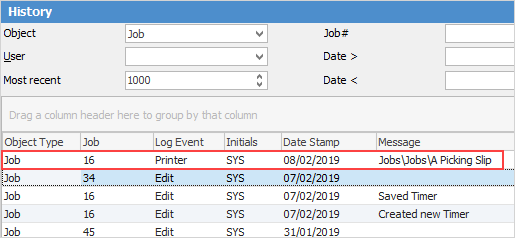
If a report is trackable and related to a Jim2 object (job, quote etc.), the report log is displayed within the history of that object. For example, if a picking slip was printed for Job#16 (image below), the log of that is displayed when viewing the history of Job#16.
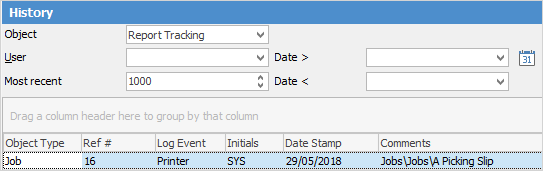
For reports that are not related to an object, or to see any trackable reports, select Report Tracking as the object in the Tools > History selection criteria.
 |
One of the benefits of marking a report trackable is the ability to display how many times it has been printed on the actual report.
Several variables are available within Report Designer, via the JimSystem report pipeline, to enable this functionality.
Typically, a Label component would be added to a report, and add an OnGetText event to that label with RAP code as follows:
procedure LabelTrackableOnGetText(var Text: String) begin Text := ‘’ if (JimSystem(‘ReportTrackable’) = ‘T’) and (JimSystem(‘ReportDestination’) = ‘Printer’) then begin if JimSystem(‘ReportTrackable_PrintCount’) = 0 then Text := ‘First time printed’ else Text := ‘Report print count = ‘ + IntToStr(JimSystem(‘ReportTrackable_PrintCount’)) end
The following properties are available within the Scripting Engine via the ReportLogger object
ReportLogger.IsLogging ReportLogger.PrintCount ReportLogger.PreviewCount Reportlogger.ExportCount
Sample Scripting Engine code:
if (ReportLogger.IsLogging) and (ReportLogger.PrintCount = 0) then begin // first time printed ... end |
Further information
Set up Back of Page Text on Invoice
For more detailed information regarding Report Designer please refer to www.digital-metaphors.com (copy and paste into a web browser).