Macros are available for two purposes:
▪To customise the default billing job description within the stock grid and invoice description. The macro can be specified at a global level, or can be overridden for a particular contract.
▪To customise the stock description at a job level. Macros with Meter as part of the macro are available. The macros are stock-specific and can be edited via the stock record Contracts tab in the Macro Desc field.
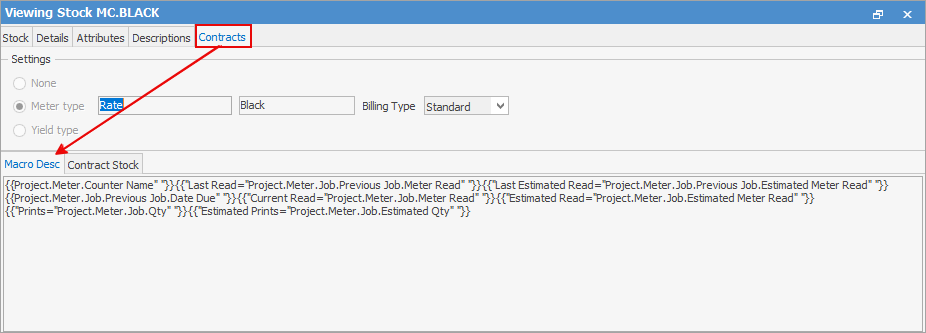
There are three areas where macros can be edited:
1.On the ribbon, go to Tools > Options > Contract > Managed Print Services.
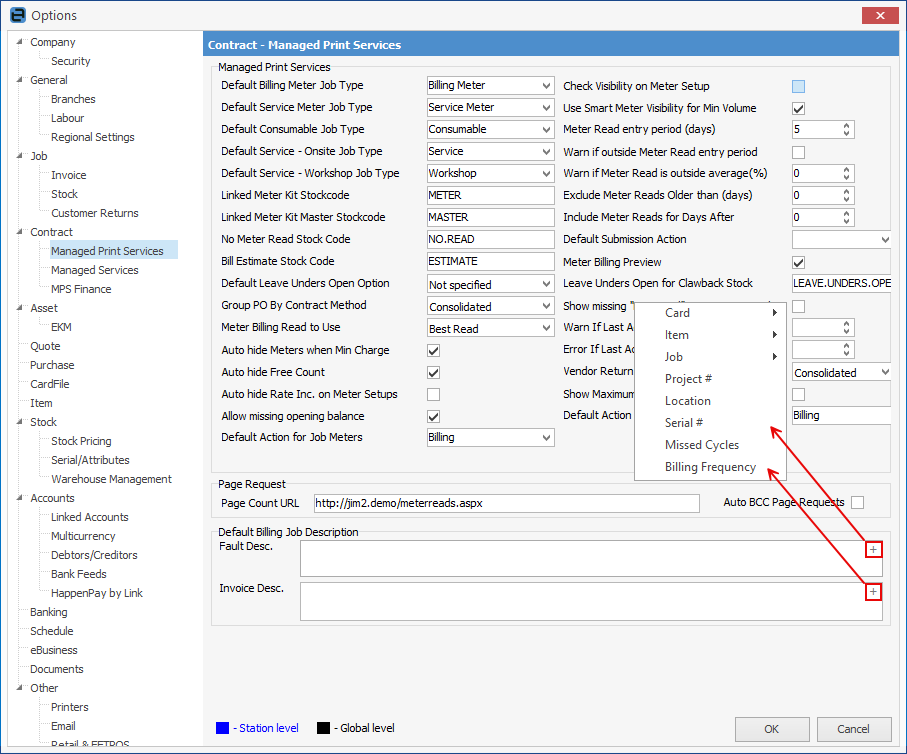
Within this area of Options, any macro with Meter in it is unavailable. The default Fault Desc. and Invoice Desc. can be changed by adding macros to the descriptions, or more generic information can be entered here. The available macro options are shown below.
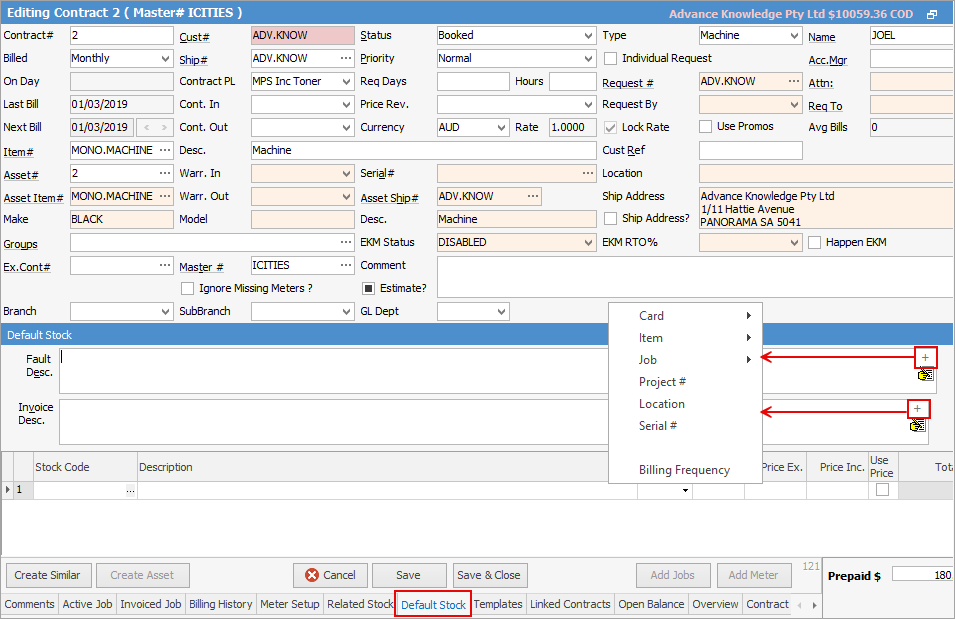
2.On the ribbon go to Contracts > View/Edit Contract.
3.On the ribbon go to Stock > View/Edit Stock.
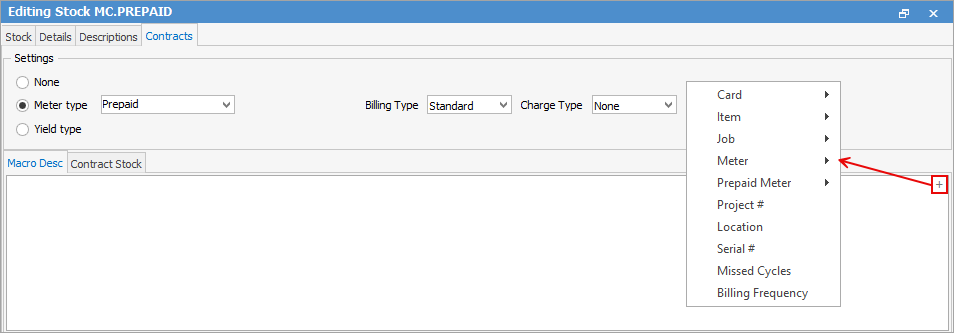
The list of macros is available either by right clicking on the field, or by clicking the + button attached to the field.

These are also in meter-specific macros.
|
Examples of Prepaid Meter macros 1.Project.Prepaid Meter.LinkedMeters.Meter Names results in: Rental (Base Charge) Black. 2.Project.Prepaid Meter.LinkedMeters.Meter Type Rate TF Period results in: Rental (Base Charge) 2x 20.0000 2 Monthly Black Black 0x 0.0100. 3.Project.Prepaid Meter.LinkedMeters.Meter Type Rate TP Period results in: Rental (Base Charge) 2x 22.0000 2 Monthly Black Black 0x 0.0110. 4.Project.Prepaid Meter.LinkedMeters.Meter Type Rate TF Period results in: Rental (Base Charge) Base Charge 2x 20.0000 2 Monthly Black Rate Black 0x 0.0100. 5.Project.Prepaid Meter.LinkedMeters.Meter Type Rate TP Period results in: Rental (Base Charge) Base Charge 2x 22.0000 2 Monthly Black Rate Black 0x 0.0110.
There are also a corresponding set of macros for a linked meter, if available. They can be formed by adding the wording Linked Meter after the Meter part of the macro, ie. Project.Meter.Linked Meter.Counter Name. There is also some special handling of macros when they are for meter billing kits. |
|
Each date has a corresponding set of sub macros attached to it. The first two are each dates. They are: ▪Previous Month ▪Next Month
For each individual date macro (including Previous Month and Next Month) there are the following sub macros: ▪Day ▪Month ▪Year ▪LongDateFormat
For example, if the contract's bill date was 30th May 2019, the following macros would evaluate:
|
All of the above macros can be used in any combination to suit specific needs. As a starting point, consider the following macros, as these work nicely with estimates, and the clawing back of estimates.
The suggested macro for purchase order stock is very similar, except that it includes the additional information about the customer (which would be redundant for meter billing stock) and serial number.
The suggested macro to use for billing stock is:
{{Project.Meter.Counter Name}}{{"Last Read="Project.Meter.Job.Previous Job.Meter Read" "}}{{"Last Estimated Read="Project.Meter.Job.Previous Job.Estimated Meter Read" "}}{{Project.Meter.Job.Previous Job.Date Due}}{{"Current Read="Project.Meter.Job.Meter Read" "}}{{"Estimated Read="Project.Meter.Job.Estimated Meter Read" "}}{{"Prints="Project.Meter.Job.Qty" "}}{{"Estimated Prints="Project.Meter.Job.Estimated Qty" "}}
For example, below image shows the stock description using the macros that are fired:

In this case, the macros fired are: {{Project.Meter.Counter Name}}{{"Last Read="Project.Meter.Job.Previous Job.Meter Read" "}} – Black Last Read=12,000 {{Project.Meter.Job.Previous Job.Date Due}} – 15/03/2019 {{"Current Read="Project.Meter.Job.Meter Read" "}} – Current Read = 16,000 {{"Prints="Project.Meter.Job.Qty" "}} – Prints=4,000
For 3rd party purchase orders, the suggested macro is:
{{Project.Card.Name}}{{"Serial No="Project.Serial #" "}}{{Project.Meter.Counter Name}}{{"Last Read="Project.Meter.Job.Previous Job.Meter Read" "}}{{"Last Estimated Read="Project.Meter.Job.Previous Job.Estimated Meter Read" "}}{{Project.Meter.Job.Previous Job.Date Due}}{{"Current Read="Project.Meter.Job.Meter Read" "}}{{"Estimated Read="Project.Meter.Job.Estimated Meter Read" "}}{{"Prints="Project.Meter.Job.Qty" "}}{{"Estimated Prints="Project.Meter.Job.Estimated Qty" "}}
For service reads, the suggested macro is:
{{Project.Meter.Counter Name}}{{"Current Read="Project.Meter.Job.Meter Read" "}}{{Project.Meter.Job.Read Date}} |
Further information