The ability to add, edit, view and amend cardfiles is handled via Jim2 Security, as well as within the cardfile itself.
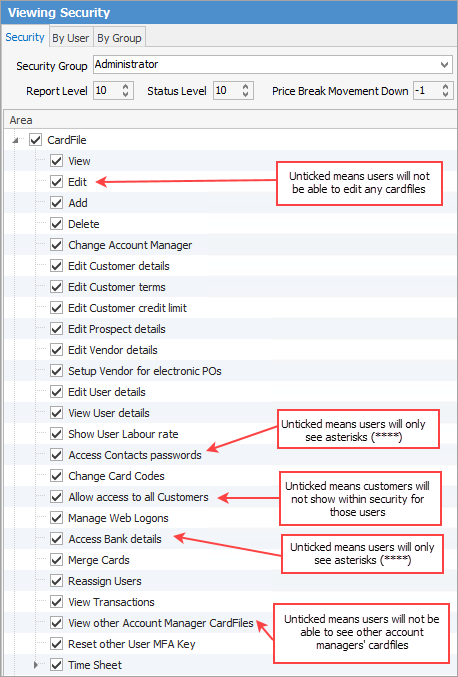
The image above shows all the security settings available for cardfiles (all of which are self explanatory).
 |
Note: It is not possible to block visibility of 1 cardfile from a Jim2 user. |
Select the Security Group, click Edit and expand the CardFile (and sub-folder) checkbox, etc.
Choose what the user group is able to do.

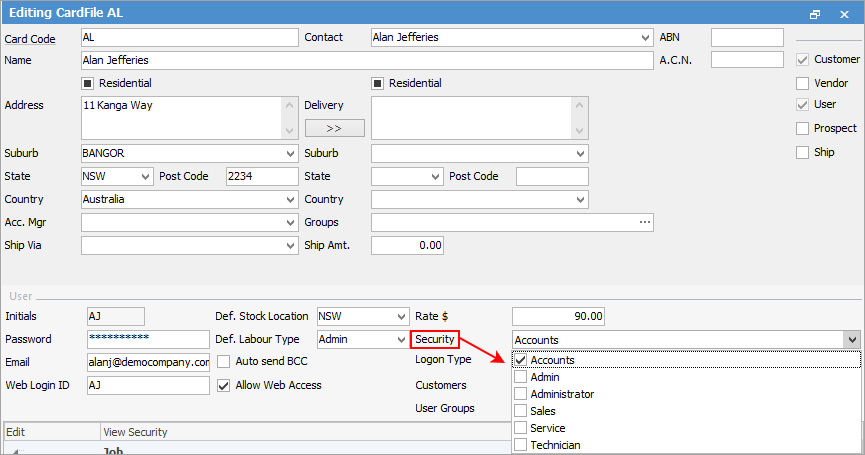
To add a user to multiple security groups, go to CardFiles > View/Edit CardFile (or right click from a CardFile List to choose from there), click Edit, then go to the the User tab. Click the arrow (
Checkbox settings:
Please see User Group – Tags/Category Groups for more in-depth information on cardfile security. |
 ) beside the Security field, and choose the security groups as required.


Further information