This report is based on the meter averages report. See here for an explanation of the calculation of averages. This report shows the Finance tab information which the meter averages report does not.
The report end date is set to Today by default, and cannot be changed. That is the same Date we base our calculations for Averages from in the Meter Averages Report.
Average Periods are unticked by default. If Show in Report is ticked, columns will appear in the report for 3, 6, 12 months and lifetime.
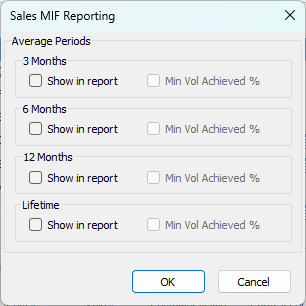
The report only uses the Contract reads or the reads used in billing (as per in the billing history). Asset Reads are not available in this report.
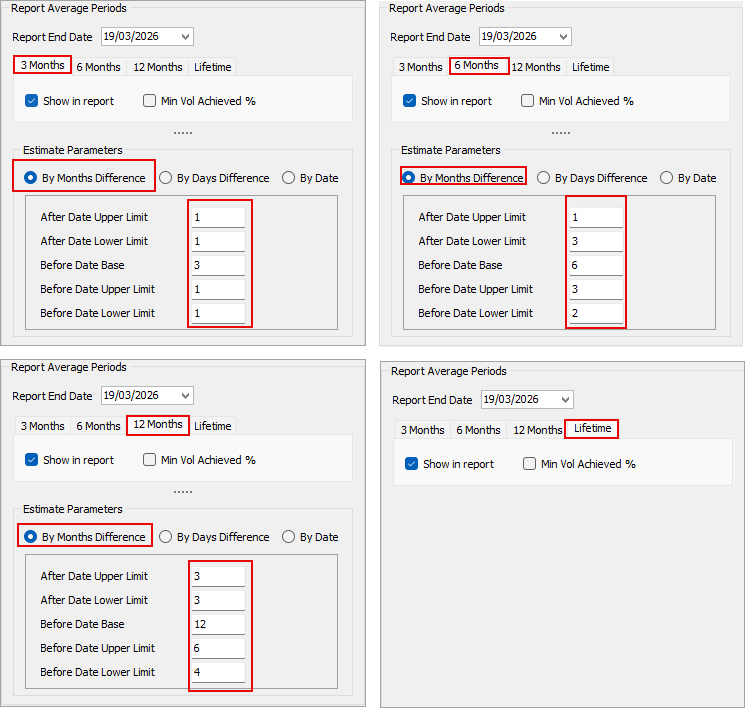
Whilst the Meter Averages report has options for users to adjust the average calculation params to suit their needs, this MIF report has these params pre-set in the script. The image below is the default preset in the Meter Averages report, which is also used in the MIF report.
Compared to the Meter Averages Report that shows the Averages on each Meter, this report only calculates the Averages against the Primary Meters only.


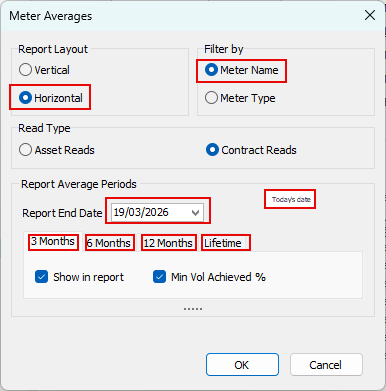
To check for the correctness of averages generated, please refer to the Meter Averages Report. Using the same Contract List, run the Meter Averages Report and make sure to use the following filters:
Further information