There are times when certain stock sold to customers needs to be returned for various reasons, such as warranty issues or faulty parts. Jim2 has the facility to track stock and allow customers to return goods, maintaining thorough records of the events.
A customer cannot have a refund without having a credit, so adding a return from customer is the most common form of credit creation.
There are two types of returns.

A non strict return allows crediting a customer for something returned from a sale that Jim2 doesn't know about, eg. sold from a previous system or sold in a retail environment where it is difficult to identify the original sale. Unlike a strict return, the resulting credit has no link to the original sale.
This needs to be set up in Security first. On the ribbon, go to Security > Jobs > Return From Customer > Allow non strict Returns.
Tick this security setting if it is not necessary to enforce the use of an invoice number when adding a return from customer. This means there is no link to an invoice against the customer. A return can also be made against multiple invoices.
The non strict return generates the credit for the customer. When finished, a linked debtors purchase order (DPO) is automatically generated on a status of Received to handle the return of the stock to inventory. The RFC will dictate the value of the customer credit, and the DPO will dictate the asset value of the returned stock.
The COGS on the DPO should be confirmed prior to finishing it, as it will take this from the stock record – not from the COGS of the original sale.
The DPO should be finished promptly to ensure stock levels and values are accurate.
When a DPO is created from a non strict return, it does not create another credit for the customer.
It is then required that the DPO be updated with the COGS value against the stock, then set to Finish.
When adding a return with no invoice number, a related DPO will be created on the status of Received. This allows sales staff to add returns without requiring access to Purchases. Purchasing staff can cost the return correctly at a later time. |
If Strict Return is ticked, you can enter an invoice number. All or part of the goods can then be returned on that invoice. If you leave that field blank, when clicking the ellipsis beside the stock code field, you will be able to select stock from multiple invoices. The value of the credit to the customer can be any dollar value. It does not need to be the dollar value of the invoiced stock. For example, you may need to include a restocking fee.
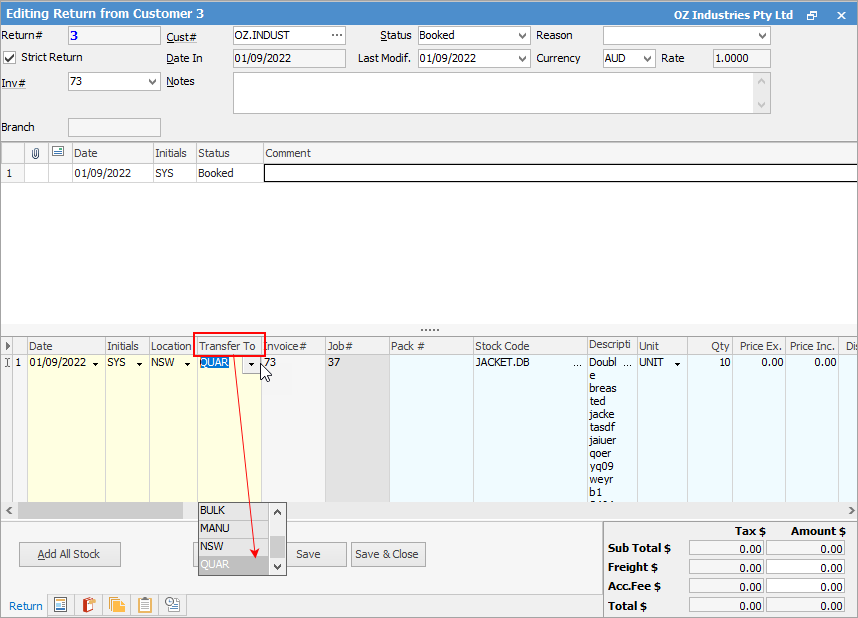
Returns from customers often involve the return of damaged stock. If this is the case, the stock should NOT be returned to the main warehouse, it should be returned to a quarantine or damaged goods warehouse location.
For this reason, add a QUAR (or something similar) stock location via Tools > Setups > Stock > Stock Locations, then utilise it in the RFC screen.
|


▪Allow returns from multiple invoices on the one RFC (non strict return). ▪Allow returns with no invoice number (non strict return). ▪Strict return (allows return from one invoice or multiple per customer). ▪Additional security settings.
To cater for these features, the stock grid includes both Invoice# and Job# columns.
Creating a return from customer has the opposite effect on stock and invoice transactions.
The Jim2 Return from Customer form is divided into the following specific information areas that will provide a complete detailed record of: ▪The return from customer details via the Return header. ▪The stock information via the return stock grid. ▪The totals of the return via the return footer. ▪List of returns from customers via the return list.
|

Further Information