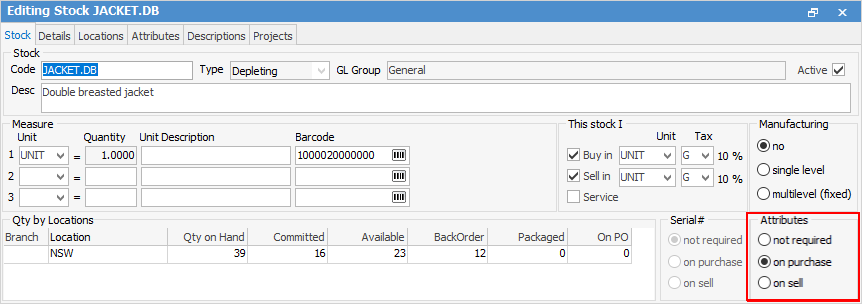
To apply the attributes, a stock code must be created.
|
Jim2 will not allow changing attribute settings there are transactions for that stock, ie. Attributes cannot be turned off on purchase or sell, but they can be added or deleted. |

It pays to think very hard about whether attributes will be required in the future, and how they will be used.
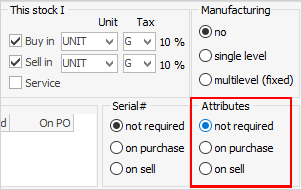
There are three possible attribute setting choices:
▪Not required is the default setting for stock, and it means that there will be no prompt to enter attributes for this stock.
▪On purchase means that attributes need to be entered for this stock at time of purchase on the purchase order stock line, as well as on sell.
▪On sell means that generic stock can be bought in and attributes entered to identify the stock on the job when selling.
Once either Attributes on purchase or on sell has been selected, the Attributes tab will appear at the top of the stock form. If attributes has been selected to use for either, at least one attribute must be selected to use from this list. More can be added later or deleted, provided that there are no active orders open with that stock.
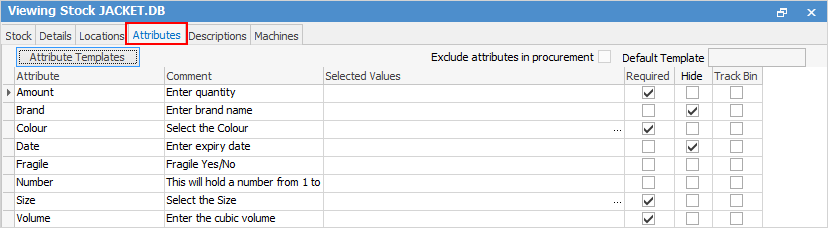

In Setups, there is an option to require attributes and also to hide them. In this Attributes screen, specify whether a particular attribute for individual stock is to show on the invoice, and also whether to make entering it compulsory.
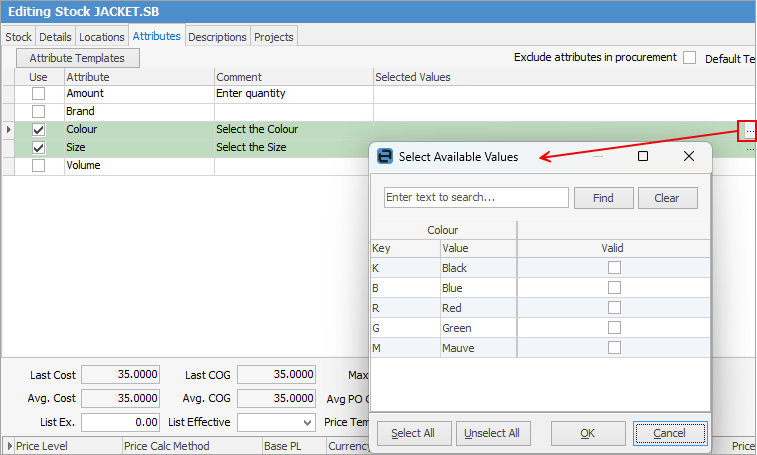
From this screen (click Edit on the stock code, go to the Attributes tab and click the ellipsis [...] beside the required attribute), select all the attributes to be used and tick Valid for the attributes to be used. When using this stock on a job, quote, etc. only the attributes that have been ticked as Valid will appear for selection. Click OK.
Tick whether they are required and/or to be hidden.

For example, in this example for this particular stock, use the attribute colour and size, and also make them required. Once all the attributes have been selected, save the stock. |
Further information