|
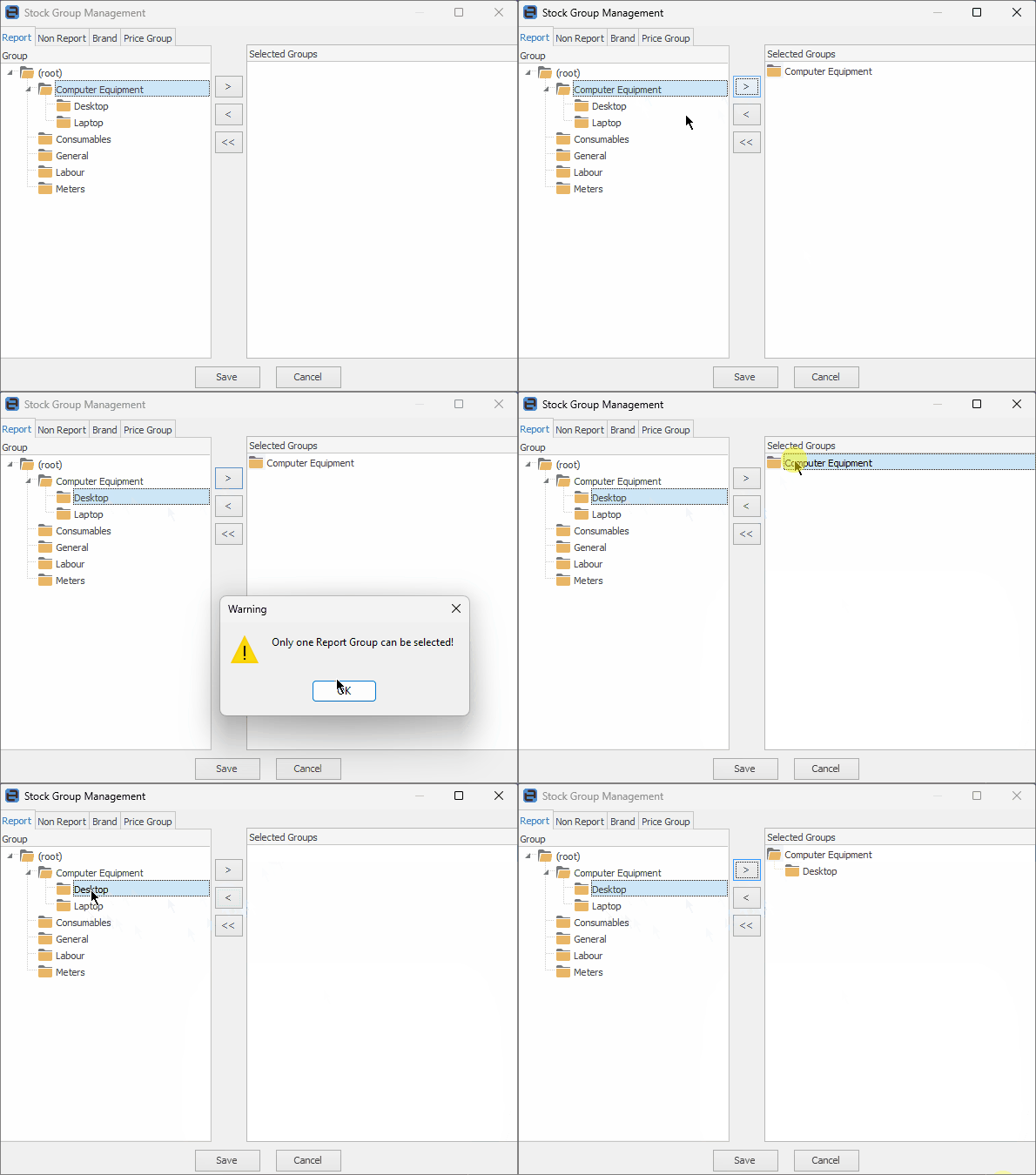
Adding Groups to stock records allows for stock reports by groups to sort the data logically, and to allow for greater search facilities. There are two different types of groups that add to stock records: Report groups and Non Report groups. Combinations of non report groups can be added, but only one level of Report group.
Report Groups have a distinct relationship to each other, and are structured to form ascending levels (level 1 to level 5), that can be used to create reports to analyse stock trends.
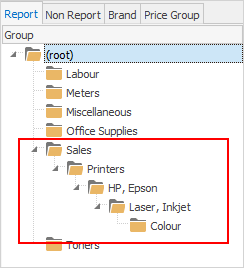
Stock records for different printers could have the following report level groups applied:
Level 1 Group – Sales
|
Reports on all sales (includes printer sales info in reports).
|
Level 2 Group – Printers
|
Reports will separate printer sales from other sales.
|
Level 3 Group – HP, Epson
|
Reports will separate sales of HP and Epson from other printer sales.
|
Level 4 Group – Laser, Inkjet
|
Reports will separate sales of HP laser printers, HP inkjet printers, Epson laser printers and Epson inkjet from other printer sales.
|
Level 5 Group – Colour
|
Reports will separate sales of HP colour laser printers, HP colour inkjet printers, Epson colour laser printers and Epson colour inkjet printers from other printer sales.
|
In a Level 5 monthly stock profit report, Jim2 will include the above HP colour laser printer sales.

|
Report levels must be applied in ascending order to provide the analysis or report breakdown that is required. Using the above stock example, HP colour laser printers will belong to these groups (in order): Sales: Printers: HP, Epson: Laser, Inkjet: Colour. To add the group, select the last child group required – this will add all groups above as well. The parent group, then the child group cannot be chosen.
|
Non Report groups are very general and very useful for gathering slightly more fluid information from stock records. Non Report groups can include useful generalisations (level 0). Non Report groups can be used when creating lists of cardfiles, Items and stock. As many Non Report Groups can be added as desired.
As an example, stock records could have the following Non Report groups applied:
Catalogue
|
All stock in this group appears in the current sales catalogue.
|
Flammable
|
All stock in this group should be stored according to OH&S requirements.
|
|
Further information
Barcode
Measures
Qty by Locations Grid
Serial and Attribute Requirements
Stock Code and Description
Stock GL Groups
Stock Types
This Stock I
|