The ability to add, edit, view and amend jobs is handled via Jim2 Security.
To enable other users to view specific areas, select the Security Group, select Edit and expand the Jobs (and sub-folder) checkbox(es).
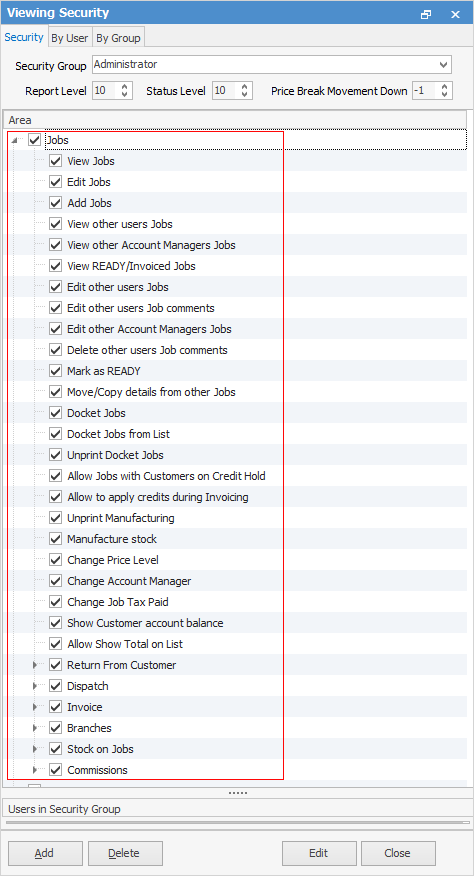
Choose what the user is able to do.
Checkbox settings:
Checkboxes |
Explanation |
|---|---|
|
Will only return results for what is ticked. |
|
Will not return results for any unticked boxes. |
|
Will return results for all of the above. |


The following lists the security settings available for jobs. Whilst some things have been grouped below, ie. view/edit/add, these are all individual security settings.
Job Security |
|---|
View/edit/add jobs |
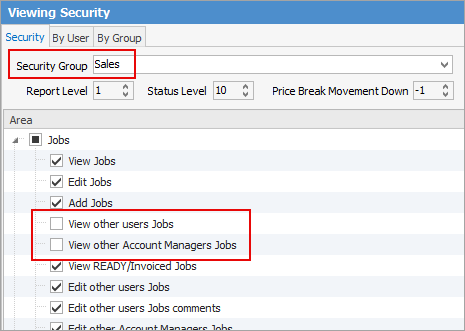
View/edit other users' and account managers' jobs.
If you receive a warning that you cannot view other account managers' or users' jobs this is what controls that.
 |
View ready/invoiced jobs |
Edit and/or delete other users' job comments. |
Mark jobs as ready |
Move/copy details from other jobs |
Docket jobs individually and from list |
Unprint docket jobs |
Allow jobs with customers on credit hold. This will allow users to bypass credit hold settings when adding jobs. |
Allow to apply credits during invoicing |
Change Account Manager |
Change Job Tax Paid |
Change Price Level |
Unprint manufacturing jobs |
Manufacture stock |
Change price level/account manager, job tax paid |
Show customer account balance |
Allow show total on list |
Return from Customer |
|---|
View/edit/add/finish/unprint returns from customer |
Allow to finish returns from users |
Allow non strict returns |
Dispatch |
|---|
View/edit/delete dispatch sessions |
Allow dispatch sessions for all branches (if branches are enabled) |
Invoice |
|---|
Invoice jobs |
Change invoice date/date due |
Unprint invoice |
Allow to invoice users |
Allow invoicing when customer credit limit reached |
Allow invoicing when customer outside trading terms |
Allow discounts on invoice |
Allow invoicing when customer is on automatic credit hold. This will allow users to bypass credit hold settings when adding jobs and invoicing. |
View/reprint invoices |
Branches |
|---|
View jobs from different branches |
Sell from different branches |
Sell from locations of different branches |
Sell from all locations, regardless of branch |
Stock on jobs |
||
|---|---|---|
Edit stock |
||
Edit other users stock |
||
Delete Applies stock |
||
Delete and/or Edit Applies stock description |
||
Sell committed stock |
||
Sell stock in advance |
||
Reserve/un-reserve stock |
||
Show stock cost/prices |
||
Allow to sell stock for less than minimal price
|
||
Show stock cost |
||
Sell from Intercompany locations (only works if usingMulti-Company) |

Commissions |
|---|
View/edit commission values |
View/edit other users' commission values |
View/edit other account managers' commission values |
Please see User Group – Tags/Category Groups for more in-depth information on Jobs security.
Further information