A range of invoice reports (layouts) are available. Let's start with the simplest (Invoice Meters report):
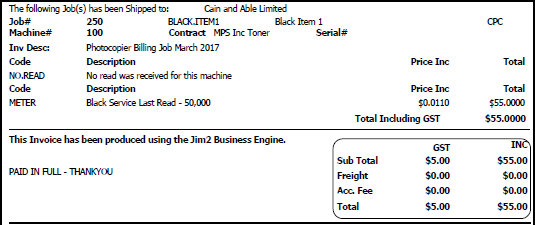
This report would typically be the default invoice report for all meter billing invoices. This is set in Options:

In some cases, a particular customer might want a slightly different invoice, in which case set the customer cardfile to use a specific invoice layout for meter billing. On the ribbon, go to CardFile > View/Edit CardFile and select the cardfile to use the different default invoice report. Edit the cardfile, then go to the Reports tab at the bottom of the screen.

Where a customer may have multiple meter billing jobs due to having more than one contract, the default behaviour in Jim2 is to group those jobs onto a single invoice when batching the jobs together.

The master invoice summary may calculate that there were 2,000 overs pages, and 750 of these were clawed back. This would display two lines on the invoice summary.
If the rates for standard and overs pages are the same, this has exactly the effect as just having only 1,250 overs pages, which simplifies the invoice appearance.
It is even more important when they cancel each other out. If there are 600 overs and 600 pages clawed back, this can be unnecessarily confusing on an invoice. In this case, the NetOvers and NetClawback fields would both be empty, requiring no other line than the Min Volume line. |
Further information