This setup can be used for either a master or a standalone contract. The setup for both is identical, except that in the master contract case the prepaid meter is on the master, and in the standalone case it is on the standalone contract.
As a part of winning a contract, the sales person has provided 20,000 free black pages to the customer. The master contains two black contracts.
The setup for this scenario is nearly the same as for prepaid pages. The difference is that there are no prepaid bulk pages specified. It is still possible to specify an expiration frequency.

|
In the above image, this is a Master contract. Meter 2 is not ticked as a master meter and prepaid pages won't appear on child contracts. |


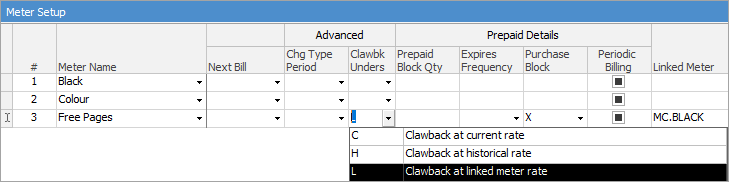
Because the free pages are not sold automatically (as there is no block size specified), a separate job is required to give away the free pages. This involves creating a job which assigns the free pages to the contract.
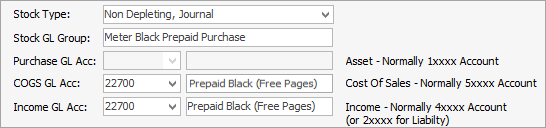
It is recommended to set up a Stock GL Group, such as Meter Black Prepaid Purchase, linked to a liability general ledger account (2XXXX):
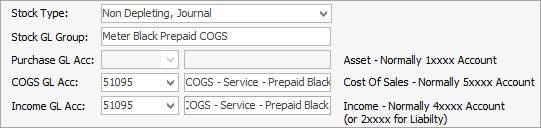
Another Stock GL Group, such as Meter Black Prepaid COGS (cost of goods sold) is also required.
The stock codes are set up as follows:


|
The MC.BLACK.FREE.COGS stock code is not used in the meter setup. It exists to offset the MC.BLACK.FREE stock on the job, which gives away the free pages. In order to do this, it is recommended to use a dynamic kit. |

The kit consists of the MC.BLACK.FREE and MC.BLACK.FREE.COGS stock.
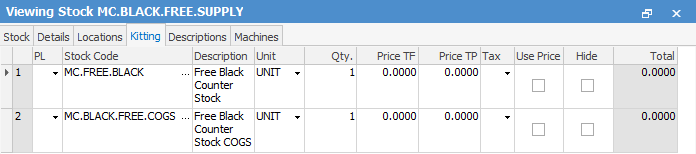
A job is then created to give away the free pages. This job is linked to the master contract. This can be created via the master contract and clicking Add Jobs > Consumable Job (at the bottom of the contract).
The MC.BLACK.FREE.SUPPLY stock is then added to the job. The price for the MC.BLACK.FREE stock is manually changed to the price per black page. The MC.BLACK.FREE.COGS is changed to the negative of this amount. Finally, the number of free pages provided is entered in as the ordered quantity. This zero dollar job is then invoiced. The date due on the job is the earliest date these prepaid pages can be used.
The next bill date on the master contract must be on or after this date for the pages to be used.
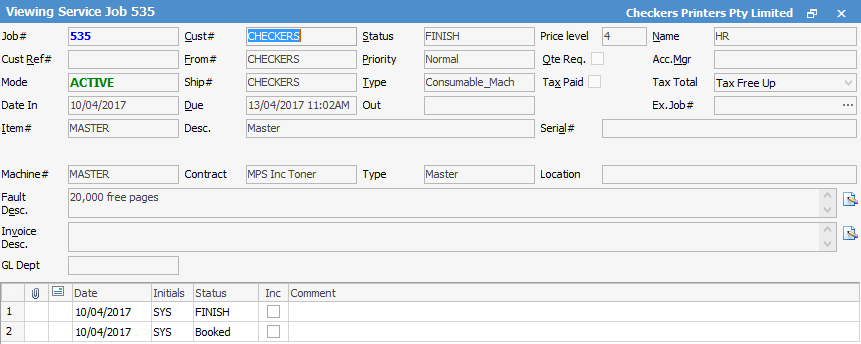

|
The negative amount on MC.BLACK.FREE.COGS (this may need to be manually entered). This allocates 20,000 pages to the master's Free Pages meter:
 |
If reads of 33,000 (8,000 pages) and 57,000 (7,000 pages) are received, it creates standard jobs for the child contracts:

Contract 1

Contract 2
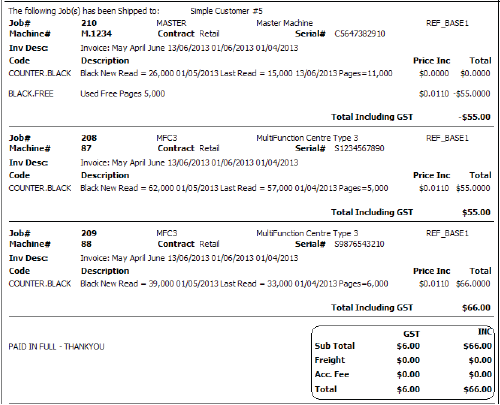
The amounts charged on the child contracts are offset by the free pages being used on the master:

If the meter setup on the master is then viewed, it will show that there are only 5,000 free pages remaining:

If the following month reads are 39,000 (6,000 pages) and 62,000 (5,000 pages), the following jobs are created:

Contract 1

Contract 2
The master can only use the remaining 5,000 free pages. Unlike the standard prepaid pages situation, there are no further free pages purchased. This means the customer is billed for the remaining 6,000 pages.

Further information
Add or Remove a Child from a Master
Contract with Price Break Point
Master with Different Billing Periods
Master with Black A3, A4 Meters and Min Volume
Master with Multiple Children and Min Volume
Master Meter does not copy to all children
Master with Multiple Children with Different Black Rate