A Currency column is displayed on the Vendors tab of the stock file.
When you add vendor information to a stock code, Jim2 recognises that the vendor selected is set up in foreign currency and pulls in the default exchange rate entered for that currency.
You can see this rate under Tools > Setups > Currency Rates.
How it works:
•When you create a purchase order or job with an overseas vendor or customer, the system uses the default exchange rate from that vendor's cardfile, not from the stock code.
•Adding this stock code doesn't change the exchange rate itself, however, this rate does drive the estimated cost shown in the Vendor tab on the stock code.
•This matters because estimated cost can be used to drive pricing.
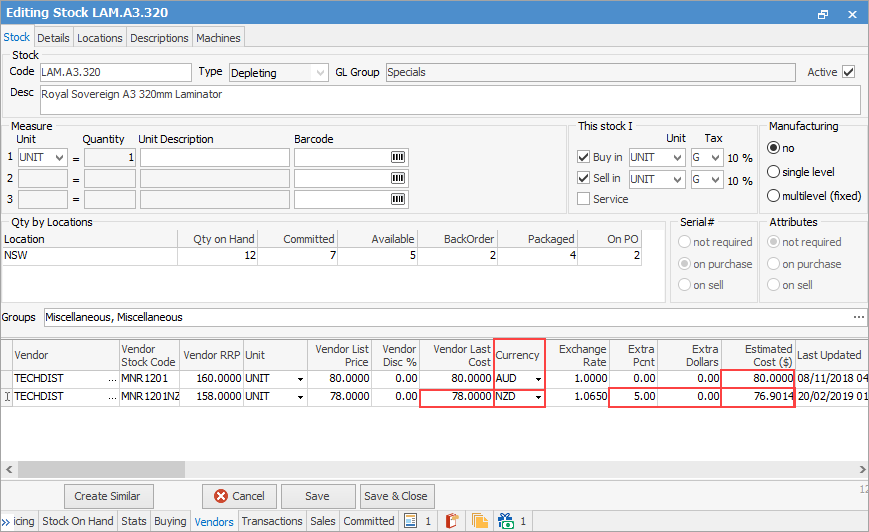
As an example, on line two (2) above, the Vendor List Price is NZD78.00 and is set at an exchange rate of 1.0650. An additional five percent has been added to provide an estimated cost of AUD76.9014, thus allowing a margin between the estimated cost and the probable actual cost when a purchase order is completed.
|
Remember that stock files are always set up to reflect the most regular purchase. In the example above, although this stock can be purchased overseas at a lower cost, it is normally purchased locally, so the default tax code on purchase is G. When purchased from an overseas vendor, the tax code will reflect what is set on the vendor cardfile, and so changes to X. |

Further information