The following security settings should be reviewed for all users prior to using Promotional Pricing:
On the ribbon, go to Tools > Security > Stock > Stock Promotional Pricing, and tick/untick based on users/user groups.
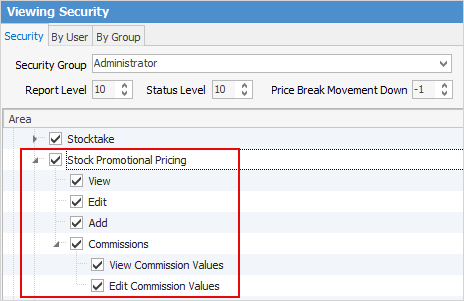
 |
Note: You cannot delete Promotional Pricing, however you can make it inactive by unticking Active in the header:
 |
See Commission Sessions for more information on commissions on promotions.
|
These security settings are disabled by default for all users without administrator rights. Typically, management would have access to add/edit/view Promotional Pricing, and sales/service staff view rights only. |
Further information
Example Usage of Promotional Pricing
Promotional Pricing Order of Processing