Promotional Pricing is a powerful feature that allows special promotional, bid or contract pricing based on cardfiles, cardfile groups, price levels and projects (if Projects is part of the Jim2 licence).
Whilst Promotional Pricing works on fixed price only, it handles multiple price breaks (and ranking), optional promotion purchasing details, including vendor, vendor purchase order cost and commission details, such as floor cost, percentage and amount.
Promotional Pricing includes a start/end date (and time), and can be configured for a specific branch (if branches are enabled) and currency. Data can also be imported from a spreadsheet file and other sources, such as current quotes and jobs.
 |
Note: If a promotion price is set to lower than the calculated stock price, a warning will pop up to this effect.
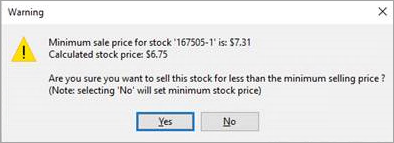
If you do not wish to see this warning, there are two ways to do so. 1.Via Tools > Security on the ribbon, select the relevant Security Group, expand Jobs, then Stock on Jobs, and tick Allow to sell stock for less than minimal price. 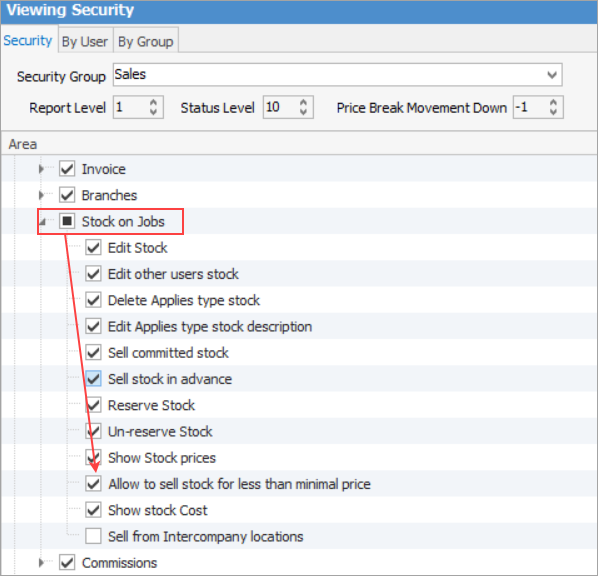 2.On the stock code, set the minimum price to higher than other price rules. |
Promotional Pricing needs to be set up via Tools > Options > Stock > Stock Pricing first.
|
It is possible to create similar from a promotion. You cannot delete Promotional Pricing, you can only make it inactive. |

On the ribbon, the Promotional Pricing icon appears under Stock.

Promotions appear in jobs, quotes, projects, cardfiles and stock, displaying the Promotional Pricing icon in the bottom bar of the individual objects, along with the number of promotions applicable.

Clicking Promotional Pricing in the bottom bar will display the available promotions. When viewing the Promotional Pricing tab, the following three display options are available, based on the object currently open:
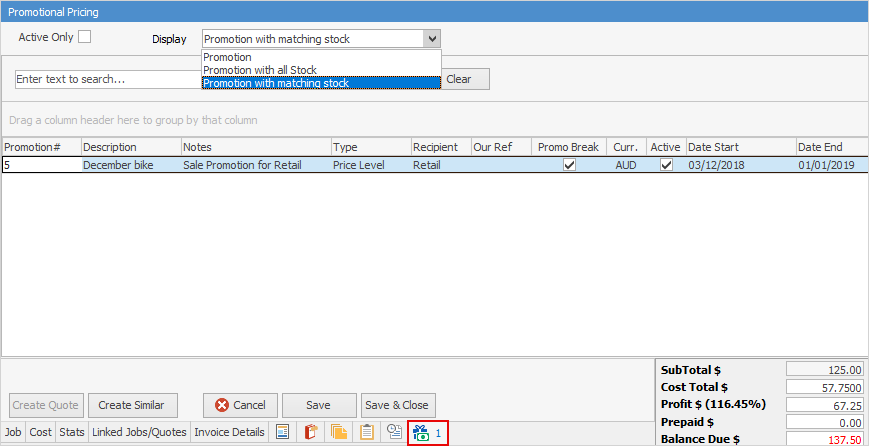
|
|
Note: You cannot delete Promotional Pricing, however you can make it inactive by unticking Active in the header:
 |
Further information