There are times within the course of business when stock quantities need to be adjusted and/or the cost of goods, for various reasons.
There are no stock adjustment list reports, however there is a stock adjustment report.
Within Jim2 stock levels can be adjusted up or down, as well as adjusting the cost of goods for stock on a certain purchase order.
|
Note: Locations cannot be specified when doing COGS adjustments . |

Stock adjustments up or down should only be performed if there is a discrepancy with real stock levels, or if you wish to write off stock. The stock quantity is only being moved – no credits/debits are being created to vendors. For example, if Jim2 shows a quantity of 6 on hand but the reality is that there are only 5, a stock adjustment down will correct this.
The cost used on a stock adjustment line (QTY -) comes from the stock's existing cost/COGS records, and will be the same cost the stock code was purchased at.
When adding a stock adjustment (QTY +), the cost comes from the Last Cost field on the stock code.
Stock adjustments create general ledger journals that affect stock on hand and cost of goods, so be very clear that the stock levels aren’t incorrect because a purchase order or RTV hasn’t been closed off, or that there is stock on open jobs or loaned out, on display, etc. Stock adjustments affect profitability – so these must be carefully thought through. It’s okay to use stock adjustments for instances where serial numbers have been incorrectly entered, but it must be identical quantity up and down, and no $ value differences.
Stock adjustments (COGS) should be used to write down the value of stock on hand, or write off damaged stock.
|
Please be very clear here – the stock value is being devalued or written off stock value and profitability for good. |

Unlike purchases or invoices, COGS stock adjustments can’t be unprinted. If a mistake has been made or an adjustment needs to be reversed, just add another adjustment – exactly the opposite to the first one.

|
Before adding a stock adjustment, check that this is really required – if adjusting a stock quantity up because a purchase order wasn't entered, or quantity down because a return to vendor wasn't entered, do not use the Stock Adjustment function, as this will not reflect correctly in the general ledger. Instead, create a purchase order or a return to vendor. |
|
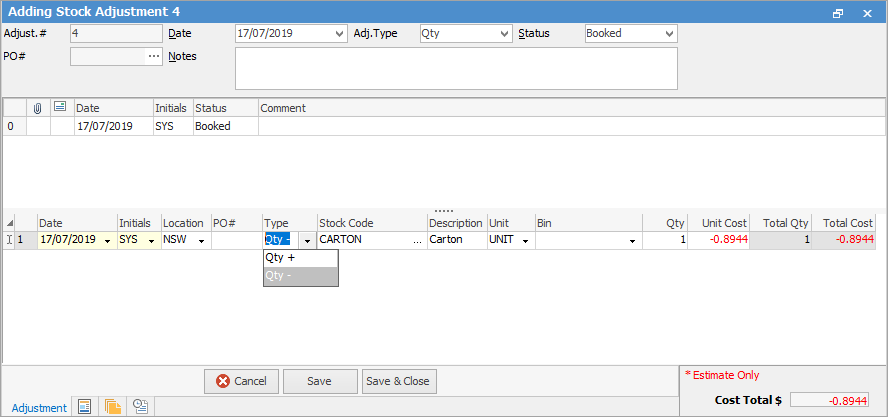
Some letters in the field names within the header are underlined, eg. Status. Using Alt+ the underlined letter will jump to the field beside that heading. |

Further information