
The integrated stocktake facility enables high level, real-time stock control and reconciliation, with the ability to handle multiple rolling stocktakes based on extensive criteria such as locations. Jim2 caters for serial and batch numbers, kits, packages, consignment stock and multiple unit measures.
Although the ultimate goal is the same, stocktake procedures vary from industry to industry and business to business. A small family operated business operates differently to a multi-site corporation, just as a retail store operates differently to a factory.
Jim2 caters for all of these varied business requirements to cover all the general stocktake requirements of the Distribution, Manufacturing, Service and Retail sectors.
This is a very flexible facility, simultaneously supporting multiple stocktake sessions, each with multiple counts per stock. Stock integrity is ensured by automatic stock locking while a stocktake is in progress, and a full audit trail with the ability to see who counted what and where. All types of stock are included: serialised, special, attributed, consignment and multiple stock unit measures.
Back order sessions handle unresolved count issues, and stock adjustments are automatically generated at the end of a session (if there were any count discrepancies), making the whole stocktake process very easy.
Full drilldown to related stock and stock adjustments, plus a real-time snapshot of the value of stock discrepancies ensures stock is kept under strict control.
Some of the more advanced options include informed or blind methods of stocktake, scanning and portable stocktake, and strict serial number control.

▪Stock that has no location set and has never been transacted against will show in all locations. Once transactions have been made with the stock code, it will be correctly allocated to the relevant location in the stocktake function. ▪Stock that has had transactions but has none on hand will show only in the locations transactions were from. ▪Stock on a purchase order which is on order and is not linked to a job does not affect stock on hand in any way for stocktake purposes. ▪Stock on a purchase order which is on order and is linked to a job does not affect stock on hand in any way for stock take purposes. ▪Stock on a purchase order which has been received and is not linked to a job is considered on hand and not committed for stock take purposes. ▪Stock on a purchase order which has been received and is linked to a job is considered on hand, committed for stock take purposes but not reserved. ▪Stock on a job that is line reserved is considered reserved and will show as such in the stocktake count sheet reserved column. ▪Stock on a job that is job reserved is considered reserved and will show as such in the stocktake count sheet Reserved column. ▪Stock on a job that is READY is considered reserved and will show as such in the stocktake count sheet Reserved column. ▪Unless stock is line, job reserved or ready, it will not show on the Stocktake Count Sheet. ▪Stocktake sessions should never include stock supplied in advance. These need to be backfilled prior to counting. ▪Stocktake sessions should never include negative quantity stock. This should be rectified before commencing the stocktake session. ▪Auto created stock only ever shows as Committed if it has been received and not reserved. ▪Line level reserve will work extremely well at all picking stages, allowing for performing a snap stocktake at any time. ▪Inactive stock codes will not automatically appear in a stocktake. Users can manually add these if stock is found. This does not reactivate the stock code. When you finish the stocktake that includes inactive stock, Jim2 will display a message advising that inactive stock is present, and will ask whether you wish to proceed with creating the stock adjustment. 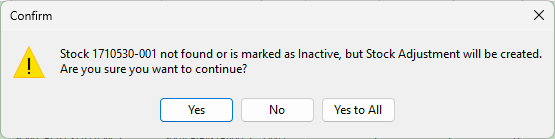 |
|
Performing smaller stocktake sessions at a time is the preferred way to perform stocktake sessions. These can be based on individual stock locations, or stock report/non report groups, etc. |

Your gross profit is based on the income from the sales you make, the cost of purchasing your stock, and the management of your stock. There is an impact on your profit when the value of the stock in your stocktake is less than your balance sheet expects, and the loss is recorded as a stock adjustment expense.
Stocktakes should be carried out throughout the year. The stocktake involves counting the stock quantities and matching these to Jim2. The variances are then recorded as stock adjustments, and will alter the balance sheet, profit and loss reports and stock on hand quantities. |
|
All stock within a stocktake session is locked to prevent any transactions that may impact the count. |

Further information