There are two basic methodologies which can be used when performing stocktake in Jim2.

With this method, the counters are told how many pieces of each stock there should be, and they are to verify this. This is helpful when Jim2 says that there should be ten pieces of stock in a particular location, but when the counter looks on the shelf there are only nine. While many businesses prefer this method, it is dependent on the vigilance of the counter. This is the normal and recommended way to count stock. |
With the blind method, quantities are not displayed or provided to the counter. Counters record whatever number they find, then move on to the next stock. In the case of serialised stock, serial numbers are only shown once they have been scanned.
The up side to using a blind stocktake is that Jim2 is being told what stock is actually found, rather than confirming what was expected to be found. The down side is that there will probably be more work required at the end of the stocktake session to resolve miscounts, etc. |
Tick Blind Stocktake to perform a blind stocktake. The default is unticked for Informed Stocktake.
 |
When generating a stock list, you can choose to include all stock including stock which should be zero (nil). This will allow counters to confirm that there is indeed zero quantity of this stock or, if they locate some, record the actual quantity found. |
|
Stocktake sessions should never include negative quantity stock. This should be rectified before commencing the stocktake session. |

Inactive stock codes will not automatically appear in a stocktake. They will only be included if a user manually adds the inactive code and enters a count.
This is designed for situations where inactive stock is physically found in the warehouse.
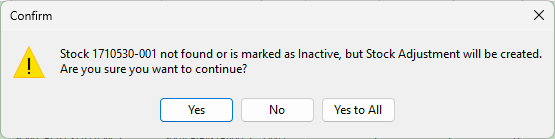
Additionally, when you finish a stocktake that includes an inactive stock code entered manually, Jim2 will display a confirmation message advising that inactive stock is present, and will ask whether you would like to proceed with creating the stock adjustment.
 |
|
All stock within a stocktake session is locked to prevent any transactions that may impact the count. |
Further information