As stocktake sessions are conducted by stock location, it's important to suitably arrange the stock in each location. These locations typically include stores, showrooms, warehouses, damaged goods areas, company vehicles, warehouses, etc. Poor layout of stock will lead to a poor count. Areas of concern are stock on display (away from the general stock), stock in cabinets or drawers, on point of sale counters, in offices, on loan to customers or staff, and any stock supplied to jobs that haven't been invoiced.
In Jim2, a stocktake session can be run at any time for any selection of stock within a location. This means that stocktake can be performed on the whole showroom or just one stock code, and the results reported in both the accounting and stock control sections of Jim2. This functionality allows for conducting regular, cyclical stocktakes which are easier than one annual stocktake.
When a stocktake session is commenced, all stock involved in the session is locked, ensuring accounting transactions can’t be entered against these stock codes. A warning will pop to screen if stock is locked in a session. When the count has been completed, the results of the count are confirmed and the session is saved with a Finish status.
The Finish status of the stocktake session creates a stock adjustment on Booked, which can be viewed, investigated, then finished. The finished stock adjustment will have either an expense or income value, which will be posted to the stock adjustment account. The relevant asset accounts in the Balance Sheet will also be adjusted to record the variance of stock on hand.
Once the stocktake session and the stock adjustments have been finished, stock quantities in Jim2 will be accurate, and the stock will be unlocked.
Once the preparation has been completed, a stocktake session can be commenced. This is accessed via Stock > Stocktake on the ribbon.

|
A Stocktake session locks all stock within the session until the session status changes to Finish or Cancel. This means that none of this stock can be edited, added to jobs, etc. until this is performed. |

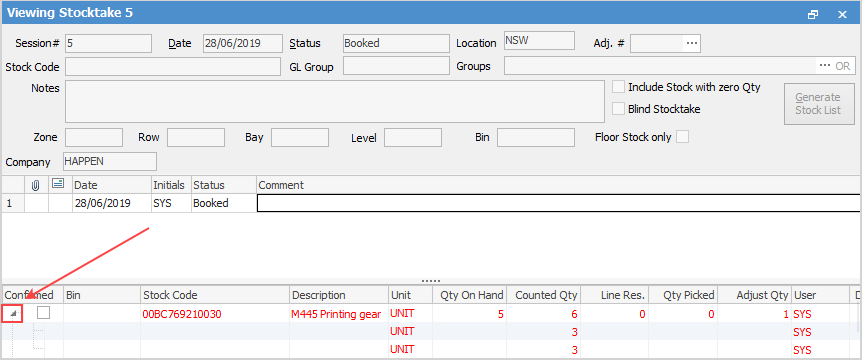
Multiple users from multiple computers can add their counts into the same stocktake session and same stock code at the same time. The stocktake session is not edited to add a count. In View mode, the user right clicks on the relevant stock code and adds their count to the count window. The arrow on the left hand side expands to show the various count records for each stock code.
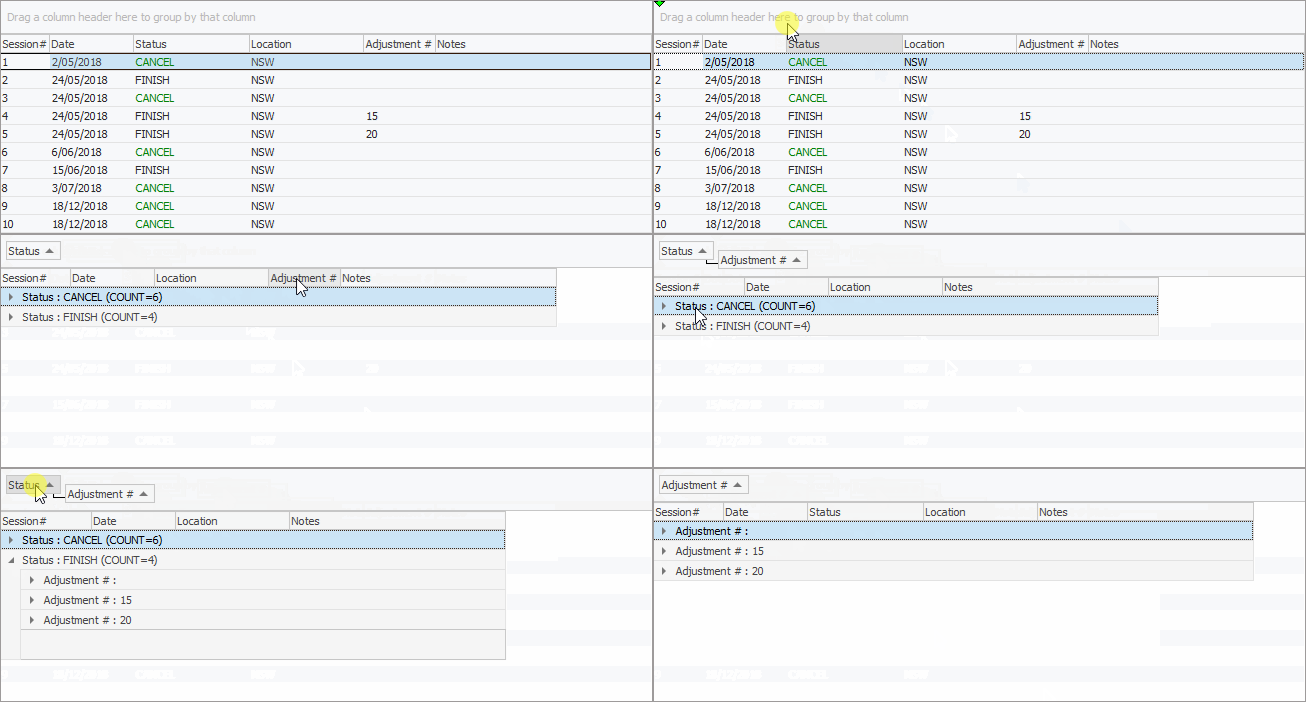
Sorting, searching and grouping are available as per other lists in Jim2. Select the column header in the grid, then drag it to the Group By area to group.
From the stocktake list you can generate a list of active and completed stocktake sessions, add new sessions, or view/edit existing sessions.
|
A stocktake session is by location first, then further filtering can be applied. This filtering can include Report Level groups, allowing to require counting of particular product groups. |

What is and is not included in a stocktake session:
1.Any stock that has had no transactions within the database will show if zero quantities are included.
2.Stock never transacted against will show in all locations.
3.Stock that has had transactions but has none on hand will show only in the locations transactions were from.
4.If Include Stock with Zero Qty is ticked in the header, any stock with no location will show in all locations, ie. if you select NSW location and tick as mentioned, any stock that is not in a location will show in the NSW stocktake list.
5.Any stock that has had a finished transaction within the selected location will show if zero quantities are included.
6.Any stock that has not had a transaction within the selected location, but has had any transaction at another stock location will show if zero quantities are included.
7.Any stock that has transactions that are not on finish status will display in the relevant location.
8.Bin numbers on stock codes that have had no transactions do not display in the stocktake session.

The purpose of adding a new stocktake session is to generate a list of stock to be counted for a specific stock location. Additionally, restrict the list to a specific stock code or stock within a specific Stock GL Group, or other groups. Clicking Generate Stock List will populate the session with the stock that is known to be in that location, filtered by additional selection criteria (if applicable).

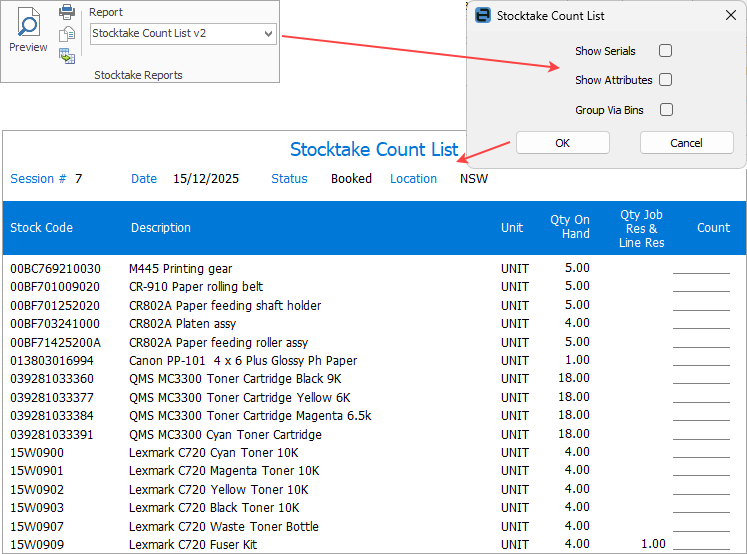
Once the stocktake session has been generated, produce count sheets (via Report on the ribbon) and commence adding stock counts.
When all the stock counts have been added and confirmed, the session can move along the workflow and its status can be changed to Finish. This generates a Stock Adjustment (only when stock counted was more or less than expected) and provides the option of creating a back order session for any unconfirmed counts, allowing these to be resolved at a later stage and free up all resolved stock for use.
In the footer there are checkboxes for Show Unconfirmed only and Show Discrepancies only. Once counts have been added, ticking either of these boxes will show only those unconfirmed or with discrepancies.
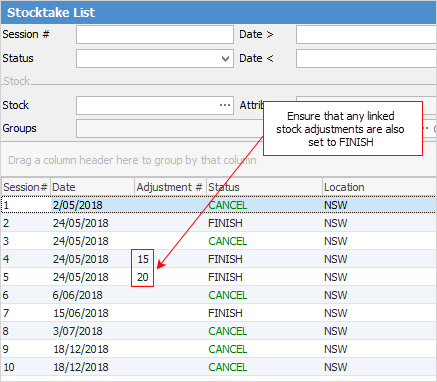
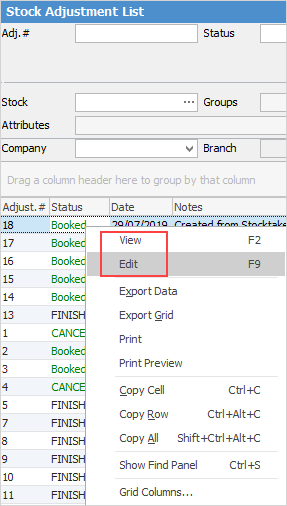
To finish any linked stock adjustments: ▪On the ribbon, go to Stock > Stock Adjustments, enter the adjustment # that is shown beside the finished stocktake session, click Run, then Edit and finish the adjustment. ▪Alternatively, open the finished stocktake session and click the ellipsis [...] beside the Adj. # field at the top of the form. 
|

Having completed a stocktake, the company's work practices will then influence the accuracy of stock records. Correct management will allow for accurate reporting of stock valuations based on the information contained in a number of Jim2 reports, as well as the general ledger. Poor work practices will quickly lead to incorrect stock valuation reporting. |
For further assistance or information, please call Happen Support on 02 9570 4696 or email support@happen.biz
Further information