The smallest stocktake is one stock code. This stock code can be depleting or special type.
The largest stocktake is based on stock location (Tools > Setups > Stock Locations). If you have many locations, there may need to be many stocktakes. Stock should be physically separated (ie. something physically separates one location from another).
Stocktake sessions can utilise filtering, ie. use Report or Non Report or Brand Groups or GL Groups to select the relevant codes. Many stocktake sessions can be run at once, however, when a stocktake session is commenced, all stock in that session is locked to prevent any transactions that may impact the count.
If you'd like to use the ABC Matrix to complete a stocktake, the best option is to filter the stocktake by stock groups.
You will first need to create the relevant stock non-report groups.
Next, add the relevant stock codes to each stock non-report group.
You can do this directly on the stock code, or by creating a stock list, filtering it as required, then right-clicking in the list and selecting Add Stock to Non Report Group.
This adds the stock codes in the list to the selected non-report group which you can then use in the stocktake..
|
Note: This is based on that session, so only stock in the applicable stock location will be locked. There are some Tools > Options that influence the properties of a stocktake count. These include:
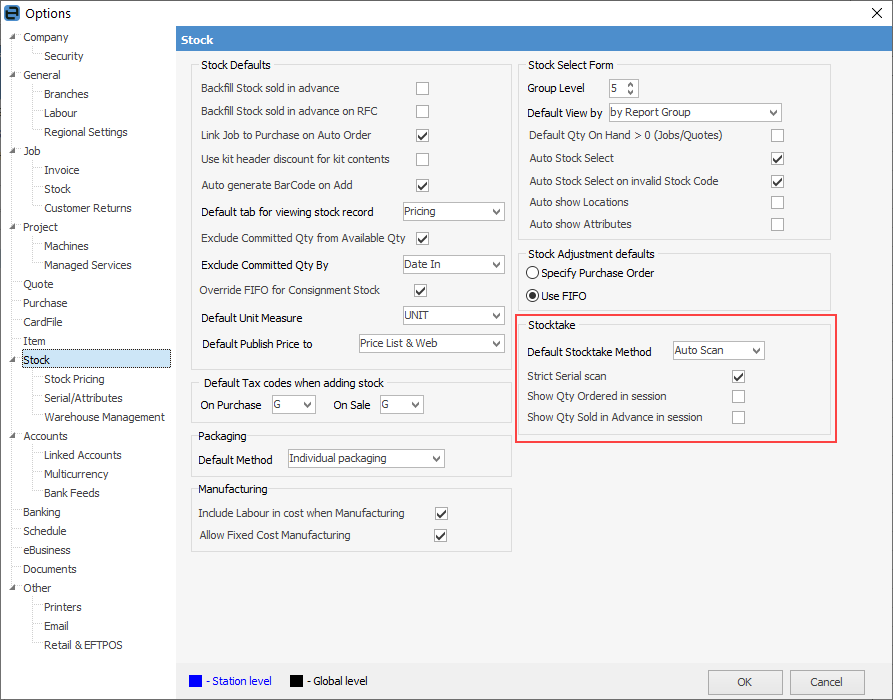
Branches are not to be confused with locations, as they have no bearing on stocktake – only locations do. |

The three stocktake methods are List Mode (entered from a count sheet), Scan & Count (scan a barcode into Jim2, then enter a count quantity) and Auto Scan (scan everything). All entries must be made into the Jim2 Stocktake Session directly. Different sessions can use different methods.
Stocktake sessions should never include stock supplied in advance. These stock codes need to be backfilled prior to counting.
Stocktake sessions should never include negative quantity stock. This should be rectified before commencing the stocktake session.
Stocktake sessions are only used to provide a count of stock – the sessions themselves do not alter the stock quantities. Once a stocktake session is moved to FINISH status, a stock adjustment is created if there are discrepancies. The stock adjustment must be moved to FINISH status for the quantity changes and resulting expenses.
|
Note: Stock adjustments for stock that is lost (Qty -) can only be moved to FINISH status if the relevant purchase orders are on FINISH status. For this reason, please ensure that purchase orders that should finished are moved to FINISH status prior to completing the stocktake session. |
Further information