Stock attributes provide more refined information that is attached to a piece of stock. Attributes allow for specifying things such as colour and size, for example. This means a stock record is not required for every colour and size. When entering stock in a job, quote or purchase order, there is an option to select the attributes for that particular stock code.
Attributes allow for further tracking stock and categorising it into specified groups. For example, in clothing store, shows that the most popular size sold is 14, or the most popular colour is blue. This information can be used to purchase extra quantities of that particular combination.
Attribute fields are specified to identify what information is to be tracked about stock and, when purchasing/selling stock, enters values for the attributes. Attributes can also be used for batch numbers and expiry dates as well.
Attributes are specified in Jim2 Setups.
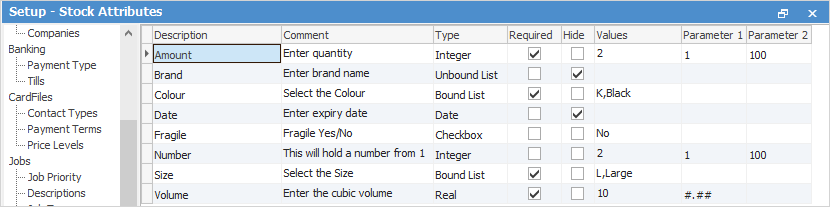
Here is where the possible attribute qualities that could describe stock are set up. Then they can be applied individually to new stock lines. For each piece of stock there is the ability to choose to not use attributes, enter them on purchase, or enter them on sell, and whether they are optional or that the user is required to enter some information.
The important rule to remember in Jim2 is that, once transactions have been made with the stock, it is not possible to change how to use attributes for that particular stock. However, change the attributes used (for example, there is no longer a need to track colour, but there is now a requirement to start tracking fabric). Once attributes have been selected, at least one must be used. This can be set to be optional if necessary.
|
To use Attributes in Jim2, tick Use Stock Attributes via Tools > Options > Stock > Serial/Attributes.
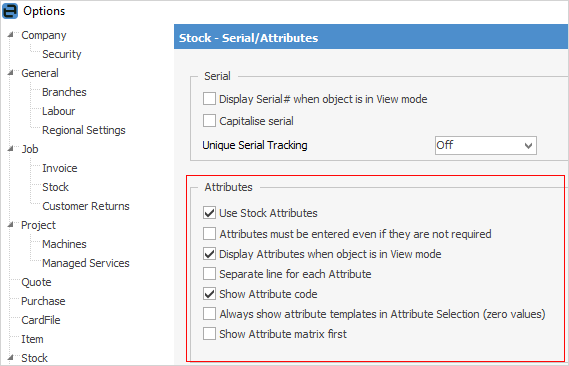
As see, also make further selections here. |

|
Attribute rules in summary: ▪Attributes are bits of information relating to a stock record. ▪They are set up via Tools > Options > Stock > Serial/Attributes on the ribbon. ▪Attributes can be used on sell, on purchase or not at all. ▪Once stock transactions have occurred, attribute options cannot be switched around. More can be added a a later time or deleted, provided there are no active orders open with that stock. ▪To use attributes, at least one must be used. This can be made optional if required. |
Attribute selection can be performed in advance from a job, purchase order or quote, ie. effectively preselect the stock attributes to sell and this information will come forward into the purchase order.
The Attributes tab is within the stock header.
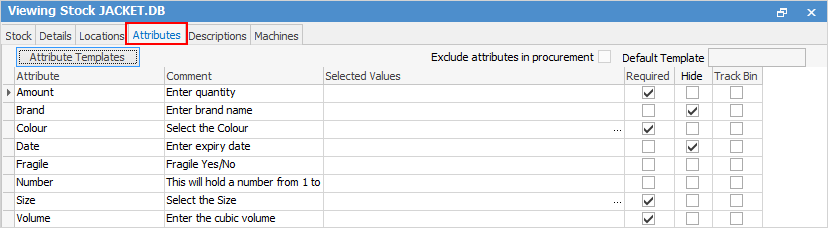
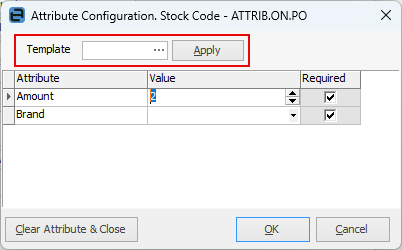
The attribute configuration grid and attribute template grid (both accessed by the Attribute Templates button) ensure all users can only select and buy/sell specific attributes for specific stock.
|
Note: Where exact attribute combinations are required for stock, ie. size and colour, create Stock Attribute Templates. |
Further information