Stock flow provides ETA management at an integrated stock line level on purchase orders and linked jobs. This provides a single view of the expected delivery date from a vendor, and the job due date advised to customers.
Select Stock Flow on the ribbon to run a list which will show everything on order, what jobs are for whom and due dates, along with the related job.

The list can be filtered in several ways, depending on the search criteria entered. For example, enter a Vendor# to filter by the list for a specific Vendor, Cust# to filter by a specific customer, etc.
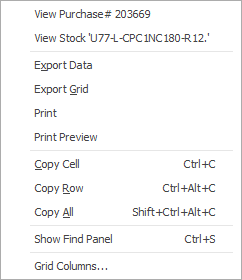
Right clicking on any row in the list displays a pop-up menu for quick access to the related purchase order and/or job.
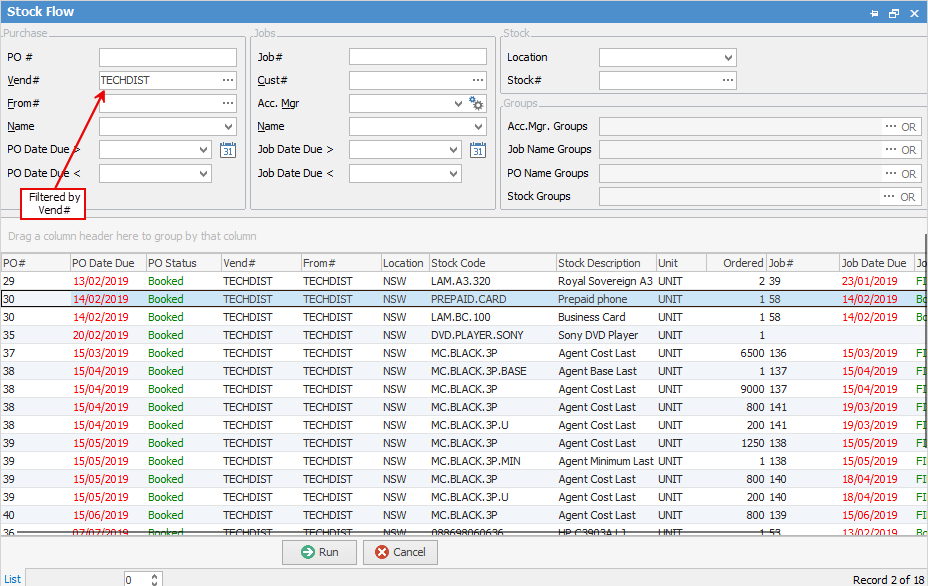

Field |
|
Explanation |
|---|---|---|
Purchase |
PO # |
Enter a particular purchase order number. |
Vend# |
Enter a vendor card code. |
|
From# |
Enter a From card code. |
|
Name |
Select a Name (user). |
|
PO Date Due > |
Date due after this date. |
|
PO Date Due < |
Date due before this date. |
|
Jobs |
Job# |
Enter a particular job number,. |
Cust# |
Customer card code. |
|
Acc. Mgr |
Account Manager. |
|
Name |
username. |
|
Job Date Due > |
Date due after this date. |
|
Job Date Due < |
Date due before this date. |
|
Stock |
Location |
Select stock location. |
Stock# |
Select stock code. |
|
Acc.Mgr. Groups |
Select Account Manager Group. |
|
Job Name Groups |
Select Job Name Group. |
|
PO Name Groups |
PO Name Group. |
|
Stock Groups |
Select Stock Group. |
Field |
Explanation |
|---|---|
PO# |
Purchase order number. There may be the same PO# recorded a number of times in this list – this means that there are numerous stock lines on the purchase order, and all are listed separately here. |
PO Date Due |
Purchase order date due. This date may be the date due in the header of the purchase order, or it may be the line level date due from the stock grid in the purchase order. |
PO Status |
Purchase order status, ie. Booked, Ordered, etc. |
Vend# |
Vendor card code. |
From# |
From card code on purchase order. |
Location |
The location where the stock is held. |
Stock Code |
The stock code for each line on the purchase order. |
Stock Description |
The stock description for each line on the purchase order |
Unit |
The unit type, ie. each, box, etc. |
Ordered |
Quantity ordered. |
Job# |
The related job number. |
Job Date Due |
The related job date due. |
Job Status |
The related job status. |
Cust # |
Customer card code on the related job. |
|


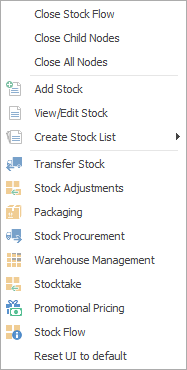
After the top 3 (which are self explanatory), these options mirror what is on the ribbon in the Stock tab, except for the last tab, which will reset all tabs to the default. |
Further information