The ability to add, edit, view and amend stock is handled via Jim2 Security.
To enable other users to view specific areas, select the Security Group, click Edit and expand Stock (and sub-folder) checkbox.
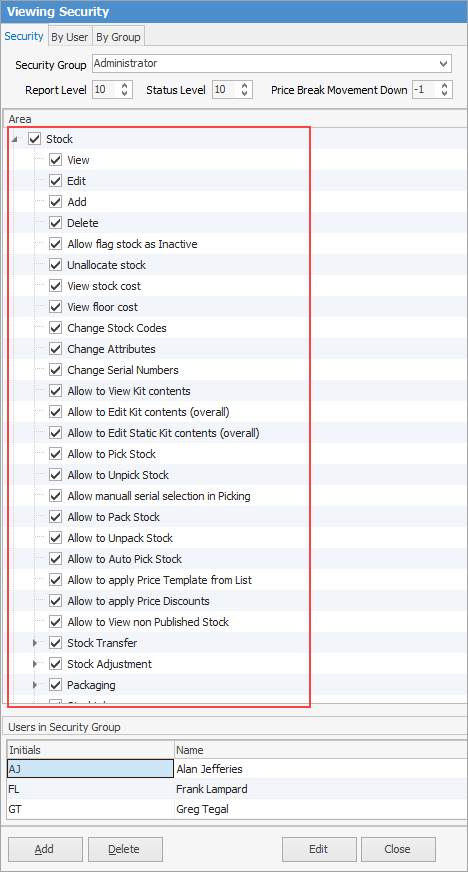
Choose what the user is able to do.
Checkbox settings:
Checkboxes |
Explanation |
|---|---|
|
Will only return results for what is ticked. |
|
Will not return results for any unticked boxes. |
|
Will return results for all of the above. |


 |
Security can be set to allow/disallow selling stock for less than minimum price. The Price Break Movement Down in the header of Security also shows whether you can or not. If set to -1 you can change pricing to anything you wish. |
The following lists the security settings available for stock. Whilst some things have been grouped below, ie. view/edit/add, these are all individual security settings.
Stock Security |
|---|
View/edit/add/delete stock |
Allow flag stock as inactive |
Unallocate stock |
View stock cost |
View floor cost |
Change stock codes |
Change attributes |
Change serial numbers |
Allow to view/edit kit contents (overall) |
Allow to edit static kit contents (overall) |
Allow to pick/unpick/auto pick, pack/unpack stock |
Allow to apply price template from list |
Allow to apply price discounts |
Allow to view non-published stock |
Stock Transfer |
|---|
View/edit/add/finish/unprint stock transfer |
Allow to transfer from different branches (if branches are enabled) |
Allow to transfer from all locations |
Allow finish transfer from all locations |
Stock Adjustment |
|---|
View/edit/add/finish/unprint |
Packaging |
|---|
View/edit/add/package/unpackage |
Unprint package session |
Change package configuration |
Stocktake |
|---|
View/edit/add/unprint |
Add/edit/delete stock counts |
Edit/delete other users' stock counts |
Allow auto count and confirm |
Stock Promotional Pricing |
|---|
View/add/edit |
Commissions: View/edit commission values |
Stock Flow |
|---|
View |
Commissions |
|---|
View/edit commission values |
Please see User Group – Tags/Category Groups for more in-depth information on Stock security.
Further information