On the ribbon, go to Tools > Setups > Contracts > Meter Setups
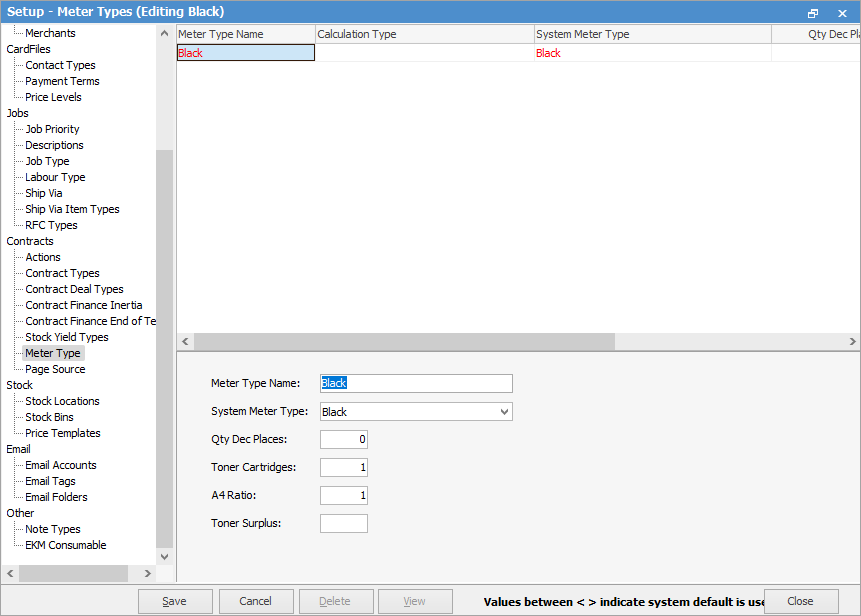
In this area, you only need to set up black and colour types, ie. black, black A3, etc.
Field |
Explanation |
||
|---|---|---|---|
Meter Type Name |
Enter the name for the meter type, ie. Black for a black meter, Colour for a colour meter, etc. |
||
System Meter Type |
Choose the appropriate system meter type from the drop down list, ie. Black for black, etc, if required. |
||
Qty Dec Places |
Up to 4 decimal places can be used in the quantity fields for meters. |
||
Calculation Type |
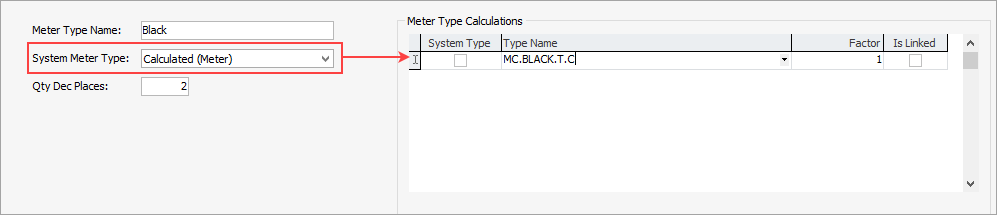
Only shows if Total Calculated is selected in the System Meter Type field. Calculations can be based on either the meter type or the stock code.
|
||
Toner Cartridges |
It is not necessary to enter anything here but number of cartridges can be entered if desired, ie. 1 for black, 3 for colour. |
||
A4 Ratio |
This sets the ratio of the page based on the meter. For instance, it would normally be 1 for black and 2 for black A3 (because it is double the size), or 3 for colour, etc. |
||
Toner Surplus |
It is not necessary to enter anything here. |

See here for more information on meter types for v4.3 and v4.5 style.
Further information