The Finance tab is purely a place-holder to store information within Jim2 contracts. Even though reports appear in the reports area, there are currently no reports available for this section.
The Finance tab records information of the three money flows in a financed equipment deal, all against the one contract.
Customer
What your end customer pays you: contracted total, periodic amount, billing cycle, term, and the residual (balloon) they will pay to keep the equipment at the end of term.
Finance
The finance company that funded the deal, recorded by card code. This captures the total funded, NPV, and the payment cycle back to them.
Originator
The party that brought the deal into existence, also by card code, as distinct from anyone who later services or funds it. Captures what they're paid and on what cycle.
A few points:
1.Deal Types are set up by you in Tools > Setups. Give them names that match how you actually sell, for example Rental, Cost Per Copy, Lease, Outright etc
2.Deal Type is the part that is genuinely functional. You can filter contract lists by Deal, so anything you want to slice your contract base by later needs to be a Deal Type rather than a value typed into a Finance field.
3.Tick Has Finance on the Deal Type only where finance details apply. That flag controls whether the Finance tab appears at all.
4. The Finance tab will only display on master or single machines. It never shows on child machines.
5. Inertia and End of Term options are configured on the Deal Type itself, not on the contract.
Inertia and End of Term are informational fields only. Linking them to a Deal Type records your intent for what happens when a contract reaches its end date. They do not drive billing, they do not change contract status, and they will not automatically terminate, renew or roll a contract over. Nothing happens in the background as a result of setting them.
What each one records
End of Term: the intended outcome at the contract end date, for example the device is returned, service continues, or the contract moves to month-by-month.
Inertia: the period after the end date where the term has finished but the arrangement is still running, along with what you intend to do with it.
When to use them
Use them as a reference for your team so anyone opening a contract can see what was agreed for the end of the term without going back to the paperwork. Any actual change to the contract, including ending it or setting up a new term, still needs to be actioned manually.
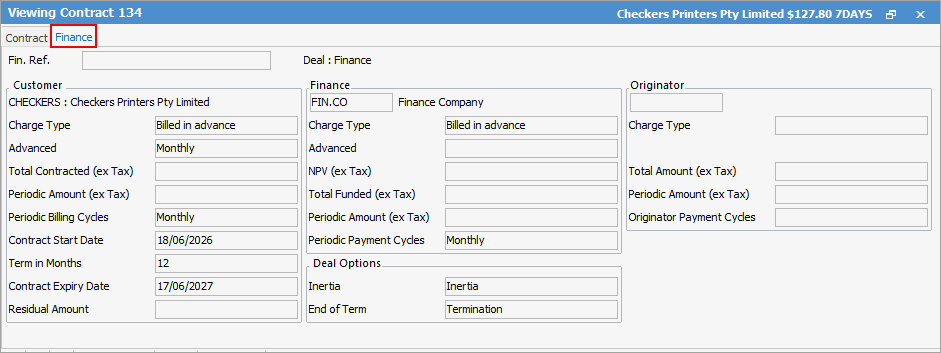
Field |
Explanation |
|
|---|---|---|
Customer area |
||
Fin. Ref. |
This can be anything, however it is mostly used for contract numbers provided from the finance company. |
|
Charge Type |
Billed in Arrears |
Whether the customer is billed after being provided the service. |
Billed in Advance |
Whether the customer is billed prior to providing the service |
|
Total Contracted (ex Tax) |
This is the overall financed amount of a contract. |
|
Periodic Amount (ex Tax) |
The amount that is paid per period, whether monthly, quarterly, etc. |
|
Periodic Billing Cycles |
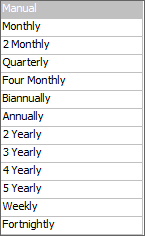
Frequency of billing, based on below.
 |
|
Contract Start Date |
Start date of the contract. |
|
Term in Months |
The number of months the contract will run for e.g 12, 24, 36 months, etc. |
|
Contract Expiry Date |
This will auto-populate from the contract start date and the term in months |
|
Residual Amount |
Residual refers to the amount of money a customer would be obliged to pay if they choose to keep the copiers at the end of the finance term. It can also be referred to as a Balloon. Typically, the residual or balloon is on a lease type deal and not a rent. |
|
Finance area |
||
Finance |
The cardcode of the finance company. |
|
Charge Type |
As per Charge Type above in customer area. |
|
Advanced |
The choices here are based on the Billed field billing cycle on the contract. |
|
NPV (ex Tax) |
NPV is a common figure used by finance companies. For example, they calculate how much the amount loaned will be worth at the end, ie. how much profit is on that loan. They then compare that amount to how much return they can obtain if they place the amount into the share market. If the share market offers a better return, there is no point performing the finance deal. |
|
Total Funded (ex Tax) |
The total funded amount of the contract, ex tax. |
|
Periodic Amount (ex Tax) |
The amount that is paid per period, whether monthly, quarterly, etc. |
|
Periodic Payment Cycles |
Frequency of payment based on below:
|
|
Deal Options |
||
Inertia |
This is set up in the Deal type in Tools > Setups. This is where to setup inertia options. |
|
End of Term |
This is set up in the Deal type in Tools > Setups. This is were to enter the end of term options. |
|
Originator |
||
Originator |
The cardcode of the originator. The originator is the source, the one who brings the asset or transaction into existence, as distinct from those who later service, buy, insure, or invest in it. |
|
Charge Type |
Choose either billed in arrears or in advance. |
|
Total Amount (ex Tax) |
The total funded amount of the contract, ex tax. |
|
Periodic Amount (ex Tax) |
The amount that is paid per period, whether monthly, quarterly, etc. |
|
Originator Payment Cycles |
Frequency of payment based on below:
|
|
The finance preview pane will only be made visible if the deal type includes finance. The finance pane will not be visible for child machines.
Further information