To reverse a bad debt, follow these steps:
1.Reversing a bad debt can only be performed in View mode.
2.Go to the Payments tab at the foot of the debtor's record.
3.Locate the bad debt that needs to be reversed.
4.Click Reverse.

5.A message will appear to confirm this action.
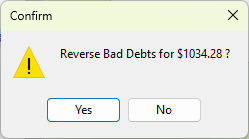
6.Click Yes.
7.Now the bad debt will not be shown, and the/purchase/invoice balance will amend to the original.
To write off invoices that were brought into Jim2 as Debtor Opening Balance invoices, use a Debtor Adjustment Down, post to the Bad Debts general ledger accounts 6-XXXX, and use tax code G, as there is no GST flagged on these invoices. The Bad Debts function automatically reverses the GST on invoices generated in Jim2.
There should be no stock being returned to prompt a bad debt. This is simply recording the fact that no payment will ever be received for a legitimate supply invoice.
Further information
Charge a Customer an Account Fee
Clear the Historical Balancing Account
Enter ATO Reportable Sub-Contractor Payments
Enter Capital into the Business
Enter Government Support Payments
Enter Prepaid Expenses and Amortising Costs
Remove Duplicate Payments in Closed Period
Share Utility Expenses with other Businesses
Suggested End Of Month Procedures