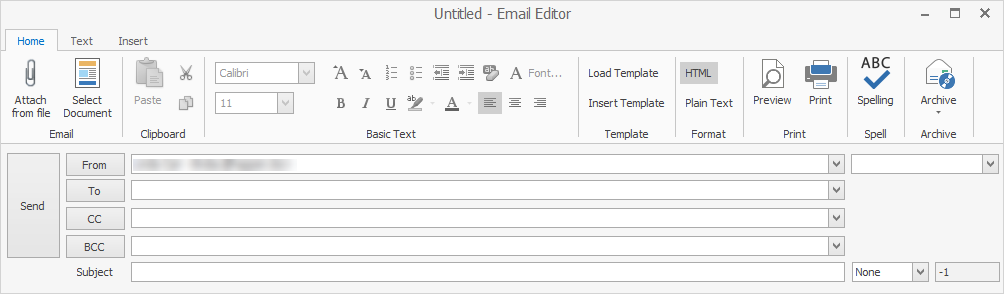
The email editor (ie. New/Reply/Forward function) has many familiar functions when composing emails. You can use Ctrl+Z to revert changes in an email. For example, enter the word 'test', then delete it. Use Ctrl+Z for it to return.
Function |
Explanation |
|---|---|
Attach from file |
Choose an external file to attach to an email. |
Select Document |
Choose a document from within Jim2 and either email the document or a URL link to it. |
Clipboard functions |
Cut, copy, paste. |
Basic Text functions |
Standard text functions, as per most email editors. |
▪Load Template replaces the body of the email with a predefined template. ▪Insert Template inserts the template in the body, keeping whatever information is already there. |
|
Format |
Choose from HTML or Plain Text. |
Preview/Print |
▪Preview will display how the email will look. ▪Print will produce a hard copy. |
Spelling |
Check spelling. |
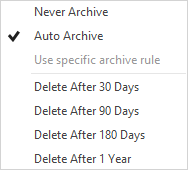
Choose from:
 |
When opening received emails, most of the icons on the ribbon are self explanatory:
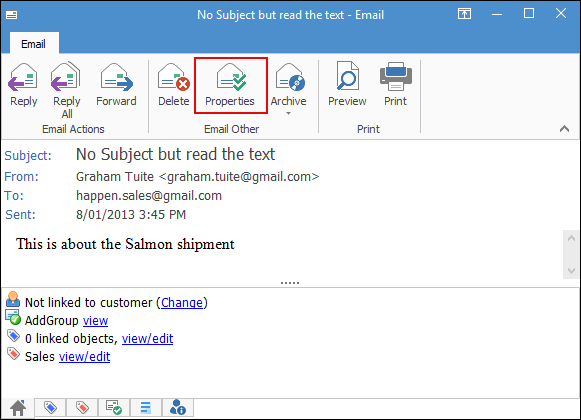
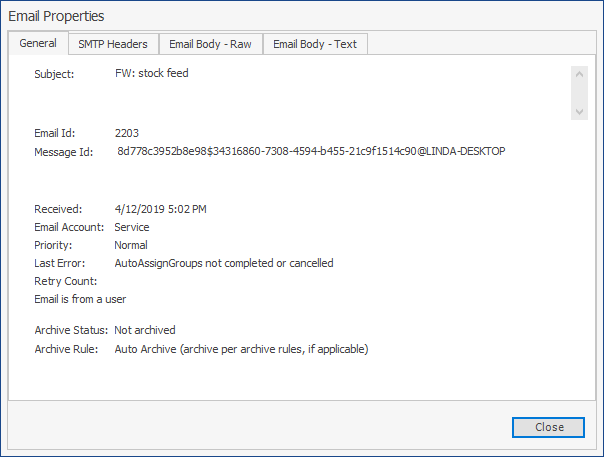
The Properties tab provides the following tabs to assist in troubleshooting emails:
Tab |
Explanation |
|---|---|
General |
Basic properties of the email including subject, email id, message id, received date, error, etc.
Note: This is useful for establishing errors when sending, etc. |
Outgoing Recipients |
Lists email addresses and contacts from the To, CC, and BCC fields. |
SMTP Headers |
The email’s SMTP Headers. |
Email Body – Raw |
The raw text of the email including HTML, etc. |
Email Body – Text |
The decoded text of the email body. Useful for working out email rules, etc. |
Further information