Email rules exist to help automate email as much as possible.
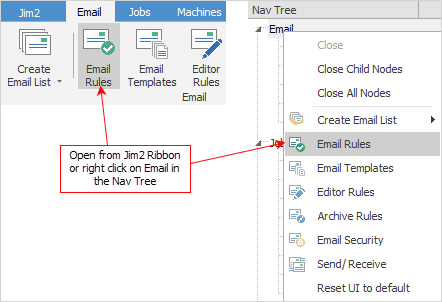
Add, edit and view email rules via the Email tab on the ribbon and selecting the Email Rules icon, or by right clicking on Email in the Nav Tree and choosing Email Rules from the pop-up menu.

Email rules are processing decisions that are applied to incoming emails as they are received. The rules are based on pre-defined conditions and actions. If an email meets those conditions, then apply those actions.
Email Rules provide an extremely powerful and flexible method of highly automating and actioning the emails that are received by the business. |

With email rules do such things as:
From the sender's email address: ▪work out who an email is from and link it to the appropriate cardfile.
From the recipient's email address: ▪automatically apply Email Tags to steer the email into the correct area of the business (to support, sales, etc.).
From the contents of the email: ▪work out if it is related to a job, etc. ▪extract the customer's reference number ▪work out the nature of the email (eg. onsite service required) ▪work out if the request is urgent. |
▪create a service job ▪make the job's priority urgent ▪set the job's Cust Ref# ▪attach the email to the job ▪tag the email with Service.
And the end result of this is: An onsite service job automatically created, linked to a job, with the email attached, and with the unread email appearing in the email Service list. The job will also appear in the Urgent Job List, flagged that it has an unread email.
From then on, all email correspondence regarding that job, is automatically related, including the final invoice, and even the payment advice back from the customer. |
Further information