Included Templates (template inheritance) allow values configured in one template to be inherited by another template, and combine to be used as part of the job creation process. The use of template inheritance is optional, but as the quantity of Projects grow the greater the case for using template inheritance becomes.
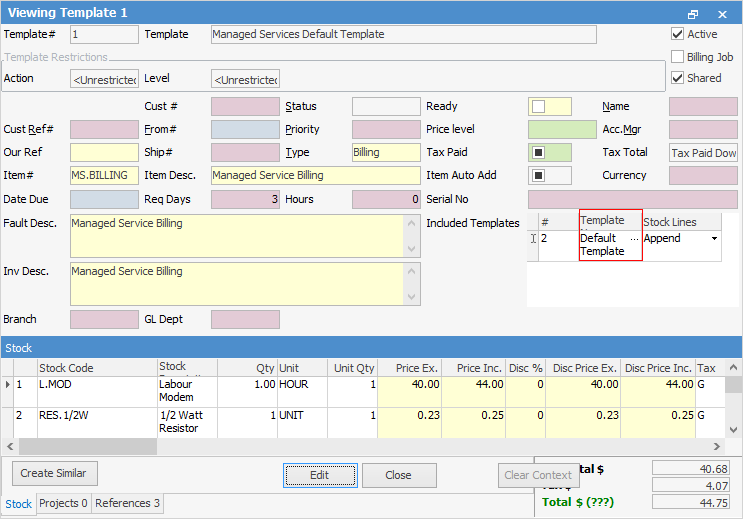
For each Project where a billing template has been created, each template has an included template called the Managed Services Default Billing Template. When viewing the Managed Services Default Billing Template, it has an included template called the Default Template.
|
Explanation of Stock Lines in Included Template Insert means stock will be added before any other stock on job. None means no stock added from default template. Append means stock will be added at the bottom on a job. There are two explanations for Append, based on what has been selected in the Template Rules and Action Wizard. If you have ticked Do not include any templates (Advanced), you then have the following choices: Append – Copy Stock Only means stock will be added at the bottom on a job. Append – Copy Stock and Include Header means the Header will be copied and stock will be added at the bottom on a job. |

The included template can be changed to any other shared template. There can be an unlimited number of completely separate sets of inheritance trees in place, and an unlimited number of included templates applied to a template. In addition to Project header value inheritance, stock lines and associated values can also be inherited.

▪All non-billing jobs that are linked to a Project are to be created with a status of Assigned, rather than Booked. The most efficient way to achieve this is to change the value of the status in the Default Template to Assigned. A status of Assigned may need to be set up first. 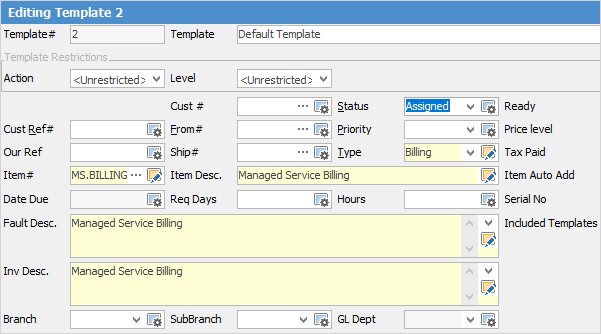 ▪There are 300 Projects that have exactly the same stock and stock quantity. In this case, create a single Project template with the stock and quantity configured, link all three hundred contracts (included template) and inherit that stock data, rather than configuring it specifically at each Project-specific billing template. Then, should there be a need to change or add stock to this type of Project, the change can be made in one place (the template) rather than having to update all three hundred individually. It is worth noting that the template to job creation process will use normal Jim2 pricing rules. It is not necessary to set a specific price override at template level, unless desired. When the billing job creation is performed, all three hundred jobs are created with the same stock, quantity and selling price based on whatever has been set up in the Jim2 pricing rules. 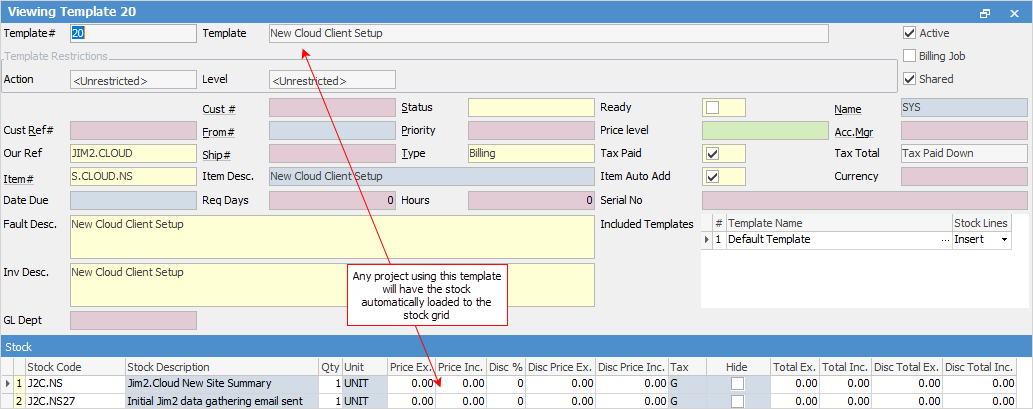
When a job is created from a template, the creation process first checks the Project-specific template. If it finds a value for a particular field, it will be used. It then checks for any included templates. If found, it will look for any value it did not find in the Project-specific template. If found in the first included template, this will be used.
The order of inheritance for a particular field value is as follows: 1.A value configured on the template, either explicitly or from the linked Project. 2.A value found in the first included template in the included templates list on the template. 3.A value found in the first included template in the list of included templates on the template. This extends to as many included templates as are found. 4.A value found in the next included template in the included template list on the template. 5.And so on, as Jim2 works through the configured included templates until it either finds a value or doesn’t. 6.The first value found in the process is used, and the process stops. |
Project Template (has no value for Status configured) Included template1 within Project Template First included template within included template1 Second included template within included template1
Included Template2 within Project Template First included template within included template2 Second included template within included template2 (Status value of XYZ configure)
Status value shown on Project Template and used in job creation: XYZ |
Project Template (has no value for Status configured) Included template1 within Project Template First included template within included template1 Second included template within included template1 (Status value of UVW configure)
Included template2 within Project Template First included template within included template2 Second included template within included template2 (Status value of XYZ configure)
Status value shown on Project Template and used in job creation: UVW |
Project Template (has no value for Status configured) Included template1 within Project Template (Status value of EFG configure) First included template within included template1 Second included template within included template1(Status value of UVW configure)
Included template2 within Project Template First included template within included template2 Second included template within included template2 (Status value of XYZ configure)
Status value shown on Project Template and used in job creation: EFG |
Project Template (Status value of ABC configure) Included template1 within Project Template Status value of EFG configure) First included template within included template1 Second included template within included template1 (Status value of UVW configure)
Included Template2 within Project Template First included template within included template2 Second included template within included template2 (Status value of XYZ configure)
Status value shown on Project Template and used in job creation: ABC |
|
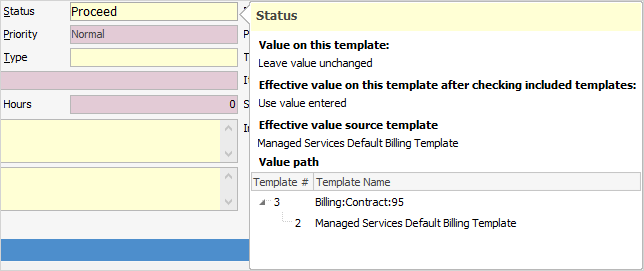
Warning: The value and where it is found is displayed by hovering over a template value when in View mode:
 |

Further information