Whenever you receive errors on Jim2 Mobile, there are a few things you can try first.
1.1. Go to the Menu and clear the local cache:
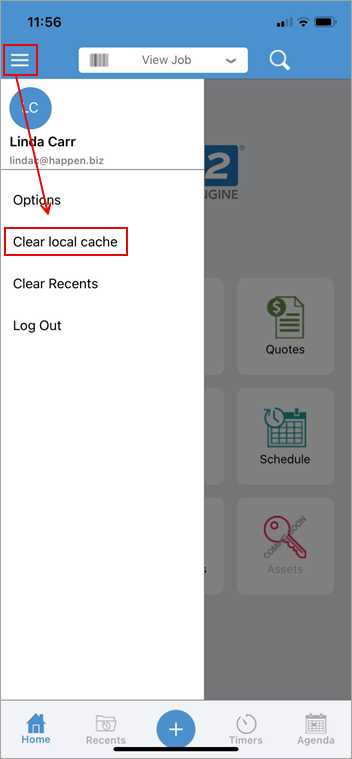
2.Ensure you are running the latest operating system for your mobile device.
3.Ensure you have the latest version of Jim2 v2 Mobile on your mobile device.
If the issue persists after this, please contact support@happen.biz.

The Happen mobile servers will return an HTTP error code 404 (meaning page not found) when the access id requested by the Jim2 mobile app is not known to the Happen mobile cloud servers.
The most likely cause for this is loss of connectivity from the JES service for the database (access ID). This can be due to the JES service being stopped, the JES CloudServices module being disabled, or internet access has failed from the server/workstation where JES (and Jim2 Server) are running.
If JES is running and the CloudServices module has been configured, JES will log warnings to the Windows event log. These warnings can help determine the reason(s) JES is not able to connect to the Happen mobile cloud servers.
Antivirus, firewall and routers can be (and have been) culprits in preventing JES from maintaining stable connections to the cloud servers.
For on premises customers using Jim2 Mobile with a third party firewall, port 3129 will need to be open outbound.
Another possibility for the error is if the AccessId has been changed on the server.
If this is the case, delete the database from the mobile device, then: ▪Launch the Jim2 Mobile App ▪Tap Settings ▪Select the database, then tap Delete ▪Add the new access ID (the app does not allow viewing the access ID once it has been entered and verified). |
Further information