On the ribbon, go to Accounts > Cheque Book.
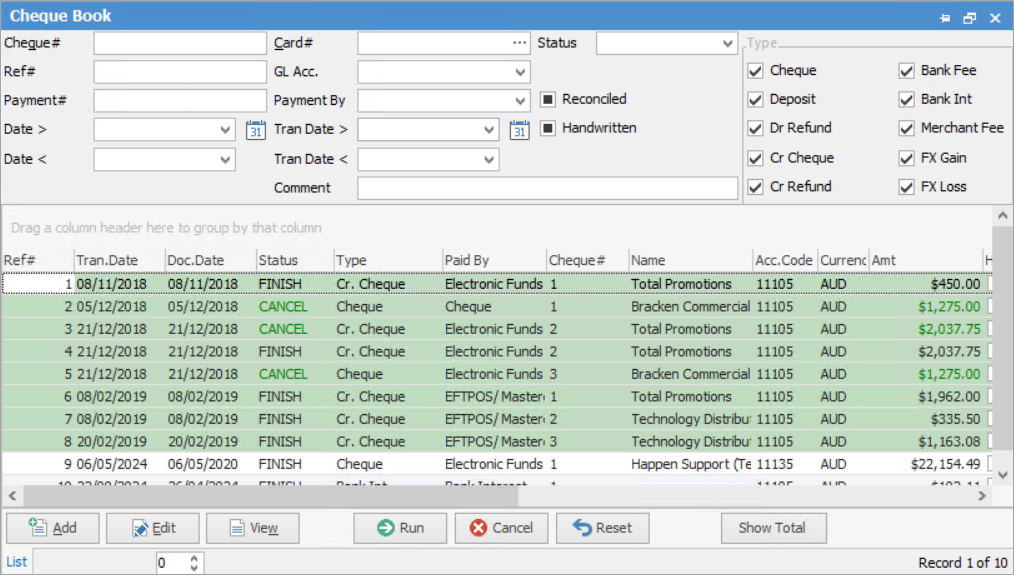
Sorting, searching and grouping are available as per other lists in Jim2. Select the column header in the grid, then drag it to the Group By area to group.

Cr. Cheque relates to payments that are performed via a creditor.
Cheque relates to payments entered via the chequebook function.
 |
Some letters in the field names within the header are underlined, eg. Card#. Using Alt+ the underlined letter will jump to the field beside that heading. |
Locate transactions by using the filters in the cheque book header, and clicking Run.

Fields |
Explanation |
||
|---|---|---|---|
Cheque# |
The deposit number. |
||
Card# |
The card code of the customer, vendor, user, etc. |
||
Status |
The status of the document: Booked, Cancel, Finish. |
||
Ref# |
The transaction number. |
||
GL Acc. |
The general ledger account: cheque, credit card, etc. |
||
Payment# |
The creditor/debtor payment number. |
||
Payment By |
The payment type: cash, cheque, electronic payment, etc. |
||
Reconciled |
Tick this box to search for reconciled transactions only (the background of the lines will be coloured green). Untick to search for unreconciled transactions only.
 |
||
Handwritten |
Tick this box to search only for handwritten cheques. Untick to search for transactions which were not handwritten cheques. |
||
Date > |
The document date on or after the date selected here. |
||
Date < |
The document date on or before the date selected here. |
||
|
The document date falls within a specific period selected by choosing the calendar icon, eg. today, this week, last week, last month, last year, etc. |
||
Tran Date > |
The transaction was finished on or after the date selected here. |
||
Tran Date < |
The transaction was finished on or before the date selected here. |
||
|
The transaction was finished during a specific period selected by selecting the calendar icon, eg. today, this week, last week, last month, last year, etc. |
||
Comment |
Search for any text that was entered into the Comment field of the transaction. Useful for finding payments such as rent, maintenance, etc. |
||
Type |
Filter by transaction type: cheque, deposit, debtor refund, creditor cheque, creditor refund, bank fee, bank interest. By default, all options are selected.
|

Field |
Explanation |
|---|---|
Ref# |
The cheque book reference number. |
Tran.Date |
The date the transaction was finished. |
Doc.Date |
The date the document was entered. |
Status |
The status of the transaction: booked, cancel or finish. |
Type |
The type of entry: cheque, deposit, refund, etc. |
Paid By |
The method of payment: cash, cheque, electronic funds, etc. |
Cheque# |
The cheque number. |
Name |
Customer name, if entered on the transaction. No name would be entered on a bank fee transaction, for instance. |
Acc.Code |
General ledger bank account. |
Amt |
The amount of the cheque. |
Handwritten |
Handwritten – True (ticked) or False. |
Reconciled |
Reconciled – True (ticked) or False – shows True if partially reconciled. |
Comment |
Information entered in the Comment field of that transaction. |
Footer Button |
Explanation |
|---|---|
 |
Opens a new cheque form (blank form). |
 |
Opens the selected cheque form in Edit mode. |
 |
Opens the selected cheque form in View mode. |
 |
Runs the list using any filters selected in the header. |
 |
Closes the cheque book list. |
 |
Displays the total dollar value of cheque book entries in the list (excluding any with the status of Booked or Cancel). |
 |
See here for information on how Reset works. |
 |
Any cheques or deposits that are on the status of Booked or Cancel will show in the list with the wording in the Status and Amount fields coloured green. Any cheques or deposits that are on the status of Booked or Cancel will not be included in the Show Total amount.
|
If user security allows it, right click within the list grid, select Export Data and save the list information as an XLSX file.
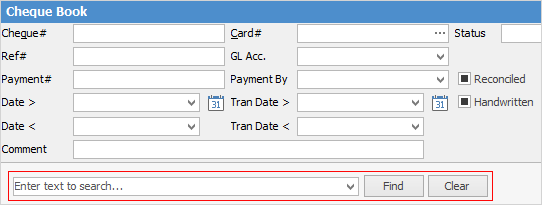
Right click and select Show Find Panel where enter search criteria.
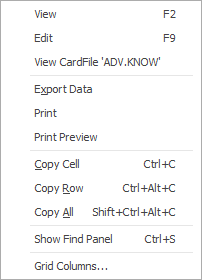
As see from the above image, there are a number of other useful right click options, all self explanatory.
Further information