Jim2 eBusiness functionality consists of two basic parts. The back end is Jim2 eBusiness Connect, which enables automated stock feeds from suppliers, and the electronic sending of purchase orders to them, among other things. Jim2 eBusiness Connect typically runs as a Windows service on the Jim2 file server. Jim2 eBusiness Connect logs on via Jim2 Server, but does not reduce the Jim2 user count.
To summarise, Jim2 eBusiness Connect allows:

Receive automated electronic stock feeds from suppliers with stock information, including stock codes, descriptions, images, pricing and availability. |
Instantly send purchase orders electronically directly to the vendor, eliminating any re-keying, and reducing errors. Within the purchase order screen there will be a button called eSend at the bottom of the form.
See Add Vendor Details with instructions on how to set up. |
See exactly what both the company and suppliers have in stock, allowing quicker purchasing decisions based on both price and availability. |
Enquire as to the current price and availability in real time (vendor permitting). |
Creation and application of an unlimited number of rules. Rules are applied upon receiving a stock feed. Typical uses of rules include hiding stock or groups of stock not required to sell, automatic updating of prices for known stock, etc. |
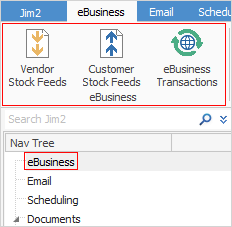
The front end is what is seen in the Jim2 Client. Access eBusiness from the Nav Tree or on the ribbon tabs at the top of the screen. Under eBusiness there are three options, Vendor Stock Feeds, Customer Stock Feeds and eBusiness Transactions.
 |
Further information
eBusiness and the Publish Price to Options