The Cost tab depends on the selling price calculation as to what cost it picks up. For example, using List – Percent it will pick up either the vendor estimated cost or last cost, depending on the most recent date.
So, if the selling price calculation is Last Cost or List, it will pick up either Last Cost or Estimated Cost (most recent). If the selling price is Avg Cost plus it will pick up Avg COGS etc.
 |
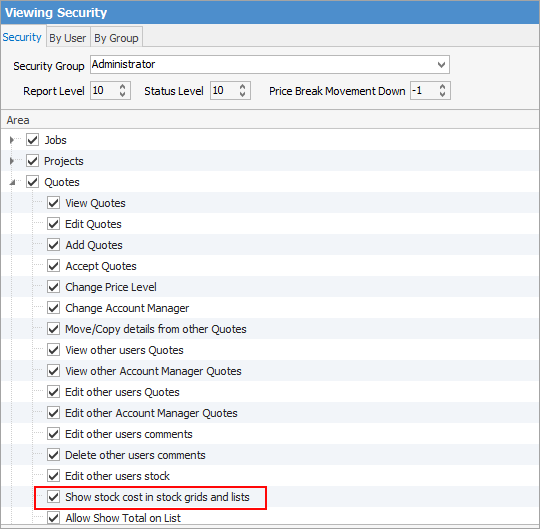
Note: The Cost tab can be hidden via Tools > Security and unticking Show stock cost in stock grids and lists.
 |
If the Vendor tab on the stock record is being regularly updated, it will use that cost – it may be worthwhile investigating eBusiness Connect to automate this process. Contact support@happen.biz for more information.
The Cost tab shows the expected cost of the stock being quoted, and the related vendor/supplier. The information is automatically added to this tab from the Vendor tab on the stock code (if populated) as stock is added to the quote.

|
Note: If Multi-Company is in use, costs are calculated from the cost of stock across all companies. |

Jim2 matches the price level (see Pricing tab in stock) with the current customer. If Jim2 finds a price level match, it will look at the Price Calc Method: ▪If Price Calc Method is Avg COGS + Markup or Avg COGS + Margin, Jim2 will get the Average COG Value. ▪If Price Calc Method is Max COGS + Markup or Max COGS + Margin, Jim2 will get the Max COG Value ▪If Price Calc Method is Est. Cost + Markup or Est. Cost + Margin, Jim2 will get the Vendor Estimated Cost (from the Vendors tab on the stock record).
All other values for Price Calc Method mean that Jim2 will get the Last COG Value. |
Grid Fields |
Explanation |
|---|---|
Date |
The date the stock was entered. |
Initials |
User's initials. |
Location |
Branch (if branches are enabled). |
Stock Code |
This is the stock code being quoted. |
Description |
This is the stock description, automatically populated after the stock code has been entered. |
Unit |
Unit type. |
Qty |
This is the quantity of the stock being quoted on. |
Price Ex. |
This is the price of the goods tax free (excluding GST). |
Price Inc. |
This is the price of the goods including tax (including GST). |
Disc % |
The discount provided, if any. |
Tax |
The tax code in use, eg. G for GST – the tax code is set up within the stock record. |
Rec. |
Recommended stock. Tick for yes, leave blank for no. |
Hide |
When printing the quote, this provides the option of hiding individual quote lines or prices. |
Total |
Total price of the stock line. |
The fields below always display amounts in the home currency. The Comm fields will only show if Commission Sessions have been enabled in Options. |
|
Vendor |
Enter a preferred vendor in this field if required. This is particularly useful as this information will flow though to jobs and auto created purchase orders. See Purchase Details below for further information on the Vendor and Markup % fields. |
Markup % |
The markup percentage (see a detailed explanation here). |
Cost |
This field is populated from the stock code, and would normally be the last cost (this can vary depending on the price level on the stock record). However, if a vendor is entered in the Vendor field, this amount can be changed. |
Cost Total |
The cost price multiplied by the quantity. |
Total Ex. |
The total price excluding GST. |
Comm Floor |
Used when calculating commission based on profit. If a commission floor cost is entered, profit calculations will use this value rather than the actual cost, eg. for cost $1000, actual cost $945, profit based on $1000. |
Comm % |
Percent of commission to be paid depending on commission method, ie. Price Inc, Price Ex or Profit. |
Comm Extra |
A flat dollar amount paid per stock sold, ie. for $100 for every 10 jackets sold. |
The fields at the bottom right of the form are explained below.
Footer Fields |
Explanation |
|---|---|
SubTotal $ |
The total price, ex. GST, that stock will be sold for. |
Cost Total $ |
The total price that was paid (or will pay) for this stock, ex. GST. |
Profit $ (%) |
Profit is shown as a percentage (in brackets), and as a dollar value in the field. |
Purchase details are added in one of three ways: manually added to a quote, automatically added or updated via a promotion.

The purchase details are used when creating a purchase order using the Auto Create Purchase Order function, and allow for pre-setting both the preferred vendor and cost (buy price). The cost value is also used for calculating the quote profit figures.
The purchase details show the source of the details (promotion, manually entered, etc.) and the source reference. The cost price is colour coded to indicate the source, and hovering over the Cost cell will display the details.
Purchase details can flow through the entire sale process as follows: ▪Added to a quote when quoting the customer and sourcing buy details from the vendor. ▪Added to a job once the quote is accepted by the customer using Create Job. ▪Added to the purchase order from the job via Auto Create Purchase Order. |
Commission details are either manually added to a job/quote or automatically added or updated via a promotion. These fields will not appear unless Commission Sessions has been enabled in Options.

The values that make up commission details are:
The commission details allow for pre-setting the commission values to use in a Commission Session, and are entirely optional.
The commission details show the source of the details (promotion, manually entered, etc.) and the source reference. The commission details are colour coded to indicate the source, and hovering over the cell will display the details.
Commission Details can flow through the entire sale process as follows: ▪Added to a quote when quoting the customer. ▪Added to a job once the quote is accepted by the customer using Create Job. ▪Used in Commission Sessions when the job is invoiced. |
Further information