Stock yield is available on all consumables and parts that have a yield value.
|
The following needs to be performed to generate the consumable preview panel in a contract record: 1.A toner must have been sold as a linked job from the contract. 2.The toner that was sold from the contract must have a yield set up via its stock record (see image below). The preview pane will then populate over time (usually around two toner supplies and at least two reads). |

|
Note: Waste toners do not typically report a percentage level. In most cases the machine will only show either 0% or 100%, as this reading is triggered by a physical switch that detects when a waste toner bottle is full. |
Edit the consumable stock, go to the Contracts tab, and select the Yield Type radio button. Choose from the available list of yield types. Enter the yield value for that stock. If this stock code is generally replaced as part of a kit or spare part replacement, in Reset by choose the kit/spare part that resets the toner yield. This would typically be because the kit contains the toner. If not, it is not necessary to choose a Reset by.
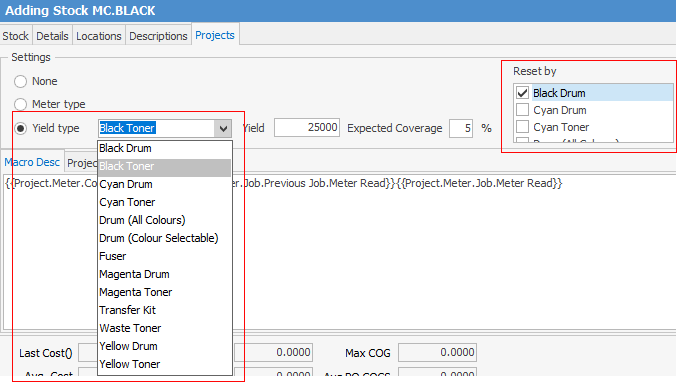
If the required yield type is not available from the list, configure additional yield types.
On the ribbon, go to Tools > Setups > Projects > Stock Yield Types.
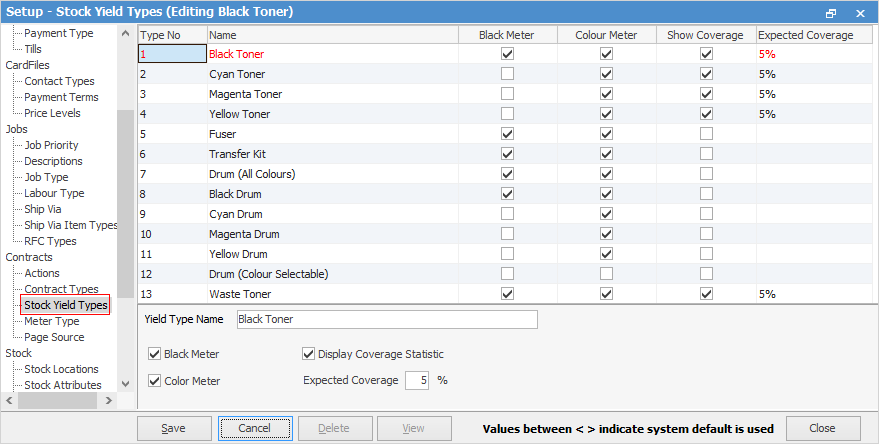
|
The Consumables Preview Pane works via the Item's related stock. |
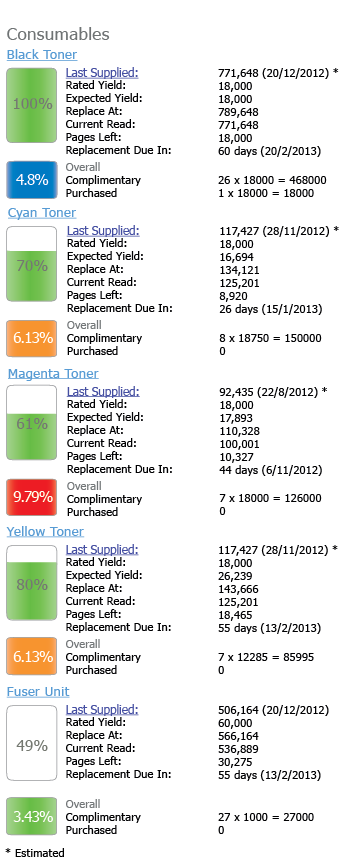
When set up, it may take some time for consumable sales to affect the displayed data. In this example, yield data is starting to appear in the consumables preview pane on the far right of the contract, usually after around two toner supplies and at least two reads.

Display Colour |
Coverage Range (values calculated) on all toners supplied for CONTRACT |
|---|---|
Green |
<Expected coverage -1%. |
Blue |
Range between expected coverage -1% and expected coverage +2%. |
Orange |
Range between expected coverage -2% and expected coverage +3%. |
Red |
>3% higher than expected coverage. |
Some consumables are installed when one or more other consumable types are installed. For example, a yellow toner is installed whenever a yellow drum is installed. This information is used when calculating coverage and expected yields. |
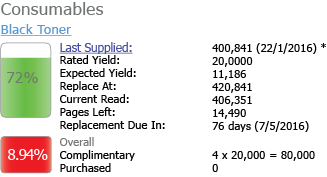
Each consumable stock that has a yield type will display the following information
|

This is a new contract where there have been 2 toners sent to the site. As this is the first time there have been any toners sent to the site, the expected yield will equal the rated yield.
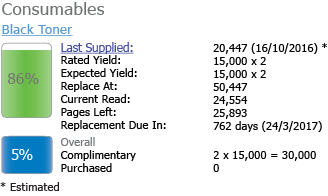
An empty photocopier:
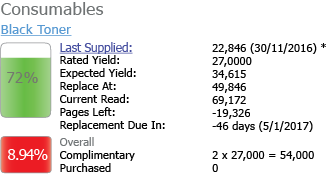
A site that uses black heavily. Coverage more than 3 points above ideal value, so it is red.
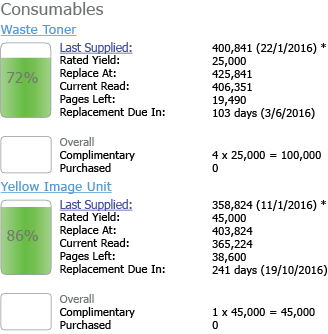
Consumables that do not have coverage or expected yield:
 |
TypeNo |
Name |
SortOrder |
CounterTypeBlack |
CounterTypeColour |
Baseline Pcnt |
ShowCoverage |
ApplyAttribute |
DisplayText |
|---|---|---|---|---|---|---|---|---|
1 |
Black Toner |
1 |
4 |
5 |
5 |
1 |
NULL |
NULL |
2 |
Cyan Toner |
2 |
NULL |
5 |
5 |
1 |
NULL |
NULL |
3 |
Magenta Toner |
3 |
NULL |
5 |
5 |
1 |
NULL |
NULL |
4 |
Yellow Toner |
4 |
NULL |
5 |
5 |
1 |
NULL |
NULL |
5 |
Fuser |
5 |
4 |
5 |
0 |
0 |
NULL |
NULL |
6 |
Transfer Kit |
6 |
4 |
5 |
0 |
0 |
NULL |
NULL |
7 |
Drum (All Colours) |
7 |
4 |
5 |
0 |
0 |
NULL |
NULL |
8 |
Black Drum |
8 |
4 |
5 |
0 |
0 |
NULL |
NULL |
9 |
Cyan Drum |
9 |
NULL |
5 |
0 |
0 |
NULL |
NULL |
10 |
Magenta Drum |
10 |
NULL |
5 |
0 |
0 |
NULL |
NULL |
11 |
Yellow Drum |
11 |
NULL |
5 |
0 |
0 |
NULL |
NULL |
12 |
Drum (Colour Selectable) |
12 |
NULL |
NULL |
0 |
0 |
-999 |
{0} DRUM |
|
Drum (Colour Selectable) relates to one standard stock code that can be used for any of the four colours (CMYK). See Stock for more information. |
Further information