This means there is a selection of products available to sell to a customer or some customers at an agreed price and period of time.
▪Create a new promotion and set promotion Type to CardFile.
▪Add the cardfile(s) to the promotion Recipients area (use Enter twice to move to a new line). This can be done individually, or via Load Recipients from CardFile List. To use this option, create a cardfile list first. In this case, the cardfile list will be filtered by the Retail cardfile group. This will then be selectable in this area.
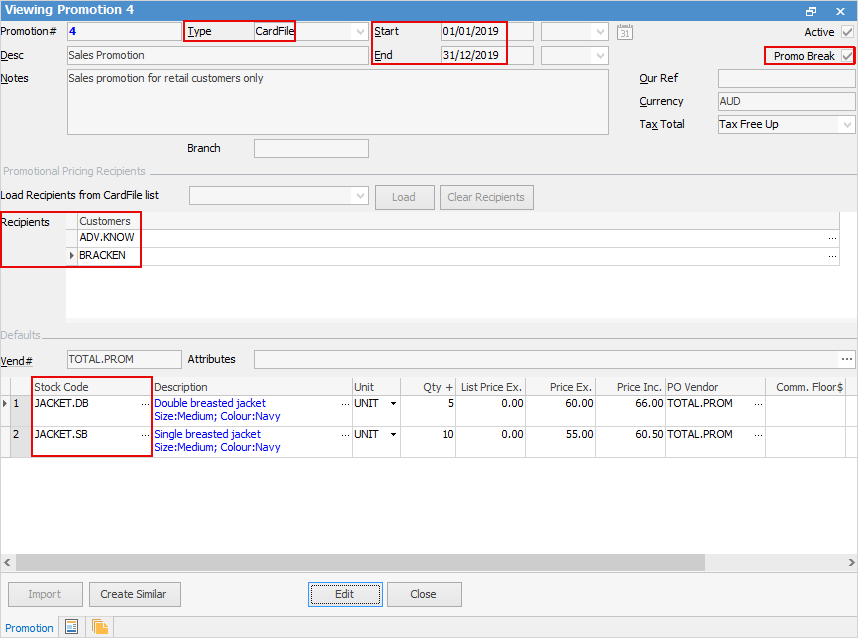
▪Set the promotion start and end dates (if based on a period).
▪Add the stock, along with price, buy breaks, commission information, etc.
▪Tick Promo Break, ensuring that no other promotions will apply. The Promo Break forces a price to be calculated at that point, and stops moving down the ranking to see if there are lower prices.
|
The above example is the same as adding customer-specific pricing to stock, but a lot more manageable. The only current limitation in using a cardfile promotion in this way is the price calculation method is effectively Fixed Pricing only. |

Further information
Promo Pricing for All Customers
Promo Pricing for a Group of Customers