The next step is to set up the JES Instance on Jim2 Server. This is performed so that JEF and JES can have a communication line. JEF needs to communicate with JES to obtain Jim2 data such as Job Lists, meter reads and service requests. JES needs to communicate with JEF in order to publish user accounts to the website.

Looks after the publication of information from Jim2 to Jim2 eBusiness Framework (JEF). |
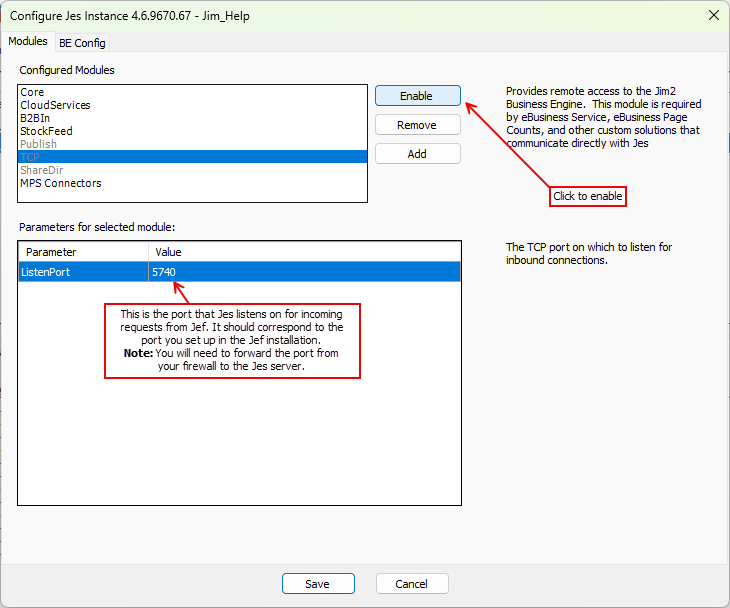
Provides the JEF connectivity to JES. This module is required by JEF when configured as online, and when obtaining Jim2 functionality such as Job Lists, meter reads and service requests. 1.Open the Jim2CM from C:\Program Files\Happen Business\Jim2Server\Jim2 Configuration Manager. 2.If a new JES Instance has not been created: a)Select File > New JES Instance. b)Enter the database name. c)Leave the default port of 5740. 3.Right click the JES Instance and select Configure. 4.Set up the Publish module. The Publish module looks after the publication of information from Jim2 to Jim2 eBusiness Framework (JEF). 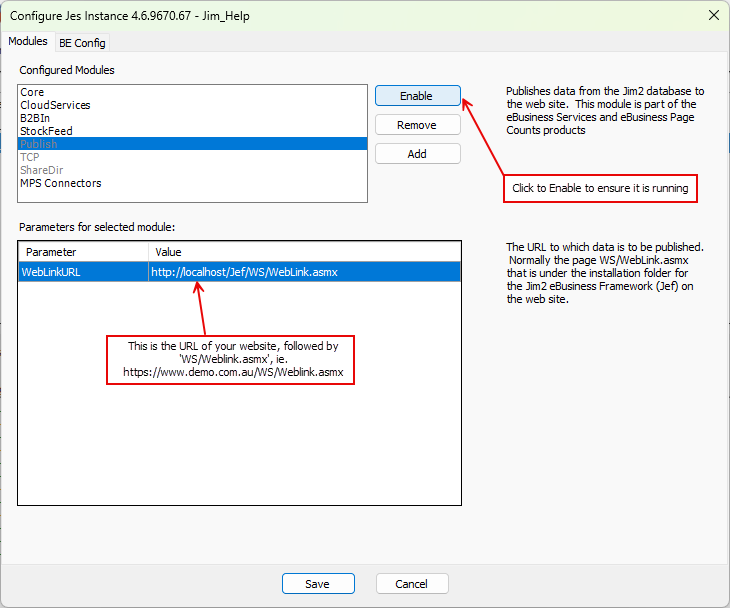 |
 |
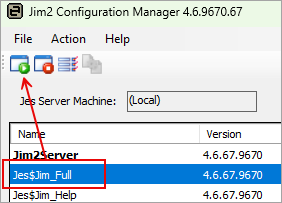
To start the JES Instance, select the JES Instance from the grid and click Start
Further information