The email macros for each object can be found in the email editor screen when adding a template (some with further drop down options):
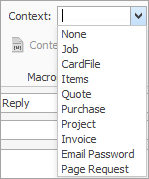
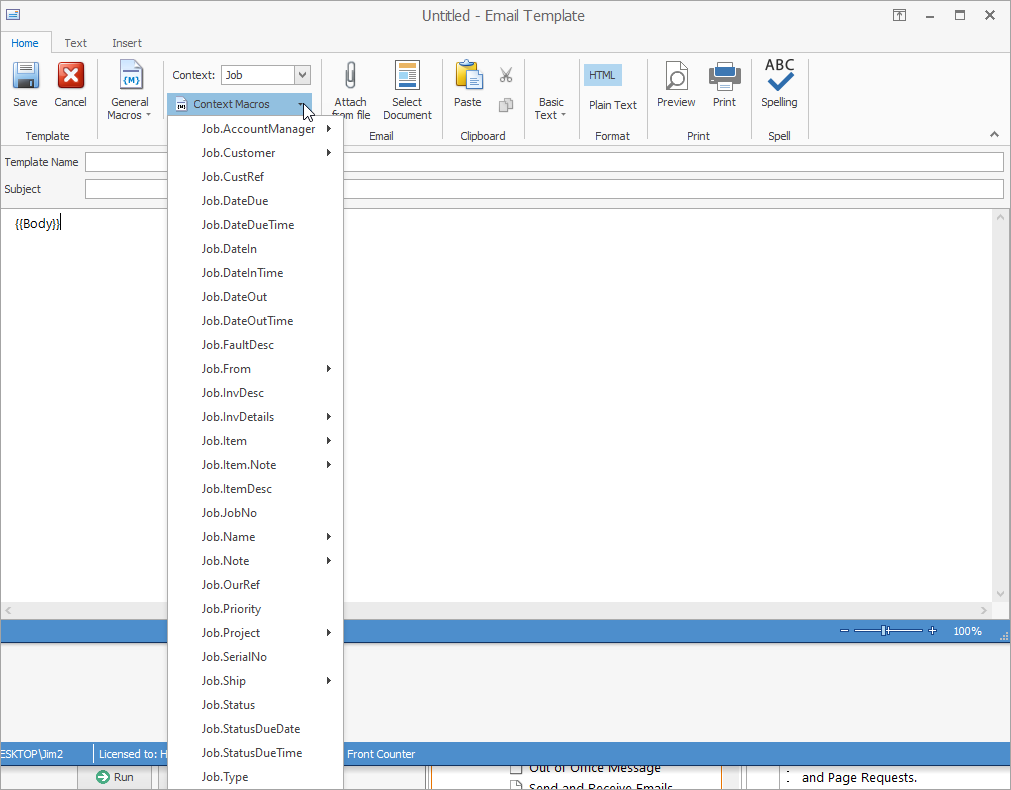
Select Context, ie. cardfile, quote, etc. then select the context macro required.
Note: There are macros for CardFiles, Items, Jobs, Projects, Quotes, Purchases, Invoices, Email Passwords and Page Requests.
Jim2 supports HTML custom macros for email templates.
See here for information on email macros syntax.
These are examples of some basic macros:

{{System.Company}} {{System.Date}} {{System.Item.ItemMakeName}} {{System.Item.ItemModelName}} {{System.Item.ItemName}} {{System.Job.JobName}} {{System.Project.ProjectName}} {{System.User}} {{System.User.ContactType=}} – requires the name of the contact type, ie. {{System.User.ContactType=Mobile}} {{System.User.Department}} {{System.User.Email}} {{System.User.JobTitle}}
|

{{Job.Customer.Address}} {{Job.Customer.Code}} {{Job.Customer.Contact}} {{Job.Customer.Contact Name}} {{Job.Customer.Country}} {{Job.Customer.Delivery Address}} {{Job.Customer.Delivery Country}} {{Job.Customer.Delivery Postcode}} {{Job.Customer.Delivery State}} {{Job.Customer.Delivery Suburb}} {{Job.Customer.Email}} {{Job.Customer.Fax}} {{Job.Customer.FirstName}} {{Job.Customer.LastName}} {{Job.Customer.Name}} {{Job.Customer.Phone}} {{Job.Customer.Postcode}} {{Job.Customer.State}} {{Job.Customer.Suburb}}
{{Job.CustRef}}
{{Job.DateDue}} {{Job.DateDueTime}} {{Job.DateIn}} {{Job.DateInTime}} {{Job.DateOut}} {{Job.DateOutTime}}
{{Job.FaultDesc}} |
{{Job.From.Address}} {{Job.From.Code}} {{Job.From.Contact}} {{Job.From.Contact Name}} {{Job.From.Country}} {{Job.From.Delivery Address}} {{Job.From.Delivery Country}} {{Job.From.Delivery Postcode}} {{Job.From.Delivery State}} {{Job.From.Delivery Suburb}} {{Job.From.Email}} {{Job.From.FirstName}} {{Job.From.LastName}} {{Job.From.Name}} {{Job.From.Phone}} Job.From.Postcode}} Job.From.State}} Job.From.Suburb}}
{{Job.Inv.Desc}}
{{Job.Inv.Details.CustAddr}} {{Job.InvDetails.CustAttn}} {{Job.InvDetails.CustOrdNo}} {{Job.InvDetails.ShipAddr}} {{Job.InvDetails.ShipAttn}} {{Job.InvDetails.ShipRefNo}} |
{{Job.Item.Code}} {{Job.Item.Model}} {{Job.ItemDesc}}
{{Job.JobNo}}
{{Job.Name.Address}} {{Job.Name.Code}} {{Job.Name.Contact}} {{Job.Name.ContactName}} {{Job.Name.Country}} {{Job.Name.Delivery Address}} {{Job.Name.Delivery Country}} {{Job.Name.Delivery Postcode}} {{Job.Name.Delivery State}} {{Job.Name.Delivery Suburb}} {{Job.Name.Email}} {{Job.Name.Fax}} {{Job.Name.FirstName}} {{Job.Name.LastName}} {{Job.Name.Name}} {{Job.Name.Phone}} {{Job.Name.Postcode}} {{Job.Name.State}} {{Job.Name.Suburb}}
{{Job.OurRef}} |
{{Job.Priority}}
{{Job.Status}}
{{Job.Project.Contract}} {{Job.Project.CustRef}} {{Job.Project.DateIn}} {{Job.Project.DateInTime}} {{Job.Project.DateOut}} {{Job.Project.DateOutTime}} {{Job.Project.Fault.Desc}} {{Job.Project.InvDesc}} {{Job.Project.ItemCode}} {{Job.Project.ItemDesc}} {{Job.Project.ItemMake}} {{Job.Project.ItemModel}} {{Job.Project.Location}} {{Job.Project.Project Address}} {{Job.Project.ProjectCode}} {{Job.Project.Serial}} {{Job.Project.Type}} {{Job.Project.WarDateIn}} {{Job.Project.WarDateInTime}} {{Job.Project.WarDateOut}} {{Job.Project.WarDateOutTime}}
{{Job.SerialNo}} |
{{Job.Ship.Address}} {{Job.Ship.Code}} {{Job.Ship.Contact}} {{Job.Ship.Contact Name}} {{Job.Ship.Country}} {{Job.Ship.Delivery Address}} {{Job.Ship.Delivery Country}} {{Job.Ship.Delivery Postcode}} {{Job.Ship.Delivery State}} {{Job.Ship.Delivery Suburb}} {{Job.Ship.Email}} {{Job.Ship.Fax}} {{Job.Ship.FirstName}} {{Job.Ship.LastName}} {{Job.Ship.Name}} {{Job.Ship.Phone}} {{Job.Ship.Postcode}} {{Job.Ship.State}} {{Job.Ship.Suburb}}
{{Job.Status}} {{Job.StatusDueDate}} {{Job.StatusDueTime}}
{{Job.Type}} |
{{Project.Contract}}
{{Project.Customer.Address}} {{Project.Customer.Code}} {{Project.Customer.Contact}} {{Project.Customer.Contact Name}} {{Project.Customer.Country}} {{Project.Customer.Delivery Address}} {{Project.Customer.Delivery Country}} {{Project.Customer.Delivery Postcode}} {{Project.Customer.Delivery State}} {{Project.Customer.Delivery Suburb}} {{Project.Customer.Email}} {{Project.Customer.Fax}} {{Project.Customer.FirstName}} {{Project.Customer.LastName}} {{Project.Customer.Name}} {{Project.Customer.Phone}} {{Project.Customer.Postcode}} {{Project.Customer.State}} {{Project.Customer.Suburb}}
{{Project.Cust.Ref}} {{Project.DateIn}} {{Project.DateInTime}} {{Project.DateOut}} {{Project.DateOutTime}} {{Project.FaultDesc}} {{Project.InvDesc}} |
{{Project.Item.Code}} {{Project.Item.Make}} {{Project.Item.Model}}
{{Project.ItemCode}} {{Project.ItemDesc}} {{Project.ItemMake}} {{Project.ItemModel}} {{Project.Location}}
{{Project.Name.Address}} {{Project.Name.Code}} {{Project.Name.Contact}} {{Project.Name.Contact Name}} {{Project.Name.Country}} {{Project.Name.Delivery Address} {{Project.Name.Delivery Country}} {{Project.Name.Delivery Postcode}} {{Project.Name.Delivery State}} {{Project.Name.Delivery Suburb}} {{Project.Name.Email}} {{Project.Name.Fax}} {{Project.Name.FirstName}} {{Project.Name.LastName}} {{Project.Name.Name}} {{Project.Name.Phone}} {{Project.Name.Postcode}} {{Project.Name.State}} {{Project.Name.Suburb}} |
{{Project.ProjectAddress}} {{Project.ProjectCode}}
{{Project.Request.Address}} {{Project.Request.Code}} {{Project.Request.Contact}} {{Project.Request.Contact Name}} {{Project.Request.Country}} {{Project.Request.Delivery Address}} {{Project.Request.Delivery Country}} {{Project.Request.Delivery Postcode}} {{Project.Request.Delivery State}} {{Project.Request.Delivery Suburb}} {{Project.Request.Email}} {{Project.Request.Fax}} {{Project.Request.Firstname}} {{Project.Request.LastName}} {{Project.Request.Name}} {{Project.Request.Phone}} {{Project.Request.Postcode}} {{Project.Request.State}} {{Project.Request.Suburb}}
{{Project.Serial}}
|
{{Project.Ship.Address}} {{Project.Ship.Code}} {{Project.Ship.Contact}} {{Project.Ship.Contact Name}} {{Project.Ship.Country}} {{Project.Ship.Delivery Address}} {{Project.Ship.Delivery Country}} {{Project.Ship.Delivery Postcode}} {{Project.Ship.State}} {{Project.Ship.Suburb}} {{Project.Ship.Email}} {{Project.Ship.Fax}} {{Project.Ship.FirstName}} {{Project.Ship.LastName}} {{Project.Ship.Name}} {{Project.Ship.Phone}} {{Project.Ship.Postcode}} {{Project.Ship.State}} {{Project.Ship.Suburb}}
{{Project.Ship.Postcode}} {{Project.Ship.State}} {{Project.Ship.Suburb}}
{{Project.Type}} {{Project.WarDateIn}} {{Project.Ship.{{Project.WarDateOut}} {{Project.WarDateOutTime}} |
Invoices {{Invoice.HappenPayByLink}} Proforma Invoices {{Job.HappenPayByLink}} Statement {{CardFile.HappenPayByLink}} |
{{Project.Job.Bill Date}} {{Project.Job.Date In}} {{Project.Job.Date Due}} {{Project.Job.Read Date}} {{Project.Job.Previous Job.Bill Date}} {{Project.Job.Previous Job.Date In}} {{Project.Job.Previous Job.Date Due}} {{Project.Job.Previous Job.Date Out}} {{Project.Job.Previous Job.Read Date}} {{Project.Job.Next Job.Bill Date}} |
Under Job, CardFile, Quote, Purchase, Project and Invoice select the first name and the last name of the customer, ie.{{CardFile.FirstName}}, {{CardFile.LastName}}
Under Project select warranty in and out dates, contract in and out dates and customer reference, ie. {{Project.WarDateIn}} |
Further information