From the expense form and the interaction of other default information, accurate and relevant reports (like the purchase order or expense reports) can be defined for transmission to the vendor.
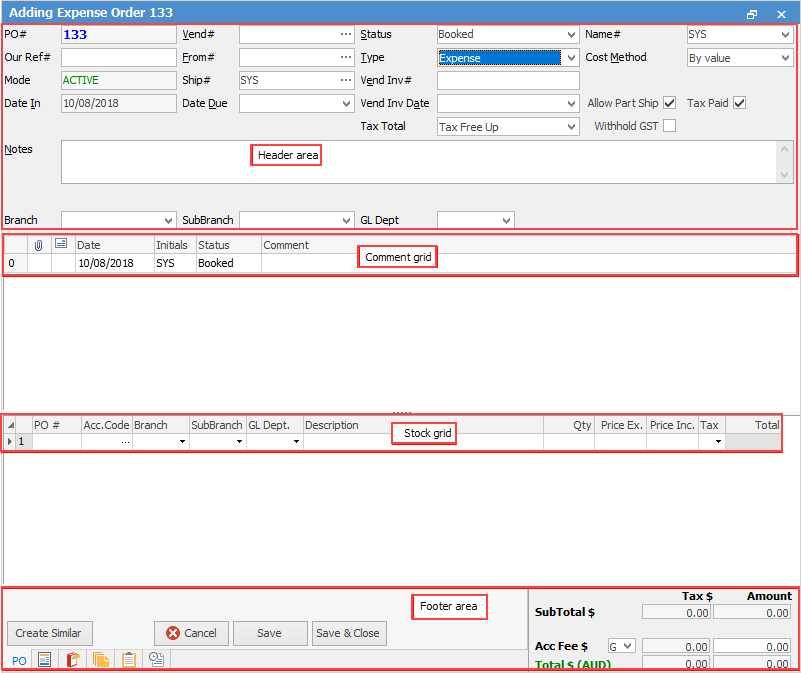
The expense order form is divided into the following specific information areas that will provide a complete detailed record of:
▪The vendor and expense order information via the Expense Order header.
▪Chronological records of status changes and customer contact notes, via the Comment grid.
▪The expense information via the expenses grid.
▪The totals of the expense order via the Expense Order footer.
Expense orders have a very specific functionality which purchase orders do not.
A negative expense order (this takes the place of returns to vendors and can be used in situations like receiving a credit for an incorrect price on a purchase order where the stock has already been sold) can be applied to stock on purchase orders. The negative expense order will show in the creditor's record like a return/credit and can be applied to purchase orders.
|
Some letters in the field names within the header are underlined, eg. Vend#. Using Alt+ the underlined letter will jump to the field beside that heading. |

|
Importing goods requires a lump sum GST value to be entered, usually a period of time after the stock relating to the importing of the goods is received. In this case the original purchase order would be entered using the X tax code (excluded on GST/BAS reports) and, when the invoice/documents relating to the lump sum GST is received, it will need to be added through an expense order to the GST Paid Liability general ledger account, usually using tax code Y. |

When selecting the GST Paid Liability general ledger account there will be the option to choose the following tax codes: Y, Z and X.
Y = Lump Sum Other Acquisition (G11 in GST calculation sheet)
Z = Lump Sum Capital Acquisition G10 in GST calculation sheet)
X = Exclude from GST Reports
|
An expense order can be applied to a purchase order at any time, and can also be unprinted at any time. |
Further information