This screen lists all meter reads received for this contract.
Double click on any line to open that job or purchase order.
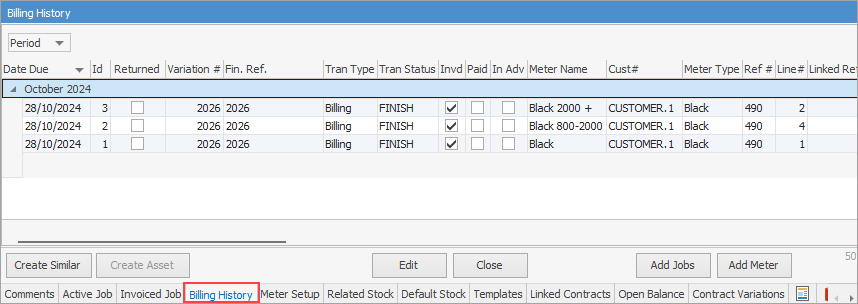
Field |
Explanation |
|---|---|
Date Due |
The date billing is due. |
Id |
The line ID in the grid. This number reflects the reads in the order that they are processed by Jim2. Reads are ordered by Effective Date, and returns follow the job that they are returning. |
Returned |
This is ticked by Jim2 to signify that it is a customer return. This is not an editable field. |
Variation # |
Variation number |
Fin Ref # |
Reference number, if using Finance. |
Tran Type |
Specifies whether the meter read refers to: ▪Opening Balance – the read comes from the meter's opening balance ▪Billing – the read is linked to a billing job. ▪Return – the reversal of a read is linked to a Return from Customer. ▪Purchase – the read is linked to a purchase order. ▪Vendor Return – the reversal of a read is linked to a Return to Vendor. |
Tran Status |
The status of the transaction, ie. Booked, Finish, etc. |
Invd |
If job is invoiced, this box will be ticked. |
Paid |
If invoice is paid, this box will be ticked. |
In Adv |
If billed in advance, this box will be ticked (this is a licensed feature). |
Meter Name |
Black, colour, etc. |
Cust# |
The customer card code. |
Meter Type |
Type of meter, eg. black, colour. |
Ref # |
▪For billing reads, this is the job number. ▪For return reads, this is the RFC number. ▪For purchase reads, this is the purchase order number. ▪For vendor return reads, this is the RTV number. |
Line# |
Line number of the stock grid in the transaction. |
Linked Ref # |
Any linked job/purchase reference number. ▪For return reads this is the job number that is being returned. ▪For vendor return reads this is the purchase order number that is being returned. |
Stock Code |
The stock code for the meter type. |
Recorded by |
The user who produced the job. |
Add Date |
The date the job was added. |
Effective Date |
The actual date of the read. |
Read Date |
The date the read was taken/received. |
Date Out |
The date out on the job. Once invoiced, this is the invoice date. |
Meter Read |
The actual meter read for that period. This is the same as Standard Read + Overs Read. See here for information on how to fix incorrect meter reads. |
Standard Read |
The total number of pages billed as standard pages. |
Standard Estimate Read |
The standard estimate read. |
Under Read |
The number of pages billed against the contract using Unders stock code. This value increases as minimum volume unders are billed, and decreases if unders are clawed back. This value excludes unders used to bill an estimate. |
Over Read |
The total number of pages billed at the Overs rate. |
Over Estimate Read |
The over estimate read. |
Qty |
The number of actual pages billed for this period. This equals standard quantity plus overs quantity. |
Standard Qty |
The quantity of standard pages billed for this period. |
Standard Estimate Qty |
The standard estimate quantity. |
Under Qty |
The quantity of pages billed as an under in order to bill a minimum volume. This value can be negative if previous unders are clawed back. |
Over Qty |
The quantity of pages billed at the Overs rate for this period. |
QtyOverEstimate |
The over estimate quantity. |
Minimum Volume |
If applicable, this specifies the minimum number of pages that were to be billed for this period. |
Daily Avg. |
The average number of actual pages used in the previous period. This value uses previous read dates and values to calculate the average number of prints used in a day. This daily average can be used to estimate what the read might be at some time in the future. |
Rate Ex. |
Actual charge excluding GST per page. |
Rate Inc. |
Actual charge including GST per page. |
Total |
Job total. |
Further information