There are a number of ways to add a credit to a debtor. Credit entries will automatically be created by Jim2 when:
▪a return from customer is performed. A return from customer credit will either be applied to an outstanding account or left as an outstanding credit in that debtor's record.
|
This should only be used if crediting the amount is not related to an existing invoice. If there is an existing invoice, perform a return from customer and re-invoice with the correct amount, or if the customer was invoiced incorrectly on the spot, unprint the invoice, correct the amount and re-invoice. |

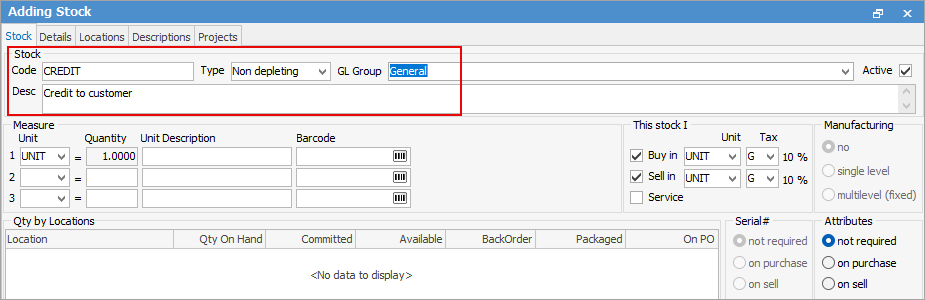
If you wish to create a credit for a dollar amount only (not stock to return), create a non depleting stock code and ensure it is set to the appropriate Stock GL Group.
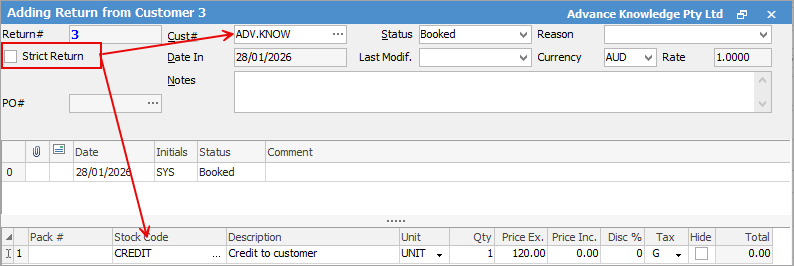
Then add a return from customer, untick Strict Return and add the customer cardfile and the stock code just created.
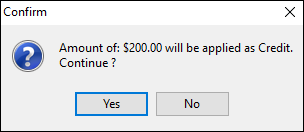
▪the amount tendered as payment is greater than the amount due/owing. If the amount received from a debtor is greater than the amount owed by that debtor, allocate what can be allocated. When saving the entry, a message will appear asking if the remaining amount is to be applied as a credit.
▪a debtors adjustment down is entered. Debtors adjustments down can be used to increase a customer's credit balance. Debtors adjustments can be applied to invoices in the same manner as a credit/return from customer.
▪a debtors purchase order is completed.
 |
A Debtors purchase order is to be used if a customer/debtor is returning stock which has been sold from previous software to Jim2. Debtors purchase orders can be applied to invoices or adjustments up, the same as a normal credit. |
▪a payment has been made but not applied to an invoice.
Further information
Enter a Payment Against Multiple Debtors
Enter Discounts and Account Fees
Debtor Payments Including Commission
Move Unknown Payments to Debtor