When setting up or maintaining cardfiles within Jim2, they can be more than just one type. For example, a cardfile can be set as a customer and a vendor, which eliminates the need to create multiple cardfiles for the same entity. The five available selections can be used individually or combined.
▪Tick Customer if the company sells to this entity.
▪Tick Vendor if the company buys from this entity.
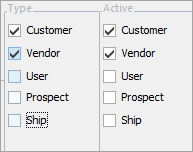
The example above shows that this cardfile was initially set up for someone who was both a customer and a vendor. As soon as the cardfile was saved, the two checkboxes on the left were locked and can never be unticked. At a later time, it was decided that this entity would continue to be a customer but would no longer be a vendor, so the Active box for vendor has been unticked below.
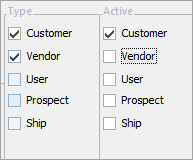
▪Tick User if this entity is a Jim2 user within the company.
▪Tick Prospect if this entity is a prospect, ie. someone who is not a customer as yet, and you may be quoting to them.
 |
Note: Prospect may be named something different, as this is controlled by what has been set up in CardFile Options.
Note: Whilst you can quote a Prospect, you cannot create a job for one. You will need to tick Customer on the Prospect cardfile if you wish to proceed. |
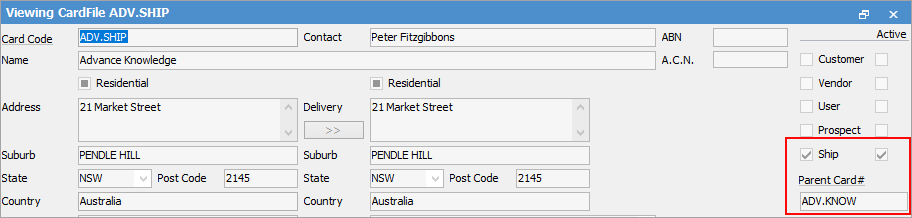
▪Tick Ship if this cardfile is for delivery addresses only. This is not a customer or vendor but is linked to one as a different delivery address. The cardfile has a nominated parent cardfile that is the entity being invoiced. All jobs raised on the various ship cardfiles will invoice to the linked parent cardfile account. All ship cardfiles will also show on the parent cardfile Ship Cards tab. See below for further information.
|
If any of the Customer, Vendor or User boxes are ticked when a cardfile is saved, they cannot be unticked later, although they can be made inactive by unticking the Active boxes on the right. This does not apply to Personal, or Ship, which can be ticked or unticked at any time. Furthermore, a cardfile with active transactions recorded against it cannot be deleted. Instead, disable it by unticking all Active boxes. See CardFile Merging & Deleting for information on how to delete cardfiles which don't have any recorded transactions in Jim2. |

Ship cards can be linked to parent cards (ie. other customer or vendor cardfiles).
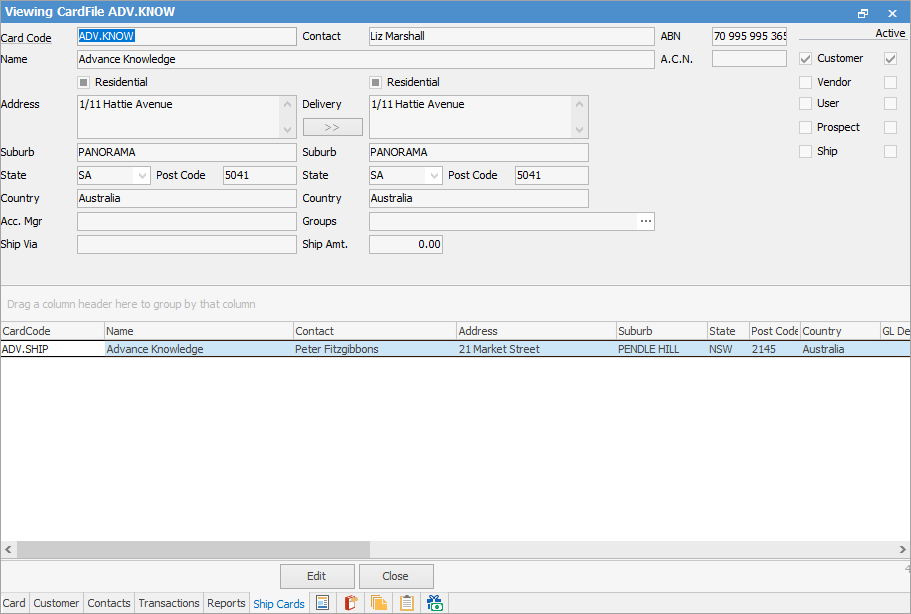
The Ship Cards tab on a customer cardfile displays all related shipping cardfiles (and contact details) for that card. This grid can be filtered and sorted. Double click (or right click) to view and/or edit the related ship cardfile.
Within a job, select the parent card (who will pay for the goods) in the Cust# field, then choose the ship card (who is receiving the goods) within the Ship# field. By clicking the ellipsis [...] in the Ship# field, a list of all the ship cards for this parent customer will display. This is very useful when dealing with companies that have a head office for billing but the goods need to be shipped to various locations. Set up the head office as the parent card, then link multiple ship cards to this parent card.
Within a CardFile List search for associated ship cards. Enter the parent card via the Card# in the header of the list, then tick Ship to view ship cards of this parent.
A cardfile can be added as a Ship only card, without linking it to a parent card.
Similarly, Vendor and Ship – in the case of a buying group, most purchases will be made through the buying group, but sometimes a purchase might be made directly from the supplier.
There are times where a cardfile can be both a customer and a ship. This would be where most goods and services are billed to the parent card, but sometimes the ship card may require to be invoiced because they will pay for something. |

Further information