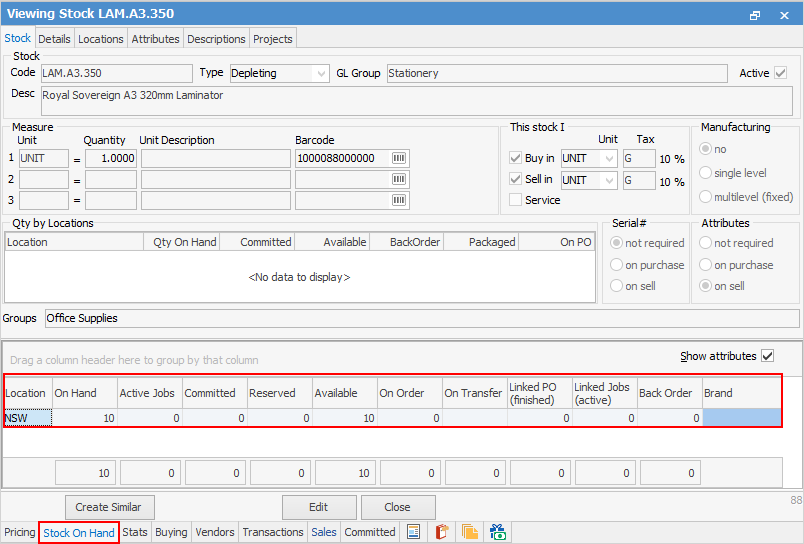
The Stock On Hand tab allows identifying current stock on order, on hand, reserved, linked, allocated, back ordered and available quantities.
|
Remember that Jim2 is a live multi user environment. It should be made clear that calculation of available quantities of stock is affected by what is/has been received via purchases and what has actually been sold (invoiced or specifically held for a job). |


Column |
Explanation |
||
|---|---|---|---|
Location |
This is where the stock is located. It can be in one or more locations. |
||
On Hand |
This column shows how many units of stock are currently in stock. |
||
Active |
This column indicates how many active jobs are using this stock. |
||
Committed |
This column shows how many units of stock are required for jobs.
|
||
Reserved |
This column shows how many units of stock are in jobs which are reserved/ready. |
||
Available |
This column shows how many units of stock are available for sale. |
||
On Order |
This column shows how many units of stock are listed in purchase orders which are not received or finished. |
||
On Transfer |
Displays the quantity of stock currently on transfer to that location. |
||
Linked PO (finished) |
This column shows how many units of stock are in finished or received purchase orders, linked to jobs that are not yet invoiced. |
||
Linked Jobs (active) |
This column shows how many units of stock are in active jobs and linked to any purchase orders. |
||
Back Order |
This column shows how many units of stock are listed in the back order column in the stock grid of jobs. |
||
Attributes Column |
When Show attributes is ticked, these columns will show coloured with a blue background. |
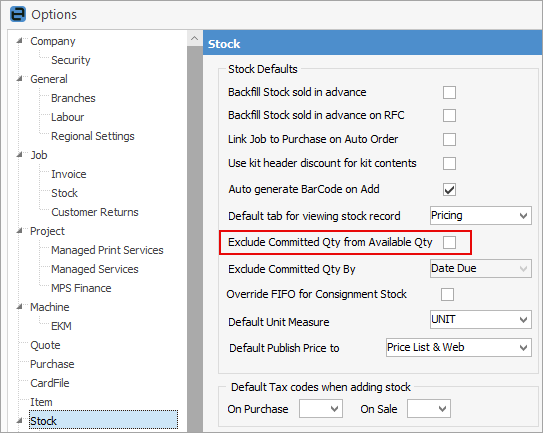
Further information