
Packaging

Back Top Prev Next Print
PackagingInHeader


Packaging is similar to creating a kit, then storing the created kit as stock, ie. create the package and Jim2 understands that the individual components have now been locked away, unavailable for another job. This means that Jim2 knows there are packages on hand for sale. An example of a package would be a hamper containing different things that has actually been made up and is sitting in stock as such.
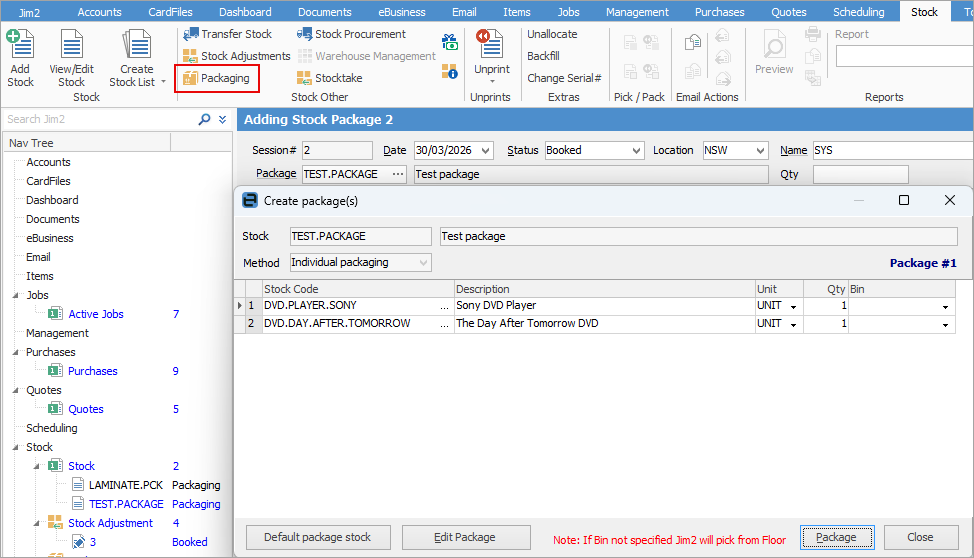
 

PackagingStock


Tip

Some letters in the field names within the header are underlined, eg. Status. Using Alt+ the underlined letter will jump to the field beside that heading.


The pack type and the default content for the packaging is set up and maintained via the packaging stock record.


A second packaging process is run to indicate that the building process has taken place. Jim2 will then manage serialised identification on individual packages or batch numbers (ie. attributes) on batch packaging.


The packaging process becomes part of the workflow, where each packaging session can be monitored through defined status milestones.


At the end of the packaging process, the quantity of packages will be available as stock on hand.


info

Because a package locks the stock, you will need to unpackage the package before the stock will be released. Unpack the package also, if a stock adjustment needs to be performed.


Further information

Stock Security

Consignment Stock

Consignment Stock for Customers

Kitting v Packaging v Manufacturing

Kitting

Promotional Pricing

Stock Adjustments

Stock Attributes

Stock Flow

Stock List

Create a Stock List

Stock Preview Pane

Stock Pricing

Order of Pricing

Stock Procurement

Stock Reports

Stock Transfers

Stocktake

Tabs in the Footer

Tabs in the Header

Warehouse Management

Add Stock

Add Service Stock

Add a Document to Stock

Add Groups to Stock

Add Images to Stock

Add Multiple Stock Records

Add Vendor Codes

Backfill Stock Sold in Advance

Buy and Sell in Different Measures

Buying your own stock

Change a Serial Number on a Stock Record

Change Stock GL Group

Create Similar

Deactivate a Stock Code

Deactivate Stock in Bulk

Donations of Stock

Export a Stock Report to Spreadsheet

Generate Backdated Stock on Hand Report

Handle Warranty Stock

Import Vendor Pricing

Merge Stock Codes/Supersede

Move Stock from Depleting to Asset

Print Shelf Talkers

Print Stock Reports

Sell Stock in Advance

Set up Pricing

Stop Users From Giving Discounts

Track Serial Numbers

Unallocate Stock

Update Existing Stock Pricing

Update Existing Vendor Pricing

Update Lead Time on Vendor Tab

Update Stock Procurement Data

Update Stock Records

Use Stock Select

Use Your Own Inventory

View or Edit Stock

Write off Stock

Use Gift Card for Purchases