Stock must be set up prior to adding meters, including macro descriptions on the Contracts tab.
Example Macros
{{Project.Meter.Counter Name" "}}{{"Last Read – "Project.Meter.Job.Previous Job.Meter Read" "}}{{"Last Estimated Read – "Project.Meter.Job.Previous Job.Estimated Meter Read" "}}{{Project.Meter.Job.Previous Job.Date Due" "}}{{"Current Read – "Project.Meter.Job.Meter Read" "}}{{"Estimated Read – "Project.Meter.Job.Estimated Meter Read" "}}{{"Prints – "Project.Meter.Job.Qty" "}}{{"Estimated Prints – "Project.Meter.Job.Estimated Qty" "}}
Jim2 offers the ability for meters to claw back unders and overs that have been previously charged. For example, a contract is charged a minimum black volume of 1,000 pages per month.
 |
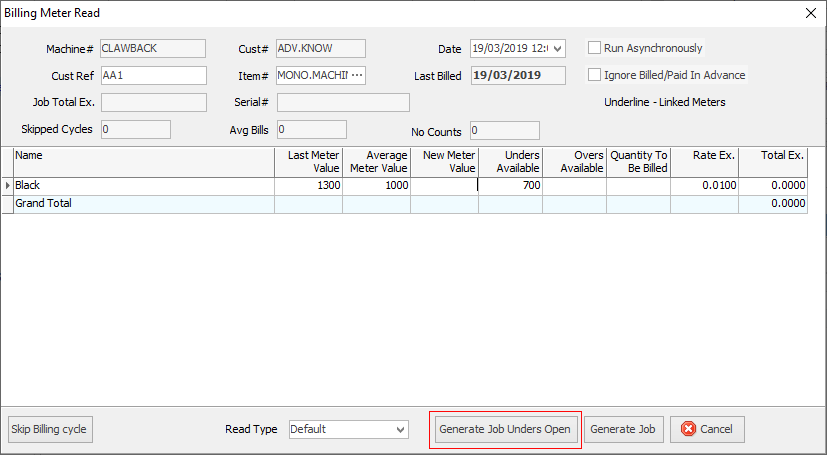
In the Billing Meter Read screen there is an extra button – Generate Job Unders Open. Click this button to not close the period. Clicking Generate Job will always close the period.
 |
Month 1 – a page count of 800 is recorded. 800 pages are charged as standard billing, and 200 pages are charged as unders to make up the minimum volume of 1,000 pages.
Month 2 – a page count of 1,100 is recorded. 1,000 pages are charged as standard billing, and 100 pages are charged as over pages.
Considering the two months together, 1,900 pages were used. 100 unders pages should have been charged to make up the minimum volume of 2,000 pages for the 2 months. To achieve this, month 2 needs to claw back 100 unders pages from month 1 to offset the 100 overs charged in month2.
Overall, this means that the following was billed.
Month 1:
800 standard pages
200 under pages
Month 2:
1000 standard pages |
|
100 over pages |
|
-100 under pages |
This is the clawback of unders. When unders are reduced overs are reduced as well, and standard pages are increased by the same amount. |
-100 over pages |
|
+100 standard pages |
Unders are made available in one of two ways:
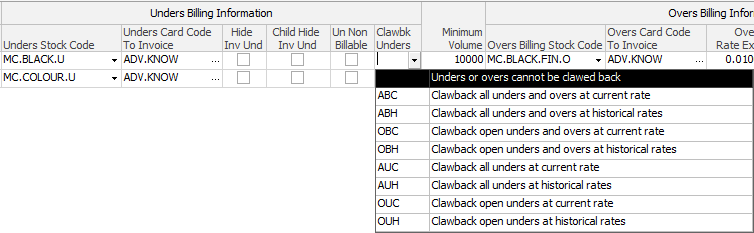
Not all options appear in this image
1.The meter has Clawback Unders set to one of the following options. All unused unders are available without restriction.
▪ABC (All Overs and Unders at Current rate)
▪ABH (All Overs and Unders at Historical rate). This option includes all unders and overs charged in the contract history, and applies the historical rates to them.
▪AUC (All Unders at Current rate). This option includes all unders charged in the contract history and applies the current rate to them.
▪AUH (All Unders at Historical rate). This option includes all unders charged in the contract history, and applies historical rates to them.
2.The meter has Clawback Unders set to one of the following options. Previous billing jobs for this child/master have Leave Unders Open stock on them. Unders for a particular meter can be clawed back from previous jobs as long as the Leave Unders Open stock is found. As soon a job is found without the Leave Unders Open stock on it, any unders that were charged prior to this are no longer available.
▪OBC (Open Overs and Unders at Current rate). This option applies the current rate to open unders and overs.
▪OBH (Open Unders and Overs at Historical rate). Similar to OBC, this option applies historical rates to open unders and overs.
▪OUC (Open Unders only at Current rate). This option applies the current rate to open unders and overs.
▪OUH (Open Unders only at Historical rate). This option applies the current rate to open unders and overs.
▪CUC: Clawback current unders at the current rate. This option applies the current rate to unders that are considered current (charged in the current billing period).
▪CUH: Clawback current unders at historical rates. This option applies historical rates to unders that are considered current.
The first letter of each option indicates:
▪A means All. If an under or over has been charged for in the contract history, it is included in this calculation
▪O means Open. This option (O) is rarely used, except in specific cases where meter reads may be unreliable. It allows for handling situations where machines may not report reads consistently, and unders can be carried over to the next billing period.
▪C means Current. For example, where a meter is charged in advance on January 1, Jim2 charges unders only, and dates them from 1 January to 1 February. On 1 February, the unders charged in advance in January are now considered current.
The choice between current rate (C) and historical rate (H) determines the pricing applied to the unders when calculating clawbacks. Most customers prefer using the current rate to keep invoices.
The second letter of each option indicates:
▪U = Unders. Only UNDERS that have been charged are available for CLAWBACK.
▪B = Both. Not used often. Essentially you only want the customer to pay for what they have printed. If overs are recorded before unders, then unders can be reduced by any overs that have occurred previously.
The third letter of each option indicates:
▪C = Current Rate
▪H = Historical Rate
This sets the PRICE that is to apply.


A contract with a minimum of 1,000 black pages per month, and Clawback Unders is set to OBC (Open Overs and Unders at Current rate).
January – 800 pages
 Image shown including tax.
February – 700 pages
March – 600 pages
April – 1,600 pages
When overs are charged in April, the 400 pages that were charged in March can be clawed back. The 300 under pages charged in February, and the 200 unders pages charged in January are unavailable because February doesn’t have Leave Unders Open stock on it.
Taking March and April together, there are 2,200 pages consisting of 2,000 MC.BLACK (600 + 1000 + 400), and 200 MC.BLACK.O (600 – 400). The unders from March are clawed back, and removed in April (400 – 400).
If the meter had Clawback Unders set to ABC or ABH, all the unders would be available for claw back, regardless of the Leave Unders Open stock, and the April billing would be changed to:
April – 1,600 pages
|
Clawback Unders not only refers to clawing back unders, but also clawing back overs in the same manner. For example, a contract with a Clawback type set to OBC would bill in the following manner:
January – 1200 pages
February – 1300 pages
March – 600 pages
April – 1,600 pages
The last three entries are clawing back the 400 overs that were charged in March. The overs from January and February are again unavailable due to the fact that February didn't have Leave Unders Open stock on it. Considering the last two months together, page counts are:
January – 800 pages
February – 700 pages
March – 600 pages
April – 1,600 pages
Notice that the amount billed for April in this situation is $6.00, which is less than the minimum charge. This is because Jim2 is adjusting for the customer paying too much in a previous month.
A contract with a Clawback type set to ABC would bill in the following manner:
April – 1,600 pages
When entering a meter read for a contract, or generating a master billing job, the unders or overs count for each meter that is available for clawback are displayed in the grid.
If the clawback type is set to only clawback open unders (OUC), the above example will change to the following:
April – 400 pages
Notice that there is no attempt to clawback the overs charged in March. Also note that the customer is still billed the minimum volume in April. |
Further information
Standard B&W and Colour Cost per Copy Contract
PMP Contract with Quarterly Bi-Annually Yearly Overs Reconciliation
Black A3 and Black A4 Meter Min Volume Over the Two Meters
Black A3 and Separate A4 Meter