To process a refund via the till, your computer first needs to be set up as a retail station. Following explains how to do so if the computer is not set up for a till.

1.On the ribbon, go to Tools > Options > Other > Retail & EFTPOS. 2.Tick This station is Retail. In the Till Code field, select TIL1. 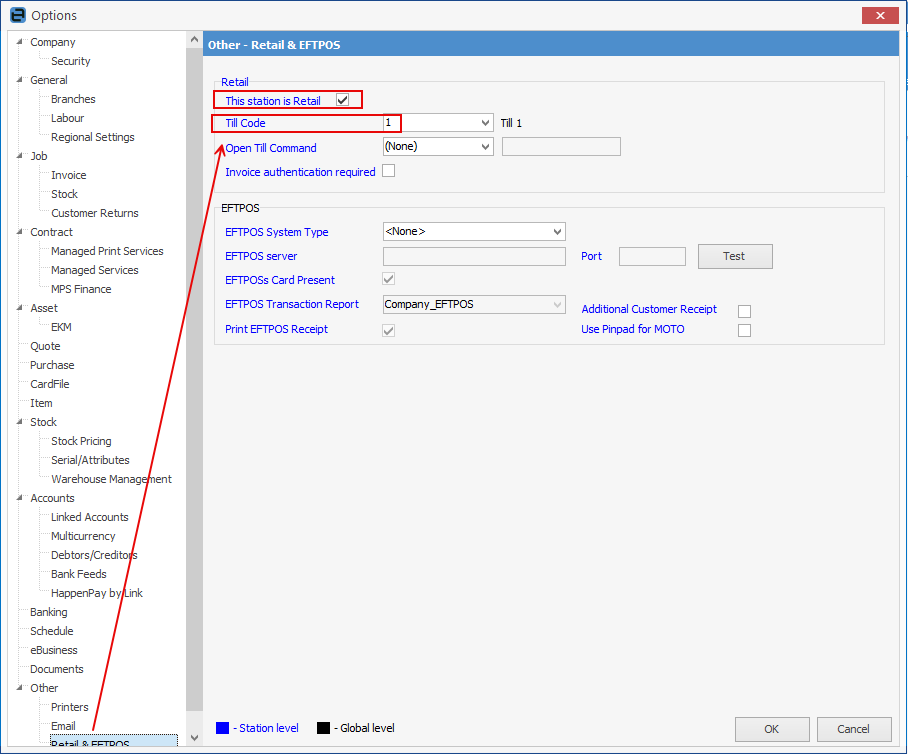 3.Click OK at bottom right. |
1.Open the debtor record and click Edit. 2.Select the relevant date. 3.In the Type field, select Refund. 4.In the Payment By field, select EFTPOS/Mastercard/Visa. 5.Confirm the Till field shows TIL1 (this confirms the payment will post to the till). 6.Enter the amount in the Paid Now field — note that entering it in the Amount field will not work. 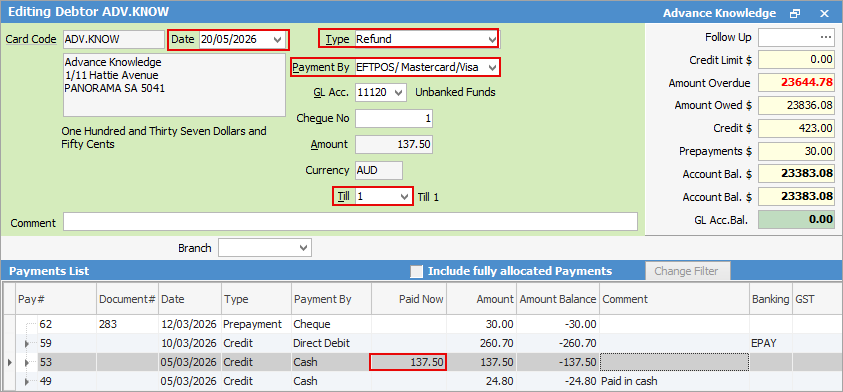 7.Click Save. |
After saving, go back to Tools > Options > Other > Retail & Eftpos and untick This station is Retail to return the computer to its normal setup.
Further information