|
Throughout Jim2 you will see filters on columns in most objects when you hover over the field heading.
This function allows filtering to narrow down the results.
Filters are available on:
▪CardFile Transactions tab
▪Job Comments
▪Purchase/expense Comments
▪Quote Comments
▪Stock Qty by Locations field
▪Asset Invoiced Job and Related Stock tabs
▪Projects (Contracts) most tabs
|
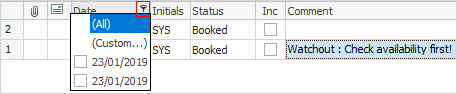
Within the Comment grid, hover over a heading and the filter image  will appear. Select the filter to see a list of available filters to help refine the search. This is particularly useful when there are a lot of comments within the grid. These filters will only show comments within the grid specific to the filter(s) chosen. will appear. Select the filter to see a list of available filters to help refine the search. This is particularly useful when there are a lot of comments within the grid. These filters will only show comments within the grid specific to the filter(s) chosen.
|
|
|
Attachments
|
All, Custom, No Attachments, Has Attachments.
|
Email
|
All, Custom, Comment, Email Replied, Email Forwarded, Email Read, Email Not Read.
|
Date
|
All, Custom, then shows all dates within the grid.
|
Initials
|
All, Custom, then shows the initials of all users within this field.
|
Inc
|
All, Custom, False. When this field is ticked, show comments on customer facing reports (not invoices) and website. When a customer goes to the job on the website, this comment will show.
|
Status
|
All, Custom then shows all statuses within this field.
|
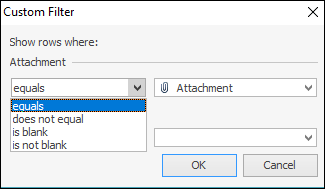
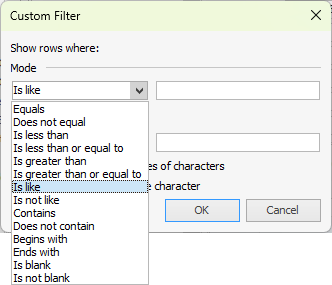
The Custom filter choice allows further defining the search:
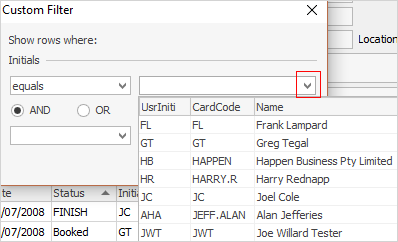
Each filter has different choices, ie. the Initials filter will bring up a grid of users:
|
The Transactions tab on cardfiles also has more extensive filters throughout.
These filters are self explanatory.
|
In most other cases, the filters are All and Custom.
Further information
Accounts
Assets
Banking
BPAY
CardFiles
Copy Move Merge
Dashboard
Documents
eBusiness
Email (inc. Archiving)
Export a Report
Export Data
Factor a Procedure with 3rd Party Debtor Finance
Give a Customer a Permanent Discount
Invoicing
Items
Jobs
Labour
Management
Notes and Watchouts
Pay Commission to a Contractor
Projects
Purchases and Expenses
Quotes
Rebates
Record Commission from Vendor
Retentions
Scheduling
Sell and Redeem Gift Cards
Standard Object Footers
Stock
|