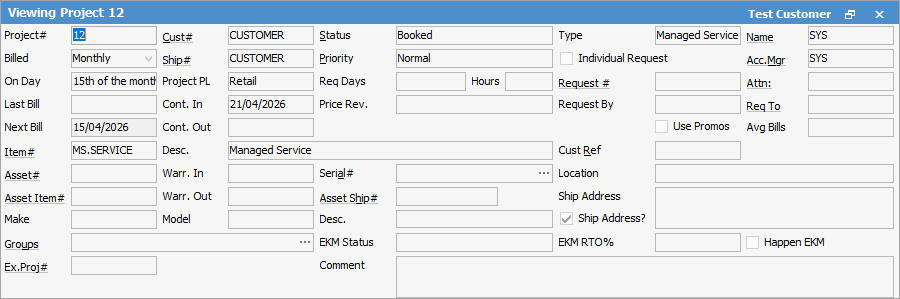

Field |
Explanation |
||
|---|---|---|---|
Project# |
Auto-generated by Jim2, but can be changed and can be alphanumeric as well. Field will take up to 50 characters. |
||
Cust# |
The customer cardfile that charges are billed to. |
||
Defaults to Booked (ie. is in use). It can also be set to Template if this Project is used as a reference to set up other Projects from. |
|||
The Project type, ie. Managed Service. |
|||
Name |
The person responsible for this Project. |
||
Billed |
Select the frequency of the billing, ie. Monthly. |
||
Ship# |
The card code of the address for deliveries, or where technicians are assigned. As with normal Jim2 jobs, this is usually the same as the Cust# if the customer only has one address, but will change to match the actual site address for multi-site customers. |
||
Priority |
Method or prioritising the contact, ie. urgent, normal, etc. |
||
Individual Request |
Ticking this box will send individual requests for reads, otherwise a consolidate request will be sent per Project. This setting normally is used for Managed Print Services when obtaining meter reads, and may not be required in managed services environment. |
||
Acc.Mgr |
The person who manages the Project, usually the original salesperson. |
||
On Day |
Select a particular day of the month for which billing is due. |
||
Project PL |
Choose the project type, ie. Wholesale, etc. |
||
Req Days/Hours |
Enter the planned response time for service here. |
||
Request # |
This field will show the card code for requesting meter reads, and is used for Managed Print Services. |
||
Attn. |
Default contact for this project at the customer's site. This contact must be set up on the ship cardfile first, ie. if Request By (below this field) is Email. |
||
Last Bill |
This will show the last time the Project was billed. |
||
Cont.In |
Date the project commenced. |
||
Price Rev. |
Enter a date that the price needs to be reviewed. |
||
Request By |
Shows how the Request for Copy Count will be sent to the customer, and is used for Managed Print Services. |
||
Req to |
Set automatically by Jim2 from the Request# cardfile, and selected Attn contact. |
||
Next Bill |
Scheduled date for next billing. This will be automatically updated after the first billing, but change this date. |
||
Cont. Out |
Date the contract expires. |
||
Use Promos |
Tick if you wish to use promotional pricing with this project. |
||
Avg Bills |
This field will display how many billing cycles have been billed (usually only used for Managed Print Services) an average meter read. |
||
Item# |
The Item this Project is linked to. This determines related stock. |
||
Desc. |
The description as entered on the Item. |
||
Cust Ref |
Enter a customer reference here. This could be a customer's standing purchase order number, or the customer's identification code for an Asset at a large site. Enter NIL if this is not going to be used. |
||
Asset# |
The Asset number linked to this Project. |
||
Warr. In |
The date the warranty starts. |
||
Serial# |
Serial number of the Asset. |
||
Location |
Location of the Asset. |
||
Asset Item# |
The Item attached to the Asset. |
||
Warr. Out |
The date the warranty will finish. |
||
Asset Ship# |
The ship card of the Asset. |
||
Ship Address |
Specific details about the location of this particular contract. By default, it will be the ship address from the Asset. |
||
Make |
The Asset Item make. |
||
Model |
The Asset Item model. |
||
Desc. |
The Asset Item description. |
||
Ship Address? |
When this box is ticked, it will automatically update the ship address when a Ship# card is changed. |
||
Groups |
Select report or non report group if applicable. |
||
EKM fields |
These fields are only used in Managed Print Services. |
||
Ex.Proj# |
Enter the original Project number if this is a new Project for an Asset that has been returned, refurbished and put out under a new Project. |
||
Comment |
Comments can be entered here, ie. further instructions, etc.
|

Further information